
BetterBright PSP
More actions
| BetterBright | |
|---|---|
 | |
| General | |
| Author | hobbo91 |
| Type | Plugins |
| Version | 0.93 |
| License | N/A |
| Last Updated | 2026/07/02 |
| Links | |
| Download | |
| Website | |
| Source | |
BetterBright, a PSP brightness control plugin for ARK-4 / FasterARK custom firmware.
Loosely based on the older bright3 by @hiroi01 (itself a mod of bright by plum) - which is where the original idea came from.
Features
- Remembers brightness state when launching games / rebooting / waking / exiting to XMB.
- Fully customisable brightness levels, with 11 sensible per-model defaults if you don't set your own.
- Configurable key combo to set brightness level up or down without cycling (the Display button still cycles as normal).
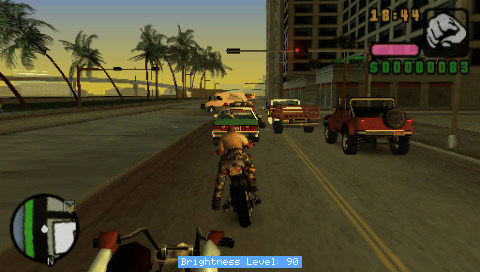
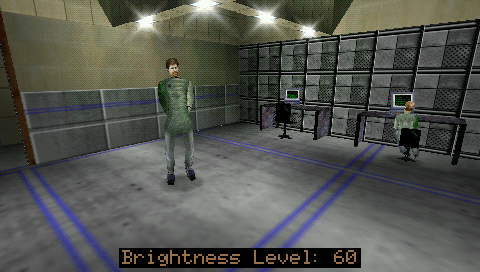
- Show the current brightness level on screen (OSD).
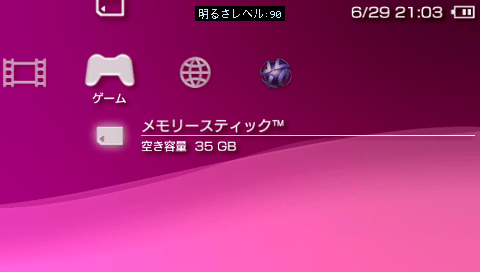
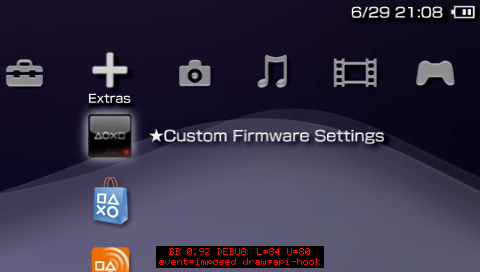
- Shows in XMB, (most) games, PS1 and homebrew.
- Customise the OSD position, size (1x-4x), background and text colours.
- The "Brightness Level" label shows in your system language.
- Option to choose a custom "dim" level.
- Option to disable display dimming / backlight auto-off ("Power Save").
- Option to disable auto-sleep ("Power Save") (use with caution).
- Developed and tested on 6.61 / FasterARK and ARK-4, should work fine with 6.60.
- Older firmwares untested. Just upgrade to 6.60/6.61, it's 2026, you'll be fine.
Installation
Put BetterBright.prx and BetterBright.ini together in your plugins folder and enable BetterBright in the ARK Custom Launcher.
https://github.com/PSP-Archive/ARK-4/wiki/Plugins
(The included vsh.txt / game.txt / pops.txt in the legacy folder are only for loaders that still use seplugins-style text files. Do yourself a favour and just use ARK-4 or FasterARK, it's way better.)
User guide
Press the PSP's "Display (brightness)" button as normal to cycle through the brightness values.
Hold L or R Trigger then tap the "Display" button: R = brighter, L = dimmer.
You can also use L + R then Up or Down (D-Pad) when you set combo_mode=2 in BetterBright.ini.
You can change the position, colour, size and language of the OSD by editing BetterBright.ini.
It remembers the level you chose and re-applies it after returning to the XMB, launching a game, rebooting, or (usually) waking from sleep.
Configuration
BetterBright.ini example - leave empty to use the defaults. IPS or after market screens will need to play around with these:
# --- BEGIN: List each custom brightness level on each below ---
28
40
50
70
90
99
# ---------------------------------------------------------------
- One brightness value per line,
0-100.0= backlight off,100= full (99is the max for PSP-1000/2000 with OEM display, this may vary further for after market screens) - Only one whole number per line
0-100are accepted; blank lines,#comments and any malformed line are ignored. - Leave the list empty to cycle a built-in default range chosen for your model (PSP-1000, 2000 and 3000/Go, each get their own list). Set
oem_brightness_levels=1(below) to instead cycle only the four stock backlight steps.
combo_mode - Adjust scheme (the plain Display button always cycles regardless):
| value | scheme |
|---|---|
0
|
off (Display button cycling only) |
1
|
hold a trigger + tap Display: R = brighter, L = dimmer (this is the default in the included .ini)
|
2
|
hold both triggers + tap D-pad: Up = brighter, Down = dimmer (hold to ramp) |
Both schemes stop at the dimmest/brightest end of your list (no wrap-around). In mode 2, holding the D-pad auto-repeats/ramps through the levels.
dim_level - how dim the screen goes when the PSP idles. AUTO (default) uses the second-lowest value in your list; or set a specific 0-100. Only has an effect when keep_display_on=0.
keep_display_on - keep the screen always on. 1 = on, 0 = off (default).
disable_sleep - stop the PSP from auto-sleeping on its own. Manual sleep (the power switch) still works. 1 = on, 0 = off (default). Use with caution - the console will never automatically sleep when enabled.
osd_bg_colour / osd_text_colour - the plate and text colours of the OSD. Defaults are 1 (black background) and 2 (white text). Set osd_bg_colour=0 for no background.
| value | colour | value | colour |
|---|---|---|---|
1
|
Piano Black | 10
|
Lilac Purple |
2
|
Ceramic White | 11
|
Blossom Pink |
3
|
Champagne Gold | 12
|
Rose Pink |
4
|
Ice Silver | 13
|
The Simpsons (Yellow) |
5
|
Mint Green | 14
|
Spirited Green |
6
|
Felicia Blue | 15
|
Turquoise Green |
7
|
Vibrant Blue | 16
|
Matte Bronze |
8
|
Radiant Red | 17
|
Deep Red |
9
|
Metallic Blue | 18
|
Lavender Purple |
0
|
AliExpress Clear Replacement Housing Shell (no background) |
osd_size - text size: 1 = 1x (normal), 2 = 2x, 3 = 3x, 4 = 4x.
osd_position - 1 = bottom (default), 2 = top.
osd_detect_locale - show the OSD "Brightness Level" label in your system language (1, default) or always in English (0).
osd_draw_mode - how the OSD is drawn. 0 = auto (default): draw on the frame the game presents, and automatically fall back to drawing the live framebuffer for games that don't drive that path. 1 = API hook only 2 = poll only (always draw the live framebuffer). Auto (default) covers virtually every game/app.
sync_fw_level - keep the firmware's own backlight level (the four stock steps the Display button normally cycles) in step with your brightness, rounded up to the nearest step. Your actual brightness is unchanged - it just keeps the firmware's internal level more consistent with yours. 1 = on (default), 0 = off.
oem_brightness_levels - only applies when the brightness list above is empty (ignored if you list your own values). 0 (default) cycles the built-in default range for your model; 1 cycles only the four stock backlight steps - the original L= levels (2000: 36/44/56/68, 3000/Go: 44/60/72/84, 1000: 20/40/60/80). Intended for aftermarket LCD panels.
debug_enable - diagnostics, for troubleshooting. 0 = off (default). 1 = an on-screen debug line on every brightness event (press/combo/dim/wake/idle) showing the sceDisplayGetBrightness level, user level, the event, and how the OSD is being drawn. 2 = everything in 1 plus a verbose BetterBright.log next to the plugin.
Note: Max brightness will drain the battery faster! Use at your own risk.
Screenshots
Known issues
- Waking from sleep above ~84 (factory max) can still drop back to firmware max
- A few games may still flicker the OSD slightly (e.g. Lego Batman).
- Tested on a PSP-3000 (09g) and a PSP-2003, stock LCDs - other models/screens may need different values.
Compatibility
Developed for 6.61, ARK-4 / FasterARK. Other 6.61 CFW should work (untested); should work fine with 6.60.
Changelog
v0.93
- Fixed max brightness snapping to lowest on wake - when waking from dim at the highest level, the firmware's brightness bump could be misread as a Display press and wrap all the way round to the lowest level; a wake guard now treats that bump as a restore.
- Fixed a crash when exiting to XMB - in games that use the poll-draw method, having the OSD active on exit could write into a framebuffer as it was being torn down and reboot the PSP; the poll-draw thread now pauses briefly across the game↔XMB switch to prevent it.
- Tighter OSD spacing - trimmed the gap after the colon in "Brightness Level: NN" for Latin languages.
v0.92
- Per-model default levels - leave the brightness list empty and you get a sensible range tuned to your model (PSP-1000, 2000, 3000/Go each have their own), now starting at 0 (backlight off).
osd_bg_colour=0- Option for transparent / no background for the OSDoem_brightness_levels- new flag: with an empty list, cycle only the 4 stock backlight steps (the originalL=levels). Intended for aftermarket LCD panels.- OSD label is now "Brightness Level: NN" - still localised into your system language, incl. Japanese (明るさレベル), Korean, Chinese, Russian.
- **OSD sizes 1×–3x
- PSP-2000 fix - no longer need to press the Display button twice to change level (model-aware step detection).
- combo_mode 2 (L+R + Up/Down) - now auto-repeats when held, and L/R + Display no longer does anything in this mode (triggers are reserved for the combo). Also fixed the stray memory-stick writes.
- Debug mode fixes osd bug where it would still sometimes show regular osd
detect_localerenamed toosd_detect_locale
v0.91
- OSD now shows in (almost) every game - auto-falls back to a second draw method for titles the old one missed (e.g. GTA: LCS).
- Localised OSD - "Brightness: NN" in your system language, incl. Japanese (明るさ), Korean, Chinese, Russian (
detect_locale=0for English). - OSD sizes 1×–3× (was just normal / 2×).
- Leave the brightness list empty to just cycle your model's 4 stock steps.
- Crash fix: quitting a game with the OSD up no longer reboots the PSP.
sync_fw_level(on by default) keeps the PSP's own backlight level in step with yours.- Better debug/logging (
debug_enable=2).
v0.4
- Initial release.
Credits
- hobbo91 - BetterBright.
- hiroi01 - bright3 (the plugin this is loosely based on).
- plum - the original bright.