
XMB Title Sorter PSP
More actions
| XMB Title Sorter | |
|---|---|
 | |
| General | |
| Author | GrayJack |
| Type | Utilities |
| Version | 1.0.0 |
| License | GPL-2.0 |
| Last Updated | 2025/12/28 |
| Links | |
| Download | |
| Website | |
| Source | |
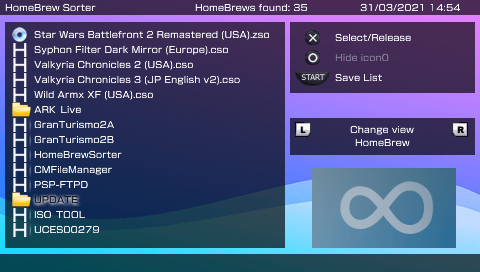
XMB Title Sorter (a.k.a. HomeBrew Sorter Plus) is a fork of HomeBrew Sorter (GUI), with improvements.
It allows you to manually sort the order that the titles will be shown in the PSP XMB (VSH).
Features
- All features of Homebrew Sorter, supports Game Categories plugin Browser mode.
- Support for all ISO and Compressed ISO formats:
ISO,CSO,JSO,ZSOandDAX. - Support to show up ISO icon0.
File extensions supported
- ISO
- CSO
- ZSO
- JSO
- DAX
- PBP (EBOOT)
Current detected paths
ms0:/PSP/GAMEms0:/PSP/GAME/PSXms0:/PSP/GAME/Utilityms0:/PSP/GAME150ms0:/ISOms0:/ISO/PSPms0:/ISO/VIDEO
Browser mode support
The Browser mode sorts homebrew from oldest to newest and uses EBOOT.PBP's date and time. The support for this mode consists on changing that dates so the top list hb will have the oldest date and the bottom list hb the newest. This is an option which is disabled by default, as it would modify the EBOOT.PBP's properties (the other two modes game categories plugin offers sort from newest to oldest by the folders date properties).
While enabled, the sorting will be made for both folders and EBOOT's properties, so you will have the same sort order in any mode. Keep in mind that Browser mode sorts categories alphabetically, so even if you sort the categories from hbsorter that won't change.
Also, if you already sorted your homebrew and found it didn't work for Browser mode, just enter hbsorter, enable Browser mode and enter each category and save the list.
Screenshots
Compatibility
Tested on
Adrenaline eCFW (Nightly)
ARK-4 (e)CFW
ARK-5 (e)CFW
Credits
- HomeBrew Sorter by Sakya
- GUI & compatibility with game categories by Valantin and suloku
- oslib (GitHub)