
Cloudpoint 3DS
More actions
| Cloudpoint | |
|---|---|
 | |
| General | |
| Author | dwalker109 |
| Type | Save Managers and Editors |
| Version | 0.5.1 |
| License | MIT License |
| Last Updated | 2026/06/24 |
| Links | |
| Download | |
| Website | |
| Source | |
Cloudpoint allows you to sync all of your saves (and extdata) between all of your 3DS & 2DS devices, via a central server. Transfer progress between consoles effortlessly, the way you're probably used to from more modern systems. Or PS Vita.
Features
- Sync your game saves (and extdata) between all of your consoles (and, in most cases, emulators)
- Simple UI with minimal user intervention (works like cloud save on any other console)
- Public, free to use cloud available for zero setup syncing over the internet
- Self hosting your own instance is also supported, via the provided Docker image
- Auto sync all saves in one go, or sync specific game saves on demand
- Enable/disable specific saves from auto sync
- Auto discover your saves, and refresh them on demand as you add new games
- "Link" your consoles to enable initial setup using local ad-hoc wireless; syncs all happen directly with the server (your consoles don't all need to be online at once)
- Auto enable wireless on boot, disable on quit - be kind to your battery life
- Slightly increased performance on New... model consoles (but works on all of them really well)
Installation
Cloudpoint is available on Universal Updater, which is the best way to install it and keep it up to date.
Or, download the latest release manually:
- 3DSX - Copy .3dsx to /3ds/cloudpoint/ on your SD card, then launch via the Homebrew Launcher.
- CIA - Copy .cia to your SD card and install it via FBI.
User guide
If you have one console
- Run Cloudpoint on your first console (console 1) - it will scan for saves and enable them for auto sync.
- Press A to sync and wait for the progress bar to complete.
- You are synced! Take your user key to a new console or run Cloudpoint again after formatting your system to restore saves and extdata.
If you have additional consoles
- On console 1, press R to reach the "Link screen and press X to share your user key.
- Run Cloudpoint on another console (console 2) - it will scan for saves and enable them for auto sync.
- Press R to reach the Link screen and press Y to receive your key from the first console. Follow the onscreen prompts on both consoles; Cloudpoint will restart on completion.
- Once Cloudpoint reloads, press A to sync and expect to be asked to resolve conflicts for any game You have installed on both consoles. You will usually see this screen the first time you sync a game on a given console, or if you progress in a game on multiple consoles without syncing.
- You are synced! You are now free to use a N3DSXL at home and a N3DS on the go; no more compromise!
Best practice
- Keep save backups yourself. Do this from time to time. Bugs happen and I don't want you to lose your 1000 hour Pokémon saves.
- Make a backup of your user.key from
/3ds/Cloudpoint/user.key(you will need this in the event you lose your console or memory card, there is no other way to recover your saves). - Auto sync when you pick up your console for a play session, auto sync again when you finish. This will avoid any need to resolve conflicts.
- Use the same version of a game on all your consoles. Syncing saves to different versions may lead to data loss, so avoid this.
- Take extra care when reinstalling titles or formatting a console; detection of title reinstallation should now work well (on real hardware at least; emulator support here is patchy), but it is the thing most likely to lead to unexpected behaviour, so please ensure you have backups before doing either of those things.
Screenshots
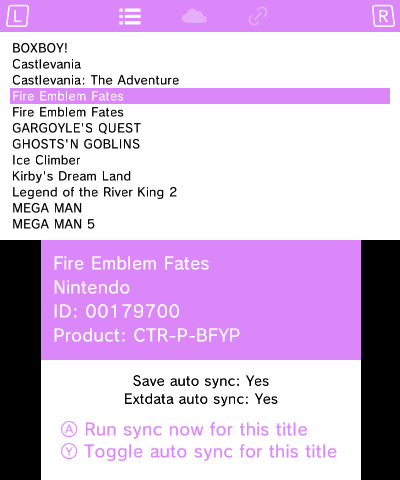
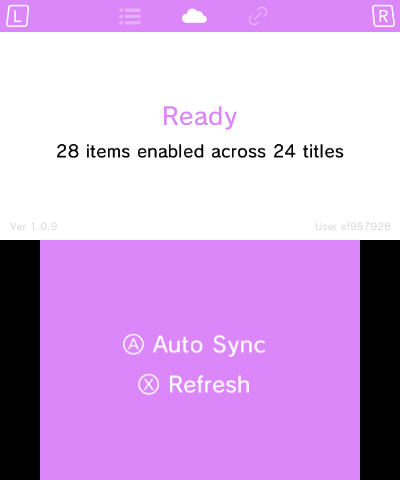
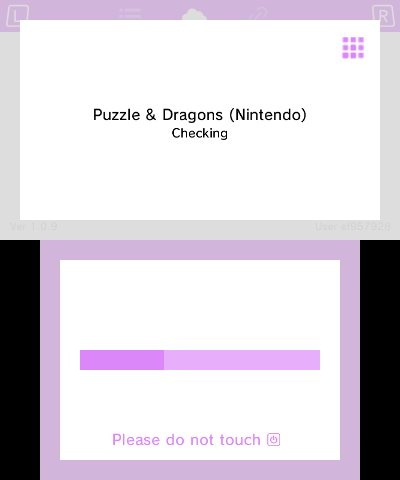
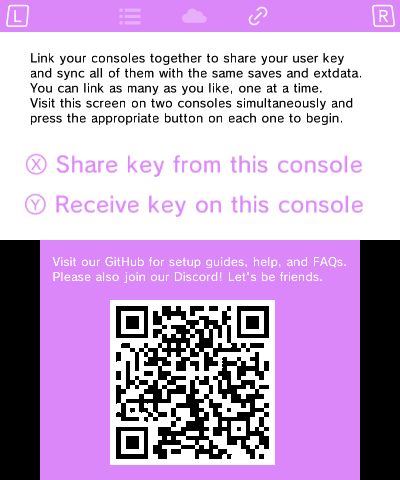
Limitations
Cloudpoint can't run in the background, and it can't automatically run when you launch a game. This isn't something which 3DS can natively support, so you will need to manually run syncs (see best practice).
3DS doesn't provide a method for knowing when a save was last modified, so we can't show that in the UI. We do know when you last synced a save, so we use that in the UI instead.
Changelog
v0.5.1
- Enable CPU/L2 enhancements for New... family consoles by @dwalker109 in #116
v0.5.0
- Fixes & Tweaks
- Refresh hangs with region changed systems (and general resilience to crashes causes by installed titles in a not-quite-normal state) by @dwalker109 in #104 - (thanks to @sofauxboho for all the support)
- Move Read + Seek impl from CtrFile to a CtrFileReader by @dwalker109 in #110
- Recover from dubious archive reads (leniency on likely uninitialised saves) by @dwalker109 in #113
- Improvements
- Auto enable wifi & connect to server on load by @dwalker109 in #106 - (thanks to @gearmo3ds for identifying a great path forward)
- Add l/r on input control to page through titles by @dwalker109 in #112
- Custom server to replace beta version's DUFS placeholder by @dwalker109 in #105 (self hosters should upgrade by looking at the self hosting readme
v0.4.0
- UI spinner & tweaks by @dwalker109 in #97
v0.3.0
- Proper detection of title reinstalls and title uninstalls by @dwalker109 in #95
v0.2.1
- Terraria oom on upload by @dwalker109 in #93
v0.2.0
- Ensure title and state db's are recreated after a system format by @dwalker109 in #89
- Tweak display of app version and user on sync screen by @dwalker109 in #90
v0.1.2
- Add shutdown screen to display in app while we finish work and quit by @dwalker109 in #84
- Display app version and user key on sync screen by @dwalker109 in #85
v0.1.1
- Implement server request body size limit in Caddy to make abuse a little harder by @dwalker109 in #79
- Better shutdown behaviour by @dwalker109 in #81
v0.1.0
- Title discovery and auto sync of all discovered titles
- Conflict resolution on demand
- Per title manual sync auto sync enable/disable toggle
- Backup of local data on downloading saves
- Sharing user key between two consoles via UDS
Credits
- devkitPro makes all of this possible
- Rust3DS packages it all up so I can actually use it
- Checkpoint is a wonderful source of inspiration for this while thing, plus a brilliant help when trying to figure out how to do something