
3DCaster 3DS
From GameBrew
More actions
| 3DCaster | |
|---|---|
 | |
| General | |
| Author | Cracko298 |
| Type | Game Engine |
| Version | 0.8.0 Pre-Release |
| License | MIT License |
| Last Updated | 2026/06/21 |
| Links | |
| Download | |
| Website | |
| Source | |
A "simple" Ray-Caster for Nintendo 3DS that turned into it's own Dungeon Crawler Player/Editor and Engine.
Make your own Dungeon Crawlers with weapons, treasure, enemies, and missions/story. Or a maze- (which is far less cool, but you do you).
Controls
Level select:
D-Pad Up/Down - Selection
D-Pad Up/Down - Action
A - Select
B - Cancel
Start - Exit app
In game:
R/L or D-Pad or C-Stick or Touchscreen - Camera
Circle Pad - Move
B - Sprint
A - Jump
X - Attack
Y - Change weapon
Select - Talk
Start - Back to level select
Screenshots
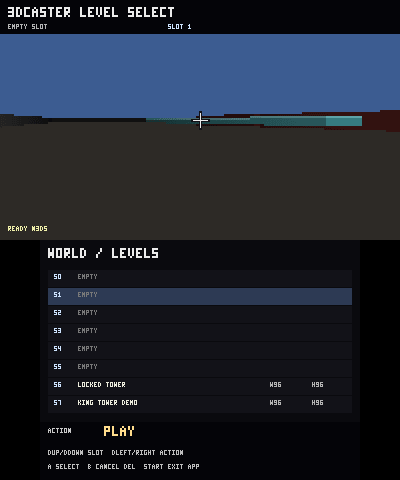
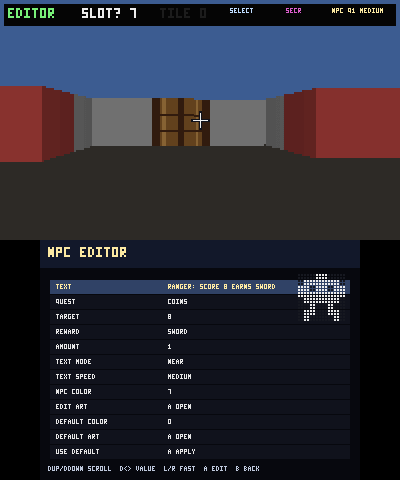
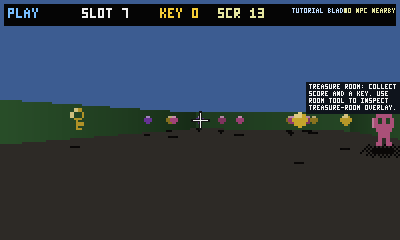
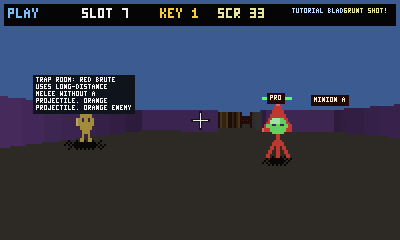
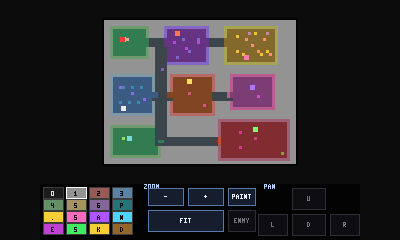
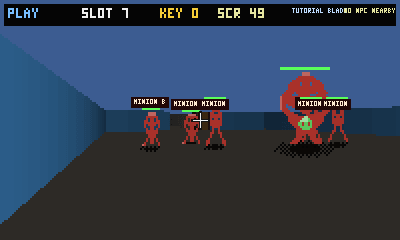
Changelog
v0.8.0
- Editor Workflow:
- Added a dedicated editor tool mode system:
PAINTfor normal tile painting.SELECTfor tapping/selecting entities.ROOMfor painting room-class overlays.
- Added a Select Tool so NPCs/enemies can be selected directly in the editor.
- Tap an NPC tile to open its NPC attributes.
- Tap an enemy tile to open its enemy attributes.
- This replaces the awkward “A + click with stats” flow.
- Added room overlay selection to the editor UI.
- Added room-class painting on top of regular tile data.
- Added visual room hue/overlay support so rooms can be seen and edited separately from wall/floor tiles.
- Added direct editing for NPC/enemy attributes after selection.
- Added weapon editing from the menu and from NPC reward references.
- Added a dedicated editor tool mode system:
- Scrollable menus / attributes (fixes)
- Settings menu now scrolls instead of going off-screen.
- NPC attribute editor now scrolls.
- Enemy attribute editor now scrolls.
- Weapon editor uses the same entity-edit framework.
- Entity editor remembers an internal scroll row and keeps the selected row visible.
- Long attribute lists no longer become unreachable on the bottom screen.
- Room classes / room overlays
- Added a BWL4 room-class overlay stored separately from tile IDs.
- Added room classes:
NONETREASUREBOSSTRAPENEMYCORRIDORSAFEPUZZLESECRET
- Room classes are painted per tile and saved in the BWL4
ROM4chunk. - Room classes are used by AI to decide whether it should continue chasing.
- Corridors/hallways can now be used as AI boundaries.
- Safe rooms can prevent AI from continuing to attack/chase through safe areas.
- Room classes are intentionally independent from tile type:
- A floor tile can be part of a boss room.
- A wall tile can still carry a room class.
- A corridor is no longer just a visual hallway; it can now affect AI containment.
- AI searching / movement
- AI now uses room boundaries to avoid chasing forever through hallways.
- Enemies can be limited to their own room class.
- Corridor/hallway behavior was added so hallway enemies can behave differently from room enemies.
- Added per-enemy Sight Range through the
ENM7format. - Enemies no longer rely only on the old hardcoded detection range.
- Default sight ranges:
- Grunt:
13 - Captain:
16 - Boss:
20
- Grunt:
- Sight range is clamped to a maximum of
40. - AI still respects line-of-sight checks.
- AI still respects room boundaries.
- Captain/boss-style AI has stronger detection behavior than basic grunts.
- Enemy runtime speed now respects the saved
Speed %attribute. - Added improved stopping distance/personal-space behavior.
- Enemies should stop within their attack range instead of walking directly into the player.
- Ranged enemies try to maintain more distance than melee enemies.
- Enemy spacing is now affected by size/hitbox radius.
- Cramming/clipping around the player should be reduced.
- Enemy and boss customization
- Enemy metadata was upgraded to
ENM7. - Added per-enemy:
- HP
- Attack
- Speed %
- Size %
- Text speed
- Color
- AI rank
- Ranged attack toggle
- Melee/attack range
- Attack cooldown
- Spawn limit
- Spawn type
- Spawn cooldown
- Sight range
- Command range
- Projectile color
- Projectile style
- Projectile animation toggle
- 16x16 enemy sprite
- 32x32 boss sprite
- Player max HP from the enemy editor
- Bosses can now:
- Use custom 32x32 art.
- Use custom projectile visuals.
- Use animated projectiles.
- Summon enemies or disable summoning entirely.
- Set summon cooldown.
- Set summon limit.
- Use custom speed and size.
- Use custom sight range.
- Summoned minions were fixed:
- They now receive a visible 16x16 sprite mask.
- They now inherit usable AI defaults.
- They should no longer spawn invisible.
- Secret/no-summon bosses are now possible using
spawn_kind = AI_SPAWN_NONE.
- Enemy metadata was upgraded to
- Combat / weapons / slash system
- Weapons are now stored per save through the
WEP3chunk. - Each save can customize up to 8 weapons.
- Per-weapon fields:
- Name
- Damage
- Range
- Cooldown
- Color
- 8x8 icon/sprite
- Slash behavior now follows weapon data more closely.
- Weapon slash color/timing can differ per weapon.
- NPC rewards can give custom weapons by using
REWARD_WEAPON_BASE + weapon_index. - Weapon customization is saved with the level instead of being purely hardcoded.
- Weapons are now stored per save through the
- Damage feedback / screen shake
- Added a Screen Shake setting.
- When enabled, taking damage triggers a short screen shake.
- Screen shake is saved in the app settings config as
SHAKE. - Screen shake can be disabled from the settings menu.
- If disabled, the shake timer is reset to zero.
- Save format / compatibility
- New saves write magic
BW4. - BWL4 keeps the compact tile RLE stream from BW2/BW3.
- BWL4 adds optional chunks after the tile stream.
- Current BWL4 chunks:
ROM4WLD5NPC5ENM7WEP3END!
- The BWL4 loader still supports:
BWL1BW2BW3BW4
- Older chunk versions are still parsed where supported:
NPCS,NPC3,NPC4,NPC5ENMS,ENM2,ENM3,ENM4,ENM5,ENM6,ENM7WEAP,WEP2,WEP3
- When older saves lack newer data, defaults are generated.
- Important: the encoder function is still named
encode_bwl2_memory()in the source, but it now writesBW4. That function name is legacy.
- New saves write magic
v0.7.0
- Added editable weapon expansion:
- Weapons can now be named individually.
- Weapon slots were expanded.
- Weapon icons are shown on the bottom-screen HUD.
- Current weapon icon bounces inside its HUD box when attacking.
- Added player health support:
- Player max health can be set by the editor.
- Player health is shown on the bottom screen.
- Players are no longer instantly killed by enemies.
- High enemy damage is capped so it does not instantly erase full health.
- Added death screen behavior:
- When player health reaches
0, the game shows a death screen. - Death screen displays who killed the player.
- Player no longer instantly respawns after dying.
- Pressing
Aretries from the level start.
- When player health reaches
- Added boss projectile behavior:
- Normal enemies no longer use ranged attacks.
- Bosses can fire visible arrow projectiles.
- Boss arrows can damage or kill the player.
- Boss arrow deaths show
BOSS ARROWon the death screen.
- Expanded enemy and NPC art:
- Normal enemies now use
16×16artwork. - NPCs now use
16×16artwork. - Bosses now use
32×32artwork. - Older NPC art can be upgraded from
8×8to16×16. - NPC and enemy
EDIT ARTbuttons now open the correct individual sprite editor. - New NPCs and enemies get default editable
16×16art.
- Normal enemies now use
- Added enemy stat customization:
- Enemies can have editable speed.
- Enemies can have editable size.
- Enemies can have editable text speed.
- Enemy size affects rendering and shadows.
- Bosses remain larger than normal enemies, but no longer comically huge.
- Added text typing options:
- NPC/enemy text can use instant, slow, medium, or fast typing.
- Text now wraps instead of cutting off early.
- Longer NPC/enemy text is supported.
- NPC text no longer disappears on a timer.
- NPC text stays visible until the player walks away.
- Added bottom-screen RPG HUD:
- Shows health.
- Shows coins.
- Shows keys/items.
- Shows score.
- Shows current weapon name.
- Shows current weapon damage.
- Shows current weapon icon.
- Shows owned weapon icons.
- Shows acquired quest list.
- Shows enemy kill count and mission progress.
- Improved shadows:
- Shadows were added under coins, keys, weapons, health pickups, NPCs, enemies, and bosses.
- Shadows now scale with sprite/entity size.
- Shadows now use visible sprite bounds instead of invisible transparent pixels.
- Shadows are drawn more like ground decals.
- Shadows are dithered/transparent-looking instead of solid black.
- Shadows are slightly larger than the visible sprite width.
- Shadows no longer follow text labels.
- Improved sprite rendering:
- Transparent sprite pixels are ignored for shadow bounds.
- Invisible side pixels no longer make shadows too wide.
- Sprite perspective scaling was restored so far entities look smaller and close entities look larger again.
- The bad “all entities are the same huge size” behavior was reverted.
- Added enemy range feedback:
- Enemies get a slight hue/tint when they are inside the player’s current weapon range.
- This makes it easier to tell when an attack can connect.
- Added save restriction fix:
L + Ysave is disabled globally.- Players cannot save level/game state during Play or Editor using
L + Y.
- Added new save/load data:
- Newer chunks support expanded NPC art, enemy art, player health, weapon names, enemy stats, and text-speed settings.
- Older save chunks still load where possible.
v0.6.0
- Input / Editor Fixes
- Y button reload/reset bug fixed
- Plain
Yno longer reloads the level and resets the player position. L + Ycan still be used for saving.
- Plain
- Editor safety fix
STARTonly saves/exits when the player is on the main editor screen.- If the player is inside NPC, enemy, weapon, or sprite editor screens, it now tells them to press
Bto back out first.
- Y button reload/reset bug fixed
- NPC Improvements
- NPC text improvements
- NPC text was moved lower so it does not float too high above the character.
NEARNPC text range was increased significantly, around 3x farther.- NPC interaction/select distance was relaxed so talking to NPCs is easier.
- NPC text improvements
- Sprite / Rendering Fixes
- Sprite visibility/depth fixes
- Items, NPCs, enemies, and pickups now use better depth handling.
- Transparent parts of coins/items no longer block enemies behind them.
- Sprites no longer render as thin vertical lines.
- Closer sprites are prioritized so far sprites do not draw over near ones.
- Items, NPCs, and enemies are more visible when they are actually in front of the player.
- Jump anchoring fix
- Enemies, NPCs, coins, and keys no longer follow the camera when the player jumps.
- They now stay anchored in world space.
- Floating pickups
- Coins and keys now float around eye-level like classic pickups.
- They still stay world-anchored and do not move with the player’s jump.
- Platform visibility fixes
- Platforms no longer block sprites behind their invisible/full-column area.
- Platforms were adjusted so walls behind platforms can render better instead of the platform behaving like a full wall.
- Crosshair added
- A center crosshair was added to the top screen.
- Sprite visibility/depth fixes
- Combat Feedback
- Enemy hit/death feedback
- Enemies wiggle when hit.
- Enemies squish when dying.
- Dead enemies disappear after the death/squish animation.
- Enemy health is always visible when enemies are rendered.
- Slash effect added/improved
- Attacking now shows a slash effect.
- The slash effect was changed from a moving streak into a centered slash motion.
- Added 3 slash variants.
- Slash types cycle so the same slash should not be used twice in a row.
- Crosshair stays centered and draws cleanly over/after the slash effect.
- Enemy hit/death feedback
- Success / Results System
- Success tile changed
- Success tile is now a floor trigger instead of a vertical billboard.
- Walking onto it opens a results screen.
- Results show:
- Score
- Enemies killed
- Coins banked
- Missions completed
- Overall percentage out of 100%
- Success tile changed
- Performance Improvements
- Render culling / visibility budget
- Far-away items, NPCs, and enemies can be skipped instead of everything rendering every frame.
- Things behind the player can be skipped.
- A render budget/culling approach was added for busy maps.
- AI throttling
- Far-away AI can update less often to reduce stutter.
- This helps larger maps with lots of enemies, NPCs, and pickups.
- Pickup stutter reduction direction
- Pickups are intended to mark themselves inactive and update state without forcing heavy immediate save/recount behavior.
- Saves should generally happen on manual save, leaving the level, returning to menu, or timed autosave rather than every pickup.
- Render culling / visibility budget
- Boss Entities / AI Hierarchy
- Boss entities added
- New boss entity support.
- Bosses can use larger
14x14sprites. - Bosses can have ranged attacks.
- Bosses can command and/or spawn simpler AI/minions.
- AI hierarchy added
- AI can now be categorized/customized as:
GRUNTCAPTAINBOSS
- Enemy editor exposes hierarchy/boss fields.
- New
ENM4save/load chunk added for expanded enemy data. - Older enemy formats still load.
- AI can now be categorized/customized as:
- Boss entities added
- Demo Maps
- Locked Tower story demo
- Larger integrated story/tutorial level.
- Includes hub, quests, rewards, enemies, boss path, ending hall, and success/results tile.
- King Tower hierarchy demo
- Uses the AI hierarchy and boss systems.
- Includes grunts, captains, and a detailed Wall King boss.
- Boss has more detailed dialogue, a larger sprite, minion spawning/command behavior, and ranged attack support.
- Includes unique NPC/enemy sprites, quests, keys, doors, rewards, story flow, and an ending/results sequence.
- Locked Tower story demo
v0.5.0
- Add Missions, NPCs, Sprites (Custom per-world), Weapons, Story/Text System.
- Customizable Weapons
- Customizable NPCs
- Customizable AI/Enemies.
- Download the DEMO.zip and extract it to the root of the
./3ds/folder like you would try and install3DCaster.3dsx
v0.4.0
- New Tiles: Door, Key, Dots (Coins).
- Use keys for doors, dots are points.
- Improved AI Intelligence Slightly.
v0.3.0
- New "Game-Mode" called 'Random' which generates a random maze-like map with enemies and AI.
- Debug Mode in Settings for Developers.
- New Tiles/AI Functions:
1–6 = solid full walls
7 = platform / raised ledge
C = enemy spawn marker
D = exit / success marker
8, 9, A, B, E, F = currently placeholders
v0.2.0
- Added a "Settings" Tab, you can toggle between the following:
- Simple Anti-Aliasing
- "Fast Renderer" should increase performance on O3DS Consoles.
- Simple 3D-Stereo Support.
- Viewbobbing.
- Level Depth Adjusting.
- FOV Adjusting.
- Depth of Field (Fade, Distance, Start)
- C-Stick now Controls the Camera if played on a N3DS Console.
- Touch-Screen now also controls the Camera (Not available in Editor for obv. reasons).
- Map-Zooming/Panning while editing levels, for easier creation of "levels".
- Map zooms in depending on sizing of the created "level".
v0.1.0
- Selector Screen for Level/Map.
- Backup(s).
- Simple Controls (R+L to pan camera, Circle PAD to Move, B to Sprint, A to Jump).
- Simple World Editing, Resizing, Duplicating, etc).