
EQVita
From GameBrew
More actions
| EQVita | |
|---|---|
 | |
| General | |
| Author | shev0k |
| Type | Utilities |
| Version | 1.10 |
| License | N/A |
| Last Updated | 2025/12/22 |
| Links | |
| Download | |
| Website | |
| Source | |
EQVita is a system-wide graphic equalizer kernel plugin and companion app for PS Vita and PSTV that processes all console audio in real time.
EQVita adds a configurable multi-band equalizer that affects every title, including games, homebrew and system apps, which makes it useful for tailoring the console’s sound to different headphones, speakers or recording setups.
Layout
plugin/— Kernel plugin (eq_speaker.skprx)app/— UI app (EQVita.vpk)common/— Shared headersdocs/— Technical notes
Install
Copy
eq_speaker.skprxtour0:tai/.Add to
ur0:tai/config.txtunder*KERNEL:*KERNEL ur0:tai/eq_speaker.skprx
Reboot.
Install
EQVita.vpk.Run EQVita to adjust settings.
Note: The plugin is disabled by default to prevent boot issues. Launch EQVita to enable it.
Usage
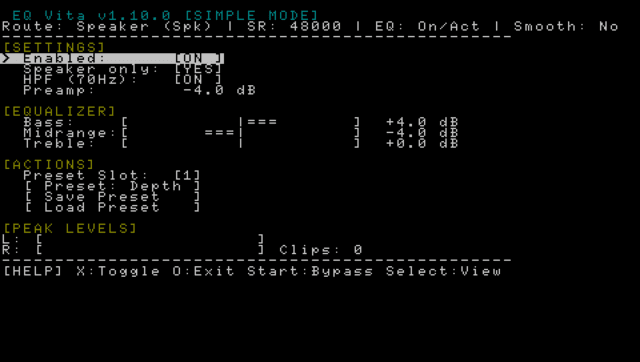
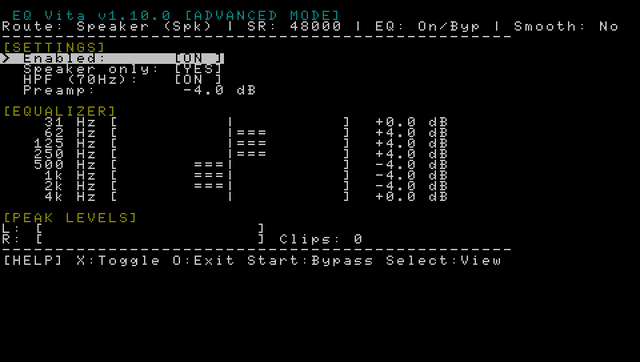
- Bands: 31Hz - 4kHz (Note: HPF option disables frequencies under 70Hz).
- Gain: ±12 dB
- Controls:
- Triangle: Save preset
- Square: Load preset (
ux0:data/eqvita/preset0.bin)
- Status: Shows route, sample rate, and clip count.
Notes
- Hardware: Tested on PS Vita 1000 (PCH-1000) with Switch OLED speaker mod. Should work on other models.
- Personal Config: I use +4 on bass and -4 on midrange. The difference is quite big.
- Disclaimer: This is my first PS Vita project and a hobby endeavor. If it works, it works.
- Credits: UI images adapted from VitaShell.
- Bluetooth detection is not yet implemented.
- DSP uses an in-place biquad chain with smoothing.
- If audio crackles, reduce gain or preamp.
Screenshots
Changelog
v1.10
- First Release.