
GimliDS
More actions
| GimliDS | |
|---|---|
 | |
| General | |
| Author | Dave Bernazzani (wavemotion-dave) |
| Type | Computer |
| Version | 1.5b |
| License | GPL-2.0 |
| Last Updated | 2025/12/02 |
| Links | |
| Download | |
| Website | |
| Source | |
GimliDS is a Commodore 64 emulator for the DS/DSi developed by Dave Bernazzani, partially based on Troy Davis's FrodoDS, which itself is a port of Frodo originally written by Christian Bauer.
Features
- Commodore 64 with full 6510 CPU emulation, 64K of base memory, VIC II and SID chip rendering.
- REU-1764 emulated with 256K of expanded memory.
- D64 disk file support for two drives (8, 9).
- CRT cartridge file support with writeback for EasyFlash (flash sectors) and GMOD2 (serial EE).
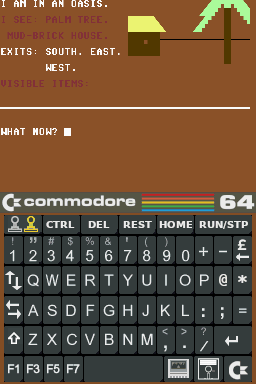
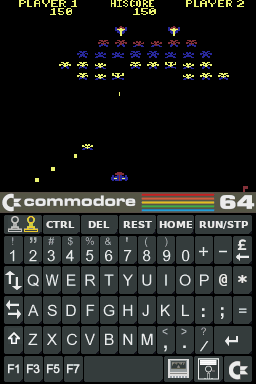
- Virtual touch-screen keyboard to replicate the C64 look and feel.
- Full key mapping of C64 Keyboard / Joystick to any of the main DS keys.
- Save/Load state so you can pickup gameplay right where you left off.
Installation
You must have original Commodore BIOS files to run this emulator.
Place them in /roms/bios or /roms/c64 and be sure they are named exactly as follows:
KERNAL.ROM   8K  with CRC32=dbe3e7c7 (901227-03)
BASIC.ROM    8K  with CRC32=f833d117 (901226-01)
CHAR.ROM     4K  with CRC32=ec4272ee (901225-01)
1541.ROM    16K  with CRC32=899fa3c5 (251968-03)
For best performance, run it from a DSi/XL/LL via Twilight Menu++ or Unlaunch (134MHz, no frameskip, better audio). Flashcarts like R4 use a slower "Compatibility" mode (67MHz, light frameskip).
User guide
How to use:
- Launch GimliDS.NDS on your DS.
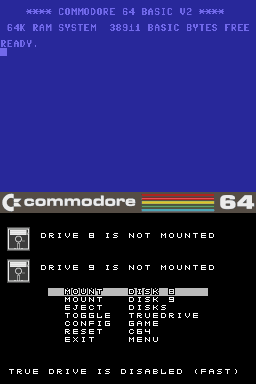
- At the CBM BASIC "READY" prompt, use the DISK ICON to mount a .d64 game file.
- Once mounted, select the exit to menu option then press the Start button to auto-type
LOAD "*",8,1and run the game.
Notes:
- The C= key on the lower right will let you set configuration for the game, save/load game states, etc.
- Use the Select button to swap joystick ports.
- Use L/R+D-Pad to scale and offset the screen. Settings are saved per game.
- You can remap any DS keys to 'PAN UP' or 'PAN DOWN' to temporarily shift the screen by 16 pixels up/down.
- You can assign any DS keys to 'TOGGLE ZOOM' in configuration for a 1:1 pixel mode to easy text reading.
- A few games use custom loaders that require 'True Drive' to be enabled. It mimics the original disk drive but it could take 2-5 minutes to load a game. It is recommended to create a save state after loading to avoid waiting for it to load again.
Cartridge support: (up to 1MB)
- Standard 8K
- Standard 16K
- Super Game Carts up to 64K
- Dinamic up to 128K
- C64 Games System up to 512K
- Ocean up to 512K
- Magic Desk up to 1MB
- EasyFlash up to 1MB with 256b RAM and Flash Write support
- GMOD2 up to 512K with 2K of Serial EE write support
- Magic Desk 16K (aka Magic Desk 2) up to 2MB on DSi or above only
Controls
L+D-Pad - Scale the screen in the X and Y directions
R+D-Pad - Offset the screen in the X and Y directions
Start - Issue the infamous LOAD "*",8,1 (be sure the emulator is at the READY prompt)
Select - switch between port1 and port2 that the joystick is in
D-Pad - Joystick directions
A - FIRE (can be remapped in Configuration)
B - SPACE (can be remapped in Configuration)
Y - RETURN (can be remapped in Configuration)
X - Joy Up for games where you jump (can be remapped)
Pressing and holding both shoulder buttons together will 'Turbo Warp' the emulator (runs as fast as it can until you release).
Screenshots
Changelog
Version 1.5b 2025/12/02
- Reverted CPU Adjustment to +0 (the +3 was too aggressive for some games - such as the new Sherwood!)
- Slight tweaks to disk icon flashing for read/writes.
- Slight optimization for another frame of performance.
Version 1.5 2025/10/08
- Added Ultimax support plus the first pass at some of the Freezer carts.
- Improved speed almost 15% across the board - helps DS-Lite run at the right speed and DSi gets additional sound improvements.
- Improved floppy icon handling - cosmetic change only on green/blue/red LED handling.
- Other minor tweaks and improvements under the hood as timer permitted.
Version 1.4 2025/09/29
- Easyflash now supports flash writes with auto-persist to the SD card.
- GMOD2 cart type (60) supported with Serial EEPROM write to the SD card.
- Fixed Game Config so it properly restores the configuration last saved (oops!) - old configurations will be reset.
- Changed default keymap... B is now UP for help with platform/jumping games, X is SPACE typical for C64 games that need 2 buttons.
- Improved SID emulation on the DSi or above with the extra CPU horsepower.
- Improved keyboard screen dim handling.
- Fix .gss Save State names for cartridges.
- Save state tweaks and fixes. Old save states will be reset.
- Disk and Cartridges can be marked as read-only on a per game configuration basis. Use DISK/FLASH options.
- For the DSi and above (with the extra memory), 2MB MagicDesk 16K carts are supported (mainly for SNK vs Capcom - Stronger Edition)
- Added PAN LEFT / PAN RIGHT options to map keys to slide the screen left/right during gameplay.
- Other minor tweaks under the hood.
Version 1.3 2025/05/18
- New global options with a number of new configurations (dim screen, default buttons, etc).
- Added ability to swap LCD screens on the main Commodore menu.
- Slight extension of vertical pixel resolution for some games that utilize more raster lines (Gaplus, etc).
- Minor cleanup and refactor under the hood for improved maintainability and slight performance tweaks.
Version 1.2 2025/05/16
- Added new DIAGONALS joystick mode for a few Q-Bert clones.
- Slide-n-Glide joystick mode made more responsive.
- Extended visual display by 4 pixels for a few games that utilize long screen renderings.
- Minor tweaks and efficiency improvements under the hood.
Version 1.1 2025/05/11
- Fix to CIA vars initialization so games like Chuckie Egg start properly.
- Fix to TOD clock counters (previous versions would not clock at all... fixes some utilities mostly).
- Improved REU handling for a bit more speed (gain of 1-2 frames on REU games)
- Improved VIC handling for a bit more speed (gain of 1-2 frames across the board)
Version 1.0 2025/05/09
- Added TOGGLE ZOOM button map to scale screen 1:1 temporarily (to make text games readable)
- Another proper fix for CPU jump commands not handling the extra cycle it takes.
- Fixed CPU zero-page wrap so it's accurate.
- Added 256K REU-1764 support. Still quite preliminary.
- A bit of polish and cleanup for the big first release!
Version 0.9d 2025/05/06
- Added ability to remap the British Pound (£) symbol to one of the other rare missing keys (left arrow, up arrow, C=)
- Fix for CPU jump commands not handling the extra cycle it takes.
- All carts insertions do a proper reset so that we don't lock up when switching carts.
- Minor cartridge accuracy improvements - new LED added to cart icon for EasyFlash loading.
Version 0.9b/c 2025/05/05
- Pressing L+R shoulder buttons together is WARP mode (run emulator fast while the buttons are held)
- Improved L/R + DPAD scale/offset (so it doesn't also produce joystick input at the same time)
- Minor tweaks to TrueDrive mode for improved cycle accuracy
- CRT and PRG Cartridge support. Most popular game-based formats are supported. Use the new CART icon.
- 0.9c hot-fix release fixes the Cartridge Menu graphic and adds a bit more speed for the DS-Lite.
Version 0.9a 2025/05/02
- Fixed TrueDrive loading so it doesn't alter the CPU speed (for games like Pang which were playing quite 'uneven').
- Bumped up volume of the SID output by 50% (was too quiet)
- Improved 1541 Drive emulation - mostly in the GCR and IEC areas. Nothing noticeable but should be more accurate.
- Fixed write floppy icon color (instead of the usual green, will flash blue).
- Tweaks to C64 keyboard graphic to be more authentic.
Version 0.9 2025/04/30
- New and improved key mapping - including the new Slide-n-Glide joysticks handling.
- SID filtering improved for better audio rendering (Space Taxi voice heard!).
- Faster across the board - even the DS-Lite/Phat is now running at (or close to) full speed.
- Fixed joystick handling so we sample at the correct rate - smoother motion on screen.
Version 0.8 2025/04/27
- First public beta released!
Credits
Acknowledgements:
- The opening jingle was done by DeNL and comes courtesy of the roalty free jingles at pixabay.
- The dwarf icon on the title screen was submitted online by 'anonymous' to an artwork site. If this is yours and you would like to be credited, please contact me.
- Christian Bauer - Original Frodo author - without whom none of this exists!
- Troy Davis(GPF) http://gpf.dcemu.co.uk - FrodoDS initial porter and others who have contributed over the years.
- Wintermute and the contributors for devkitpro and libnds.
- djleviticus for his time and efforts in helping shake out some bugs during the beta testing.