
Vita Moonlight Motion
More actions
| Vita Moonlight Motion | |
|---|---|
 | |
| General | |
| Author | AorsiniYT, MetalfaceScout, xyzz, d3m3vilurr, ShadowPrince |
| Type | Other Apps |
| Version | 0.12.0 |
| License | GPL-3.0 |
| Last Updated | 2025/06/25 |
| Links | |
| Download | |
| Website | |
| Source | |
Vita Moonlight Motion is an advanced port of Moonlight for PlayStation Vita, allowing you to stream and play your PC games (NVIDIA GameStream or Sunshine) with low latency and high quality.
It features tablet-style multitouch support, absolute mouse mode with gestures, an elevated floating keyboard, advanced control mapping, customizable hotkeys, and hardware video decoding.
The app automatically discovers hosts on your local network, supports all Vita control modes, and provides a modern, smooth user experience.
Perfect for playing your PC games anywhere using your PS Vita.
Features
- Multi-touch touchscreen mode: New tablet-style mode compatible with Sunshine, with true multitouch support and native gestures (e.g. pinch-to-zoom).
- Improved Absolute Mouse mode: Cursor always follows the main finger, right click with two-finger tap, natural two-finger scrolling.
- Exclusive touch mode selection: Choose between "Touch Mouse Absolute" (mouse gestures) or "Touchscreen (Sunshine multitouch)" (multitouch tablet) in the settings menu.
- No ghost cursor: In touchscreen mode, the host cursor is hidden and no mouse clicks are sent.
- Physical controls always active: Gamepad controls work in both touch modes.
- Refined gesture and touch experience: Improved logic for right click, scrolling, and multitouch gestures.
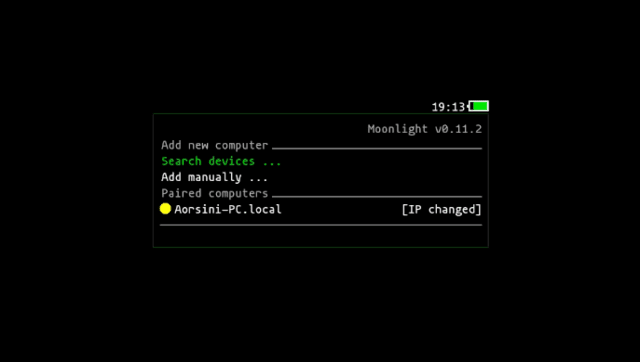
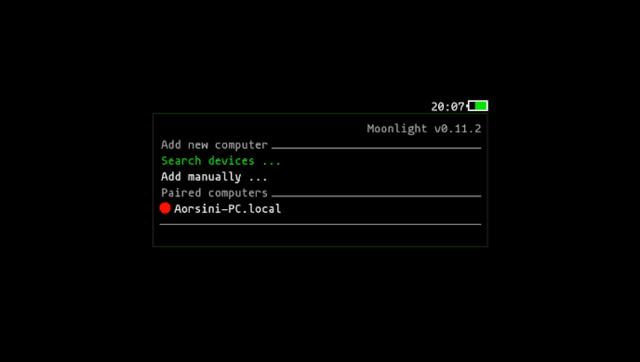
- Host status indicator dots: Green (online), yellow (IP change pending), red (offline/disconnected).
- Robust host status checking: Background scan thread and mDNS sniffer.
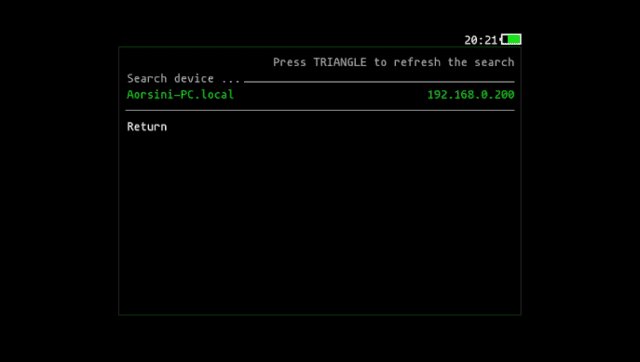
- Manual refresh: Press TRIANGLE (△) in the main menu or device search to refresh host/device status instantly.
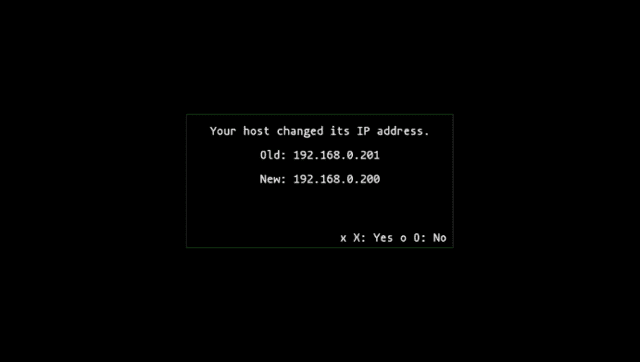
- IP change confirmation dialog: Always shows old and new IP, and always asks for confirmation.
- UI and logic robust to missing/empty host fields.
- Improved debug logging and error handling.
- Automatic pairing fixed: The pairing process is now more reliable and user-friendly. You can now pair your PC directly from the Vita using "Search device"—no more manual pairing required!
- Elevated floating keyboard: The virtual keyboard now appears above the app, never covering the main screen (see screenshot below).
- Updated libraries: All dependencies and core libraries (moonlight-common-c, enet, inih) have been updated for better compatibility and stability.
- New modular mDNS sniffer: Fast and reliable device discovery on your local network.
- Many bugfixes and code cleanups.
Usage
How to open the Pause Menu
To open the pause menu at any time (even in any touch mode), press:
START + L + R
This shortcut works regardless of the selected touch mode (Absolute Mouse or Touchscreen). Use it to access the in-game pause/options menu quickly.
How to open the Floating Keyboard
To open the elevated floating keyboard at any time, press:
START + LEFT
This shortcut will always open the virtual keyboard in elevated mode, never covering the main screen. Works in all touch modes.
Screenshots
Changelog
v0.12.0
- Multi-touch touchscreen mode: True tablet-style multitouch, compatible with Sunshine. Enjoy native gestures like pinch-to-zoom, and use your Vita as a real drawing tablet!
- Improved Absolute Mouse mode: The cursor always follows your main finger. Right click with a two-finger tap, and scroll naturally with two fingers—just like a modern touchpad.
- Exclusive touch mode selection: Choose between "Touch Mouse Absolute" (mouse gestures) or "Touchscreen (Sunshine multitouch)" (multitouch tablet) in the settings menu. Only one mode is active at a time.
- No ghost cursor: In touchscreen mode, the host cursor is hidden and no mouse clicks are sent, for a true tablet experience.
- Physical controls always active: Gamepad controls work in both touch modes, so you never lose access to physical buttons.
- Refined gesture and touch experience: Improved logic for right click, scrolling, and multitouch gestures. Gestures are more natural and reliable.
- Many bugfixes and code cleanups: More stability, better logs, and a smoother experience overall.
v0.11.4
- Host status indicator dots: Instantly see if your PC is online (green), offline (red), or needs IP update (yellow).
- Robust host status checking: Background scan thread and modular mDNS sniffer for reliable device discovery.
- Manual refresh: Press TRIANGLE (△) in the main menu or device search to refresh host/device status instantly.
- IP change confirmation dialog: Always shows old and new IP, and asks for confirmation before updating.
- Menu and status only refresh on real changes: UI updates only when status changes or the user requests it.
- Improved debug logging: Detailed logs for all host and menu transitions.
- UI and logic robust to missing/empty host fields: Works smoothly even with incomplete host data.
v0.11.2
- More reliable and user-friendly automatic pairing.
- Experimental absolute touch controls (beta).
- Floating virtual keyboard that no longer covers the main screen.
- Updated libraries and dependencies for improved compatibility and stability.
- New modular UDP mDNS sniffer for device discovery (replaces legacy mdns code).
- Improved debug logging, especially for device search and reconnect flows.
- Cleanup of legacy code and dependencies.
Credits
- Current improvements and maintenance: AorsiniYT
- Based on the work of: