
MH4U Save Editor 3DS
From GameBrew
More actions
| MH4U Save Editor | |
|---|---|
 | |
| General | |
| Author | Rokumaehn |
| Type | Save Editors |
| Version | 1.0.2 |
| License | MIT License |
| Last Updated | 2025/03/24 |
| Links | |
| Download | |
| Website | |
| Source | |
MH4U Save Editor is a save game editor tailored for Monster Hunter 4 Ultimate on the Nintendo 3DS. This tool enables players to modify various aspects of their game saves, offering a user-friendly interface for editing without manual decryption or encryption processes.
Features
- Automated Save Handling: mh4edit manages the decryption and re-encryption of save files internally, eliminating the need for external tools.
- Item Box Editor: Allows users to modify items within their in-game item box.
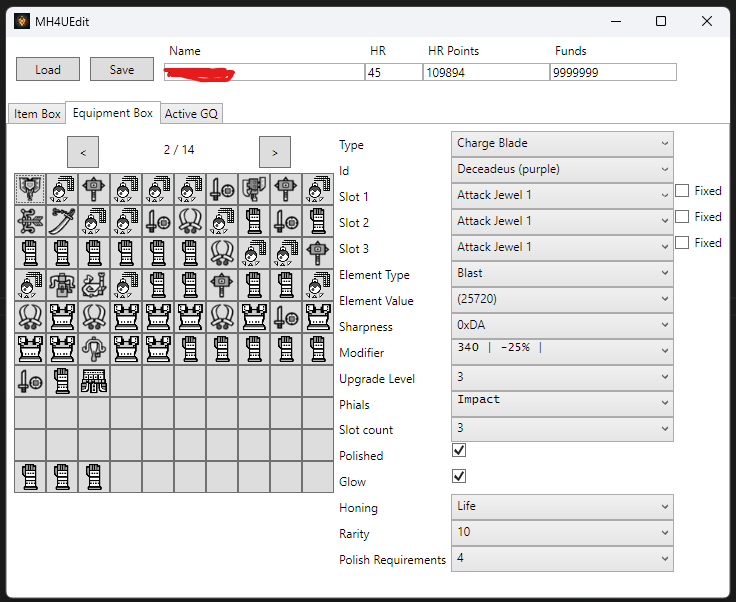
- Equipment Box Editor: Facilitates editing of equipment, including relic-specific attributes.
- Guild Quest Editor (WIP): Enables editing of existing guild quests, with caution advised when modifying the second monster slot to prevent invalid configurations.
- Palico Editor (WIP): Provides basic editing capabilities for Palico companions.
Usage Instructions
- Backup Your Save: Use tools like Checkpoint or SaveDataFiler to back up your save data, resulting in a
systemfile and one or moreuserXfiles (e.g.,user1,user2,user3). - Transfer Save Files: Copy the desired
userXfile to your PC. It's recommended to transfer the entire save folder and rename it for backup purposes. - Edit with mh4edit: Open the
userXfile in mh4edit, make the desired changes, and save the file. - Restore Save to 3DS: Transfer the edited
userXfile (or the entire save folder) back to your 3DS and import it using Checkpoint or SaveDataFiler. Ensure that all related files are in the same directory to prevent data loss.
Important Considerations
- Relic Equipment Editing: While the equipment editor allows modification of relic-specific fields on non-relic items, such changes can result in invalid items that the game may remove upon the next launch.
- Weapon Editing Restrictions: Only end-game weapon IDs, recognized as relics, have full editing capabilities. Other weapons have limited editing options to prevent the creation of invalid items.
Known Bugs
- The waist armor ids are off at some point.
Screenshots
Changelog
v1.0.2
- Fixed bugs.
- Added colored equipment icons.
- Added palico editing.
v1.0.1
- Bugfix version.
v1.0
- First Release.