
System Observer PSP
More actions
| System Observer | |
|---|---|
 | |
| General | |
| Author | mafu |
| Type | Plugins |
| Version | 1.30 |
| License | Mixed |
| Last Updated | 2011/03/24 |
| Links | |
| Download | |
| Website | |
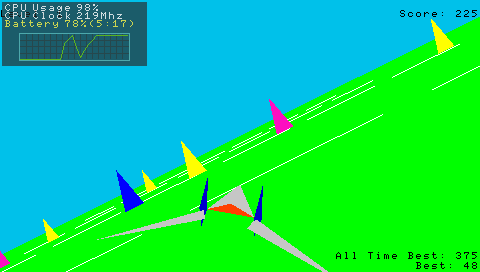
This plugin displays CPU, battery, and other system information during gameplay on the PSP.
It's a simplified version of the typical PC gadget-style tool.
Installation
Copy sysobserver.prx and sysobserver.ini to the ms0:/seplugins/ folder.
In game.txt and/or pops.txt, add the line:
ms0:/seplugins/sysobserver.prx 1
User guide
Configuration
Edit sysobserver.ini to modify the settings. Undefined values or empty fields will use the default settings. (Only use half-width alphanumeric characters; full-width spaces are not allowed.)
[Buttons]
- ShowButtons - Button to display information
- HiddenButtons - Button to hide information
- MoveButtons - Button to move the displayed position (hold while using the analog pad to move)
List of buttons:
|
|
[Flags]
- ShowCpuUsage - Display CPU usage
- ShowCpuUsageWave - Display CPU usage visually
- ShowCpuClock - Display CPU clock
- ShowBatteryLifePercent - Display battery percentage
- ShowBatteryLifeTime - Display remaining battery life time (0:00 when charging)
- ShowStartUpTime - Display startup time
- ShowLocalTime - Display current time
[Alpha]
- This section controls the transparency of the background and text.
- Values range from 0 to 255, with higher values resulting in darker displays.
- If the number starts with "0x," it is interpreted as hexadecimal (e.g., 0xAA = 170 and 0xCC = 204). Decimal numbers are also accepted.
Controls
R+L+Vol Up - Display the information
R+L+Vol Down - Hide the information
R+L+Start - Change the position with the Analog
The information is hidden by default when the game starts.
Screenshots
Compatibility
Confirmed to work on:
PSP-2000 (6.20TN-D, 6.35PRO-B3, 6.37ME-6fix2)
PSP-3000 (5.03GEN-C, 6.60PROMOD-C2p)
Known issues
- The plugin causes a freeze during the first movie of Monster Hunter Portable 3rd.
- If the information is hidden during this scene, the game continues without issues afterward.
Changelog
Ver. 1.30 2011/03/24
- Fixed a critical bug causing freezes after waking from sleep mode.
- Added features to display startup time and current time.
- Added support for configuration files.
Ver. 1.23 2011/03/21
- Changed the calculation method for CPU usage and CPU clock (performance may have improved).
- Officially added support for 6.20TN and 6.35PRO.
- Fixed a bug that caused freezes on 6.37ME.
Ver. 1.10 2011/03/19
- Slight design changes.
- Added support for 6.20TN and 6.35PRO.
- Fixed a bug causing freezes on 6.37ME?
Ver. 1.05 2011/03/18
- Added average CPU clock display.
- Allowed for position adjustments of the displayed information.
Ver. 1.00 2011/03/18
- Improved design by changing the drawing method.
- Disabled memory information display due to difficulty in retrieving heap data for most games.
- Added visual representation of CPU usage.
- Fixed bugs from the beta version.
Beta 2011/03/15
- Test release.
External links
- Author's website - http://mafu9.blog40.fc2.com/blog-entry-8.html