
MP3XMB Plugin PSP
More actions
| mp3XMB Plugin | |
|---|---|
 | |
| General | |
| Author | Slasher |
| Type | Plugins |
| Version | 3 |
| License | Mixed |
| Last Updated | 2006/08/10 |
| Links | |
| Download | |
| Website | |
 |
This application has been obsoleted by one or more applications that serve the same purpose, but are more stable or maintained. |
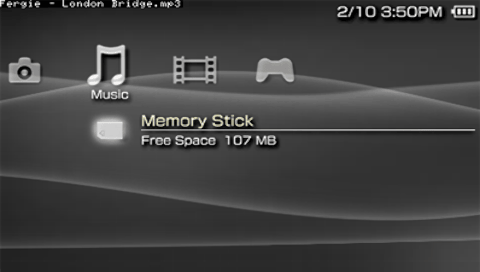
This plugin will allow you to listen to MP3s anywhere in the XMB.
Instead of being restricted only to the music section, you can now listen to MP3s while doing other activities like watching a video, while viewing images, while changing settings, etc.
Currently supports up to 200 songs in the ms0:/PSP/MUSIC/ folder.
Installation
Place the mp3XMB folder (and all of its contents) in the ROOT (ms0:/(here)).
Then, just simply point the P.O.C. Custom Firmware to load the RUNMEmp3.prx.
ex) loadmodule0 = "ms0:/mp3XMB/RUNMEmp3.prx".
Controls
Default:
Home - Activate the module
Home+L/R - Switch song (to the left/right)
Home+Up - Stop current MP3
Home+Square - Pause/Unpause
Screenshots
Compatibility
For 1.50 CF POC only.
Does not work with newer Firmware.
Known issues
- Make sure to stop (or pause) your current song before loading up a homebrew or UMD, else crashes.
- When exiting out of USB mode, music may mess up. Just switch the current song (or pause it) to fix that.
- When using this with any USB Activating-related plugins, It may cause this plugin (along with the others) to not work. Please remove all USB-related plugins for this module to work.
- This won't work in devhook.
Changelog
V3
- You can change the CPU speed if you wish to get rid of any lag you may experience.
- The song display is now more consistent.
- Easy to remap the button control.
- Now every button is configurable. Alot of people were wanting that - so here it is.
- Added a new display mode option.
- Mode A = Show song title briefly after changing song.
- Mode B = Show song title always.
- Mode C = Show nothing...ever.
- Added an option if you want your music to auto-start playing.
- Bumped the maximum number of songs up to 200.
Credits
Thanks Ahman for the irshell mp3 functions.
Thanks Danzel for attempting to tell me a proper delaythread time.
Thanks Raphael for being helpful.
All other credit: Slasher.
External links
- QuickJump - http://dl.qj.net/index.php?pg=12&fid=9290