
RLX Compressor PSP
More actions
| RLX Compressor | |
|---|---|
 | |
| General | |
| Author | mafu |
| Type | File Browsers |
| Version | 0.52 Signed |
| License | Mixed |
| Last Updated | 2011/04/24 |
| Links | |
| Download | |
| Website | |
RLX Compressor (PSP またーり圧縮) is a Japanese file compression/decompression tool for PSP.
Supported formats:
- Compression: CSO, ZIP (Password supported)
- Decompression: None
Installation
Place the RLX Compressor folder in the /PSP/GAME/ directory.
By default, it reads from flash0:/font/jpn0.pgf. However, if you place a PGF font file named font.pgf in the same folder as EBOOT.PBP, it will load that font instead.
User guide
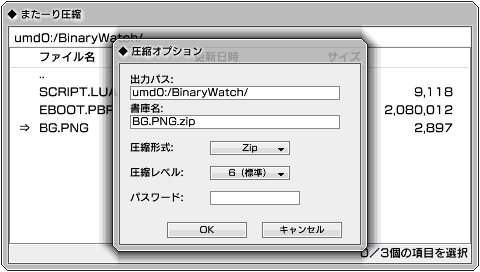
Compression options:
- Output Path - The path where the output will be saved.
- Archive Name - The name of the output archive.
- Compression Format - As-is.
- Compression Level - A higher number results in smaller archive size, but it will take more time. The default level is probably fine.
- Password - Password to use when compressing (Shift JIS encoding).
- OK - Start compression.
- Cancel - Cancel compression.
Controls
File Browser:
Circle - Open folder
Left - Close folder
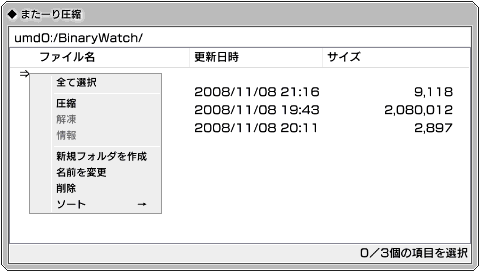
Triangle - Open menu
Square - Select/unselect item on cursor
Up/Down - Move cursor
Menu:
Circle - Confirm
Cross - Close menu
Up/Down - Move between options
Compression options:
Circle - Confirm/Change
Up/Down - Move between options
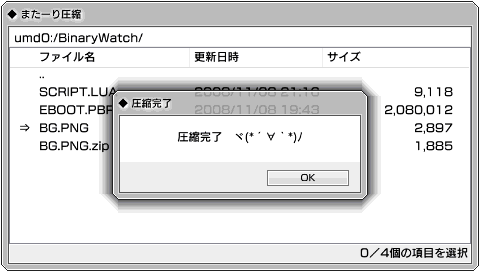
During compression/decompression:
Start - Toggle processing optimization mode (this disables screen updates to focus on the process)
Screenshots
Compatibility
It should work on all PSP models.
Changelog
- Ver.0.52 2011/04/24
- Fixed an issue where memory allocation failed when compressing large CSO files on OFW (Official Firmware).
- Fixed bugs when compressing multiple items.
- Modified to retrieve the device name from the file path of EBOOT.PBP. (This means, for example, that on the PSP Go, it can now access ef0:)
- Created an icon.
Ver.0.50 2011/04/23
- Merged the OFW version and the CFW version.
- Added support for CSO compression.
- Improved the random number generation method for encryption.
- Improved compression speed by changing the I/O method.
- Added the ability to change the output path.
- Passwords can now be used in Japanese.
- Added a processing optimization mode.
- Added sorting functionality.
- Files and folders with hidden attributes will now have lighter font colors.
- Improved menu rendering.
- Various additional fixes and improvements.
Ver.0.01 2011/01/23
- Changed the title to "PSP Matari Compression".
- Rewrote the source code that was previously too complicated.
- Added support for OFW (Official Firmware).
- Added support for the Japanese language.
- Modified the GUI to resemble Windows-style? (It should be much better now.)
- Added support for compressing entire folders.
- Added support for password protection in ZIP files.
- Added file/folder renaming and deletion functionality.
- Added the ability to change the output file name.
- Various additional fixes and improvements.
test2 version (PSP Compress) 2010/12/16
- Fixed a bug where compression was possible even when no files were selected.
test version (PSP Compress) 2011/12/15
- Released for testing purposes.
Credits
intraFont - Uses intraFont by BenHur.
zlib - Copyright (C) 1995-2002 Jean-loup Gailly and Mark Adler.
External links
- Author's website - http://mafu9.blog40.fc2.com/blog-entry-13.html