
ISO-PBP Converter PSP
From GameBrew
More actions
| ISO~PBP Converter | |
|---|---|
 | |
| General | |
| Author | LMAN (leecherman) |
| Type | File Operation |
| Version | 0.1 |
| License | Mixed |
| Last Updated | 2015/03/18 |
| Links | |
| Download | |
| Website | |
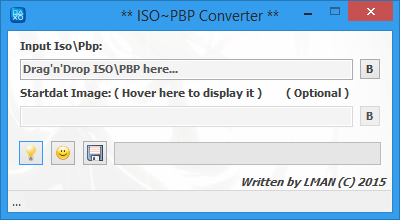
ISO~PBP Converter GUI is a program that can convert between ISO and PBP formats.
Requirement: Microsoft DotNet v2.0.
User guide
You can add files and convert\save it using a command line:
IsoPbpConverter <input> <image> [-c] [-f] <file> or [-d] <dir>
Commands:
<input> Input ISO\PBP file.
<image> STARTDAT image, use this option when converting from ISO to PBP format.
[-c] Convert ISO\PBP file when starting the tool.
[-f] <file> Output ISO\PBP filename, use [-d] <dir> instead if you want the default name.
[-d] <dir> Output folder for the Converted file.
Notes:
- The Converted PBP file will have a smaller size than the ISO file.
- The supported image files to use it as STARTDAT in PBP formats are: *.PNG, *.JPG, *.JPEG, *.BMP, *.GIF.
- If the image dimension larger\smaller than the default size (480x272), this tool will automatically resize it to the required size.
Screenshots
Credits
Special thanks to hykem, tpu.
External links
- Author's website - https://sites.google.com/site/theleecherman