
OclockVita
From GameBrew
More actions
| oclockvita | |
|---|---|
 | |
| General | |
| Author | frangarcj |
| Type | Plugins |
| Version | 1.2.1 |
| License | MIT License |
| Last Updated | 2017/01/16 |
| Links | |
| Download | |
| Website | |
| Source | |
Oclock Vita is a simple taiHEN plugin for overclocking your PS Vita.
Installation
Put oclockvita.suprx in tai folder in the root of your Vita (ur0: or ux0:).
Edit config.txt in that directory to load plugin for title of your choice by adding new lines like below (change accordingly if you are using ux0:)
# titleid for your game (this one is for Root//Letter for example)
*PCSB01019
ur0:tai/oclockvita.suprx
Go to Settings > HENkaku Settings > Reload taiHEN config.txt.
Launch the game, then open the menu with hotkeys.
Controls
Select+Up - Enable menu
Select+Down - Close menu
Screenshot
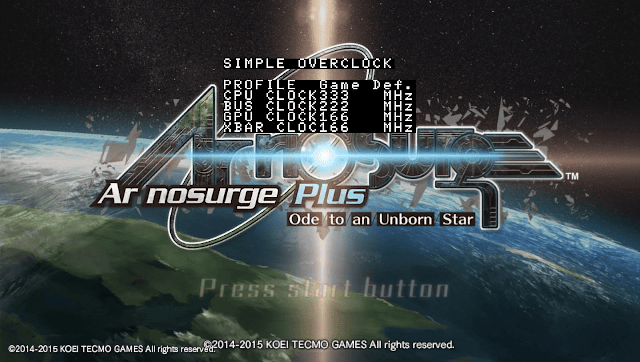
Media
Need for Speed Most Wanted - Framerate Comparison for PS Vita (Oclockvita) (MrGamemaker8)
Changelog
v1.2.1
- Fixes homebrew / system compatibility.
v1.2
- Force clock settings on games that change clock on runtime.
- Fix left / right menu controls.
v1.1
- Create LICENSE.md.
Credits
Thanks to BeatPlay - Better Amphetamin Vita.
External links
- GitHub - https://github.com/frangarcj/oclockvita
- VitaDB - https://vitadb.rinnegatamante.it/#/info/116
- Vita Troubleshooting Guide - https://cimmerian.gitbook.io/vita-troubleshooting-guide/plugins-related-problem/