
Easy Downgrader Updater Vita
More actions
| Easy Downgrader/Updater | |
|---|---|
 | |
| General | |
| Author | BaltazaR4 |
| Type | Utilities |
| Version | 1.03 |
| License | Mixed |
| Last Updated | 2019/03/26 |
| Links | |
| Download | |
| Website | |
| Source | |
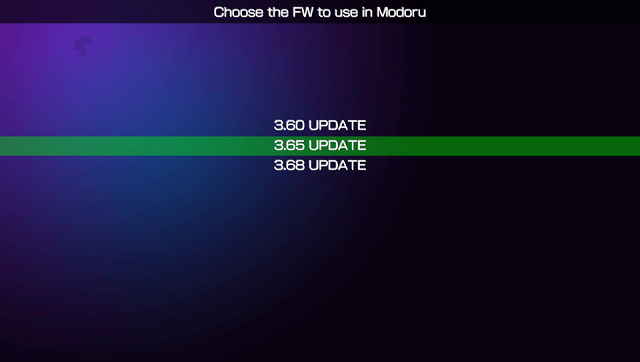
Easy Downgrader/Updater for PS Vita (formerly 365 U/D H) is a simple app will help you install/download the needed apps and files to get your PS Vita updated/Downgraded to your FW selection between 3 to choose from (3.60, 3.65 or 3.68), without a PC.
Note: Please use with caution.
Features
- Install 3.65 Enso on your console (update from 3.60 or downgrade from 3.67/3.68/3.69/3.70 to 3.65 with Enso).
- Go back to 3.60 from higher versions and Enso it.
- Go to 3.68 from higher or lower versions.
- Extra stuff this app can do:
- Install H-encore if you are on 3.60/3.69/3.70 and if you want to go up/down to 3.65 (must have Henkaku or Trinity).
- Install Memecore if you are on 3.65/3.67/3.68/3.69/3.70 and if you want to go down to 3.60 (must have H-encore or Trinity).
- Personalize H-encore/Memecore savedata (no trophy warning message when launching).
- Shrink H-encore size below 10mb if the full size bubble is found.
Installation
To be able to install and use this app you must have either Trinity, H-encore or Henkaku installed.
User guide
Refer to the readme for the latest guide.
Note:
- Modoru installed with this version is only for 3.70 and below, do not try to use it on 3.73.
- Memecore is recommended for 3.60 only, for 3.65 or above you must use H-encore except for 3.69-70.
- (After installing H-encore/Memecore, this app will restart your PS Vita and DB will be updated, no changes to bubble layout).
Controls
Main Menu:
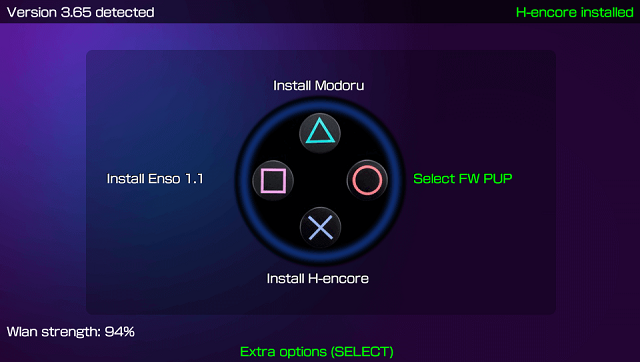
Circle - Choose the desired FW PUP in FW Download section
Cross - Start downloading
Triangle - Install Modoru
Square - Install Enso v1.1
Cross - Install H-encore
Select - Extra Options
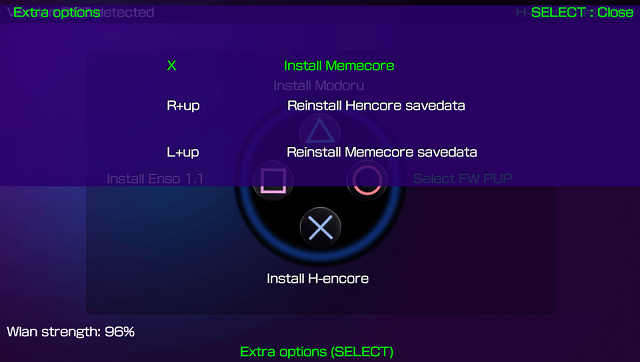
Extra Options:
Cross - Install Memecore (3.60 users who want to stay there)
R+UP - Reinstall H-encore savedata
L+UP - Reinstall Memecore savedata
Screenshots
Compatibility
For 3.70 and below only.
Changelog
1.03
- Added the option to download and save the PUP files to ux0:data/PUPS/ (127mb ea), choose yes/no for each version.
- Added Enso version autodetect to avoid reinstalling chosen Enso version if the app was found.
- Added the possibility to translate warning messages in (lang).txt.
- Added Japanese language for HackUsagi.
- Added French language for Chronoss.
- Added Italian language for TheheroGAC.
- Fixed bug when exiting Enso Menu, now it goes to Main Menu instead of PUP Menu.
1.02
- Added Enso for 3.60 and 3.65.
Changelog 1.01
- App name changed to Easy Downgrader/Updater for PS Vita.
- Added install Modoru, if not found, when FW PUP is chosen.
- Added Download FW PUP screen, 3 to choose from.
- Added option to cancel download.
- Added savedata personalization.
- Cleaned code a bit.
1.0
- Warning screens right at the start.
- Ability to install H-encore, Modoru, Enso v1.1 (Main).
- Ability to download 3.65 PUP and move it to Modoru (Main).
- Ability to install Memecore (3.60 users).
- Ability to reinstall Memecore/H-encore savedata (3.60 users).
Credits
- TheFloW for his great work and amazing apps.
- Onelua Team for support and help with this project.
- TutoProPlay for testing and videos.
- Gdljjrod for changes to original app.
External links
- GitHub - https://github.com/ONElua/36XUDHelper
- Author's Twitter - https://twitter.com/baltazarregala4/status/1130517253399515137