
3DSlibris
More actions
| 3DSlibris | |
|---|---|
 | |
| General | |
| Author | Rigle |
| Type | Utilities |
| Version | 2.6.3 |
| License | GPL-2.0 |
| Last Updated | 2026/05/09 |
| Links | |
| Download | |
| Website | |
| Source | |
| Support Author | |
Nintendo 3DS homebrew ebook reader based on the original Nintendo DS project dslibris.
3dslibris ports the original architecture to libctru, keeps the fast text-first reading model, and adds practical 3DS UX improvements (grid library, cover thumbs, indexed navigation, procedural UI skin, orientation-aware touch, etc.).
The current .cia packaging flow is based on the same makerom/bannertool process used by Universal-Updater, adapted to this project's assets and release layout.
Features
- Reads ebooks and manga on Nintendo 3DS hardware and Azahar.
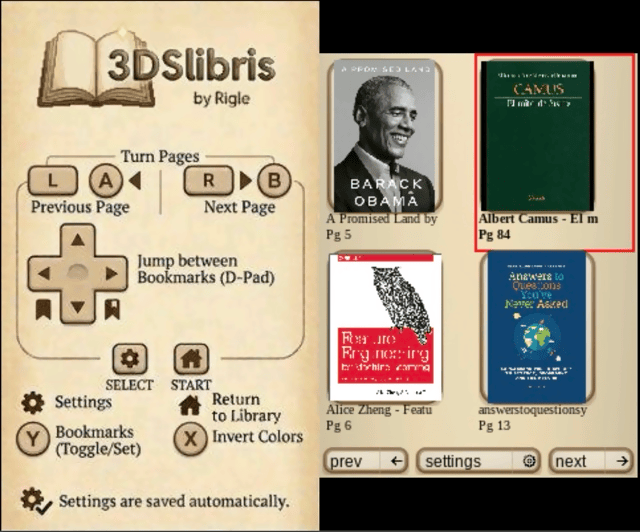
- Library browser with grid and list views, cover thumbnails, metadata titles, and touch navigation.
- Six reading themes with matching splash screens and reader gradients.
- Supported formats:
EPUB,FB2,TXT,RTF,ODT,MOBI,PDF,CBZandXPS. EPUBreflow with TOC support, bookmarks,go to page, cached pagination, and broad inline/block formatting support.- Fixed-layout viewer for manga and document formats (
CBZ,PDFandXPS) with zoom, pan, outline navigation, and full-page preview. - Bundled fallback fonts for broader language coverage (Latin, Cyrillic, Greek, CJK, Arabic, Hebrew, Thai, and more).
Installation
Recommended install (.cia via Universal-Updater):
- Install 3dslibris from Universal-Updater.
- Launch it once so sdmc:/3ds/3dslibris/ is created if needed.
- Copy your books to sdmc:/3ds/3dslibris/book/.
- Launch the installed title.
- New users: Read the bundled QuickStart.txt inside your book library to learn about menus, settings, and navigation.
Manual install (3dsx):
- Download
3dslibris.3dsxand3dslibris-sdmc.zipfrom GitHub Releases. - Copy
3dslibris.3dsxtosdmc:/3ds/3dslibris/3dslibris.3dsx. - Extract that zip into the root of your SD card, so it expands into
sdmc:/. - Put your books in
sdmc:/3ds/3dslibris/book/. - Launch
sdmc:/3ds/3dslibris/3dslibris.3dsxfrom Homebrew Launcher.
Manual install (.cia):
- Install
3dslibris.cia. - Launch the installed title once so it creates
sdmc:/3ds/3dslibris/if needed. - Put your books in
sdmc:/3ds/3dslibris/book/. - Launch the installed title.
Notes:
- The
.ciaincludes defaultfont/andresources/assets inRomFS. - Books are read from
sdmc:/3ds/3dslibris/book/and optionallyromfs:/3ds/3dslibris/book/. - Runtime data can also be installed under
sdmc:/config/3dslibris/(for examplebook/,font/,resources/, cache, prefs, and log files). - If the same filename exists in both places, the SD version wins.
- Releases also provide
3dslibris-debug.3dsxand3dslibris-debug.cia, which enable verbose logging tosdmc:/3ds/3dslibris/3dslibris.log.
Supported formats
Strong support:
EPUB: EPUB2 and EPUB3 reflow, NAV and NCX TOC support, cached pagination, bookmarks, configurable fonts, and broad inline/block formatting support.
Good support:
FB2TXTRTFODT
Experimental or best-effort:
MOBI: can be slow on first open, TOC quality depends on file structure, and some files may fall back to safer but more limited parsing.PDF: viewer mode with zoomed reading area and full-page preview.CBZ: viewer mode for manga and image-based books.XPS: viewer mode with the same fixed-layout reader controls.
Limitations
- No DRM support.
- EPUB is a reflow renderer, not a full browser engine. Complex CSS, JavaScript, multi-column layouts, and wide tables are simplified.
- EPUB tables are converted into text-oriented blocks for readability on 3DS screens.
- SVG support in EPUB is limited to common wrappers that reference supported raster images.
- Some malformed EPUB anchors and MOBI tables of contents can produce approximate navigation.
- Large or malformed MOBI files may open slowly or lose some rich formatting in safer fallback paths.
- MOBI inline images depend on recoverable image references in the source markup; malformed files can still miss some images.
- Some malformed MOBI sources still contain encoding or OCR artifacts that cannot be repaired reliably on the reader side.
- After changing layout-related settings such as font size, spacing, orientation, or some format-specific options, reopening the current book may be necessary.
- Reading position and existing bookmarks are remapped approximately after that reopen and can shift a few pages from their original location.
Controls
Library
D-Pad - Move selection
A - Open the selected book
L/R - Jump to the previous or next library page
Touch - Tap a book to select it, tap it again to open it
Y/Select - Open "General" settings
Standard reading
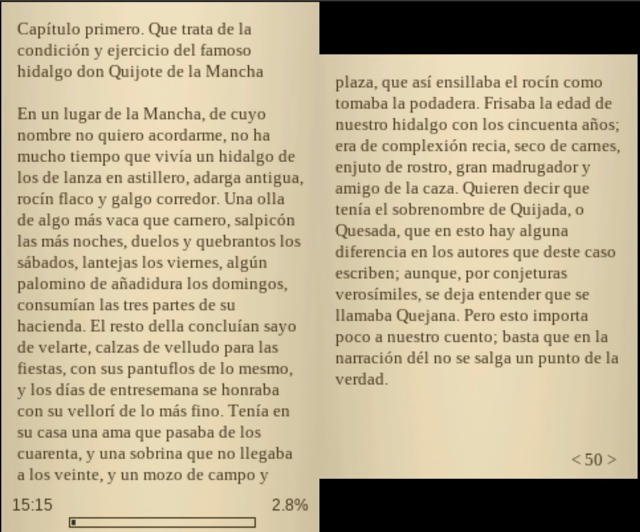
A/B/L/R - Turn pages
ZL/ZR (New 3DS) - Previous or next page
D-Pad Left/Right - Jump between bookmarks
Y - Toggle bookmark, Hold Y on a page with inline links to enter link-focus mode, then D-Pad to move and A to follow
X - Change background color
Select - Open "BOOK" Settings
Start - Return to library
Touch UI for library, settings, index, bookmarks, font menus...
Fixed-layout (PDF / CBZ / XPS)
A - Zoom in
B - Zoom out
Left/L/ZR/Right/R/ZL - Previous/Next page
Up/Down - Next/Previous chapter when the document exposes an outline; otherwise previous or next page
Touch/Circle Pad/C-Stick - Move the viewport by tapping or dragging on the page preview
Select - Open "BOOK" settings
Start - Return to library
Screenshots
Changelog
v2.6.3
- Improvements
- #83: apply global CSS element rules (
p {},body {},li {},h1 {},blockquote {}, etc.) to block layout, margins, font-size, and text-align - #76: suppress list markers when
list-style-type: noneis declared on<ol>or<ul>via a bare element selector - make PDF and CBZ fixed-layout viewport panning smooth by blitting cached zoom/preview bitmaps while expensive render/decode work is deferred
- improve EPUB NCX/NAV/TOC handling and parser coverage
- improve EPUB line wrapping
- improve preformatted text wrapping so whitespace is preferred before splitting long tokens
- improve EPUB
<dd>indentation by using block margins instead of injecting literal leading spaces - improve inline image layout for
<figure>/div.figurecontent with captions - allow page-mode images and covers to fill the available page box when appropriate
- add a START-button quit shortcut from the library/browser for Homebrew Launcher users
- improve parser dispatch boundaries and integration coverage for real EPUB opens and metadata indexing
- reduce App singleton usage across library, UI, menu, and settings layers
- #83: apply global CSS element rules (
- Fixes
- #77: fix random empty space when rendering caused by pending block-spacing not flushing correctly at page boundaries
- #83: fix text-align not rendering when declared on a bare element selector (
p { text-align: center }) - #76: fix list markers not suppressing when the CSS rule targets the parent
<ol>/<ul>element rather than the<li>directly - fix page break edge cases in EPUB reflow
- fix EPUB screen transitions so parser state and rendered page buffers stay synchronized between left/right reading screens
- fix block-boundary edge cases where pretty-printed whitespace between XHTML block elements could consume pending breaks
- fix heading spacing when a heading follows existing content
- fix page-mode inline images on the second reading screen incorrectly advancing to a blank next screen
- fix large EPUB inline JPGs failing to draw on constrained 3DS memory by using bounded subsampled decode
- fix figure-with-caption images on the second reading screen being pushed too aggressively to the next spread
- fix bottom reading-screen margin handling by using the compact margin resolver consistently
- fix a MOBI page-cache compatibility regression by bumping the cache version after line-break behavior changed
- fix old-3DS gallery covers being skipped when the previous memory guard was too conservative for real hardware
- #68: mitigate Old 3DS
.3dsxHOME/APT crashes by handling pending suspend before more graphics/input work - fix flowed text emission so local left margins cannot move text left of the base reading margin
- Infrastructure
- extract parser and renderer dispatch layers for EPUB, MOBI, FB2, TXT, RTF, ODT, PDF, CBZ
- move
Book::Indextobook_parser::Index - remove
Book::Open, move open/parse/index dispatch intobook_parser, and unify the fixed-layout book path - move public rendering and fixed-layout dispatch into
book_renderer - remove
Text::app - extract gradient drawing from
App - decouple
Text, touch utilities, browser views, library helpers, and menu layer fromApp - move the NDS/3DS hardware reference docs out of this repository into gba-ds-3ds-specs
- expand host integration, CSS, NCX/NAV, FB2 metadata, TXT/FB2/RTF, and page-cache test coverage
- #68: add targeted debug lifecycle logs for APT suspend/resume/exit and shutdown diagnostics
- keep host parser integration tests linked with the shared binary/ZIP helpers used by cache and EPUB image paths
- Testing
- host test suite now covers 110 scripts
- add real EPUB integration coverage for
epub_parser::Open,epub_parser::Index,book_parser::Open -> EPUB, andbook_parser::Index -> EPUB - add regression coverage for preformatted wrapping, inline figure placement, bounded inline-image JPEG decode sizing, and old-3DS cover warmup thresholds
- add
coverage-hostreporting for host-testable code paths
v2.6.2
- Improvements
- add battery level indicator in the reader HUD
- add publisher font-size toggle in settings
- #85: support basic
<hr/>styling for EPUB reflow - reduce heap allocations during pagination
- reuse BiDi analysis buffers across pagination
- avoid one full temporary buffer copy on EPUB first-time cover extraction
- start visible cover warmup sooner on New 3DS in conservative browser mode
- stop carrying full OPF baggage on metadata-only EPUB indexing
- avoid extra work on simple LTR text during EPUB text shaping
- reuse Latin-1 glyph advances during pagination for EPUB text measurement
- avoid the heavyweight Unicode decoder during layout for simple Latin UTF-8 text
- batch EPUB content text before shaping
- consolidate CSS class lookups into a single pass per element
- simplify button label draw code
- simplify
ContainsRTLin BiDi utils
- Fixes
- #87: render large EPUB images by moving pixel budget guard from metadata probe to draw time
- #84: support CSS
margin-topandmargin-bottomin EPUB reflow - #68: defer APT suspend hook state mutations to main thread to fix cross-thread write hazards, crashes and freezes on HOME menu
- follow manifest document order for EPUB spine ordering when the NAV
toclink is absent - #82: accumulate nested list indentation correctly per depth level
- apply CSS
display:blockpromotion to block-level layout properties - restore EPUB open path after parser-reuse regression
- #83: ensure text-align from CSS class definitions applies to block elements properly
- #76: respect
list-style-type: noneon<ol>and<ul> - #35: keep adjacent length values on CSS
marginshorthand withautovalues - use the document base instead of the inherited context size for heading font-size restore
- #81: clamp tiny CSS font sizes to a readable range
- skip no-op inline font-size changes
- keep thumbnail fast-path under the RGB safety guard for large EPUB PNG/JPEG covers
- Infrastructure
- silence noisy debug builds after the EPUB/cover profiling pass
- remove obsolete EPUB parser helpers left behind by CSS lookup consolidation
v2.6.1
- New
- CBZ
ComicInfo.xmlchapter index:.cbzfiles that include aComicInfo.xmlfile (as embedded by tools such as ComicTagger) now expose a table of contents. Pages with aBookmarkattribute in the<Pages>section appear as named chapters in the index menu. Files withoutComicInfo.xmlor without bookmarks are unaffected.
- CBZ
- Community
- GitHub Discussions is now open: questions, bug triage, ideas, and development discussion have a dedicated space at github.com/RigleGit/3dslibris/discussions. The bug triage category includes a structured form that collects version, console model, format, and reproduction steps to make debugging easier.
- Fixes & Improvements
- Inline links are visible while reading: internal EPUB links are now rendered in blue at all times, using a dark blue on light themes and a light blue on dark themes.
- Link Mode can move across pages: while holding
Yto use Link Mode,D-Pad Rightnow moves to the next inline link andD-Pad Leftmoves to the previous inline link, continuing onto nearby pages when needed.D-Pad Up/Downstill keep the existing spatial navigation within the current page. - EPUB raster images no longer turn into
[illustration]after cache rebuilds. - EPUB centered block text is aligned correctly again:
text-alignon block containers such asbody,div,section, anddisplay:blockelements is now applied to the text inside them and inherited by child paragraphs/headings unless they override it. - EPUB ornament images now render at their intended size: inline images with an explicit
width="X%"attribute or a CSSwidth: X%style are now capped to that fraction of the text area rather than stretching to full width. Ornaments such as decorative separators, stars, and bars that are authored at a small percentage of the line width now appear at that size instead of occupying the entire screen. - CSS
page-break-before: alwaysis now respected: block elements withpage-break-before: always(or the CSS3 equivalentbreak-before: page) in their inlinestyle=attribute or stylesheet class now force content onto a new page, as intended by EPUB authors.page-break-after: alwaysis also supported. - CSS
page-break-inside: avoidis now respected: blocks marked withpage-break-inside: avoid(orbreak-inside: avoid) are kept together and will not be split across two pages. - More CSS properties are now applied from stylesheets: EPUB stylesheets can now control
text-decoration: none(suppress underline on an element),font-weight: normal/lighter/100–500(reset inherited bold),font-style: normal(reset inherited italic),font-sizewithptunits and absolute keywords (xx-smallthroughxx-large), andmargin-top/margin-bottomwithem,rem, andptunits. Both inlinestyle=attributes and class rules are recognised. - CSS horizontal margins are now applied:
margin-leftandmargin-righton EPUB block elements now affect both wrapping width and visible line starts, including stylesheet classes, percentages, shorthand margins, and negative values. - CSS
text-indentandtext-transformare now applied:text-indentcontrols the first-line paragraph indent; a CSS value overrides the default indent, and a negative or zero value suppresses it entirely.text-transform: uppercase,lowercase, andcapitalizetransform text casing at parse time, and transformed inline spans are measured before line wrapping so they no longer overflow or get clipped. - CSS
text-align: startandtext-align: endare now supported. - CSS
white-spacemodes are now respected:pre,pre-wrap,pre-line, andnowrapcontrol whitespace and line-break preservation in EPUB content, so code blocks and preformatted passages render as the author intended. On the 3DS screen,nowrapstill wraps when needed after collapsing spaces so long lines remain readable. - CSS
floatandclearare now applied to images:float: leftpins an image to the left margin andfloat: rightpins it to the right margin.clear: both,clear: left, andclear: rightforce a line break before the clearing element. Text wrapping around floated images is not yet supported; the image occupies its own band and following content begins below it. - Nested EPUB lists are visually indented: second- and third-level ordered or unordered lists now shift their markers and wrapped lines inward, making nested bullets, alphabetic lists, and roman-numeral sublists distinguishable on screen.
- Inline
font-sizeand<small>/<big>tags are now rendered: any element with a CSSfont-size, via inlinestyle=or a stylesheet class, renders text at the specified size. The<small>tag applies thesmallerscale factor (~83% of the current size) and<big>applieslarger(~120%). All units are supported:px,em,rem,pt,%,smaller,larger, and the absolute keywordsxx-smallthroughxx-large. - HOME Menu no longer crashes after returning to the library: pressing HOME or powering off after leaving a book no longer crashes the HOME Menu process. Three issues were fixed: preferences were being written to the SD card inside an APT hook callback; the PDF and CBZ background-render workers could free memory still in use by a render thread (use-after-free); and switching from a PDF/CBZ book to the library now cancels any in-progress background render before the browser starts new work.
v2.5.0
- Highlights
- Text alignment support:
text-align: centerandtext-align: rightare now honoured in EPUB reflow. Each paragraph emits an alignment token that the draw routine uses to compute per-line offset, so wrapped lines stay correctly aligned across the whole paragraph. - Performance improvements: EPUB CSS scanning now reads only the
<head>section of each spine document, reducing zip I/O on large books (~1 second less loading time). A single zip handle is recycled across all spine CSS scans (~20% less loading time). Plain text pagination eliminates per-line heap allocation. First-time EPUB cover extraction is ~3× faster on old 3DS via MuPDF subsampled thumbnail decode.
- Text alignment support:
- Included fixes and behavior changes
- Browser return and suspend handling stabilized: returning from the reader to the library now correctly resumes browser jobs and handles applet suspend/resume, avoiding tearing down in-flight async opens during HOME suspension.
- Gallery covers clipped correctly: cover thumbnails in gallery view are clipped to the rounded frame, preventing image pixels from bleeding outside the card border.
- PDF HOME button crash fixed: PDF file parsing is now split into independently cancellable steps, each with an APT yield point, so pressing HOME during PDF loading is handled cleanly instead of causing a console restart.
- Large EPUB page limit raised: the maximum pages in memory raised from 5,000 to 25,000 (cache guard to 50,000), fixing books that stopped loading halfway through.
- HR overflow tracking fixed: parser and renderer now agree on vertical position after
<hr>rules, preventing text overlap after horizontal rules. - PagedListMenu overflow fixed: pagination indices changed from
u8tou16so menus with more than 255 entries no longer wrap and corrupt the page list. - SDMC zip trimmed:
3dslibris-sdmc.zipnow contains only SD card runtime files; the.3dsxbuilds are separate release assets instead of being duplicated inside the zip.
v2.4.2
- Highlights
- Stability and crash-fix release: addresses several null dereference, divide-by-zero, out-of-bounds, and infinite-loop issues identified on real hardware.
- Included fixes and behavior changes
- FontManager null dereference crash fixed:
GetFace()now usesfind()and returnsNULLfor missing style keys instead of silently inserting a null entry viaoperator[]; all callers guard againstNULLbefore dereferencing. - Division by zero in browser marquee fixed: the background color averaging loop now guards against zero-dimension covers before dividing.
- Degenerate layout when font height is zero fixed: a
line_heightfloor of 10 pixels is enforced so menus do not collapse to unreadable or non-interactive rows when no valid face is loaded. - Out-of-bounds touch in empty list menus fixed:
PagedListMenu::HandleTouchInput()now returns early when the button vector is empty, avoiding an out-of-bounds read. - Infinite loop in text wrapping fixed:
WrapTextToLines()now forces a minimum advance of 1 byte so the loop always makes progress on zero-width or unrecognised code points.
- FontManager null dereference crash fixed:
v2.4.1
- Highlights
- Crash-at-boot fix:
FontMenuis constructed duringApp::App()before fonts are loaded. CallingGetHeight()andGetAdvance()through the null font manager cascaded into a heap Data Abort immediately at startup. Both methods now return safe defaults until the font manager is initialised.
- Crash-at-boot fix:
v2.4.0
- Highlights
- Six-color theme system: the app now supports six palette-based color themes (light, sepia, dark, and three more), each controlling text, background, UI chrome, and cover overlays consistently across all views.
- Dark/light splash screen variants: the startup splash now uses a dark or light version that matches the active color mode.
- Cycle themes with X in the browser: press
Xin the library view to cycle through color modes without opening the settings menu. - Gradient backgrounds in reader mode: the top and bottom strips of the reading view now use a smooth gradient instead of a flat color.
- Improved bookmark menu: entries now show a preview of the page text alongside the bookmark position.
- Improved chapter menu: chapter titles wrap to up to three lines so long titles are no longer truncated.
- Dynamic row heights in PagedListMenu: the shared paged-list component now sizes rows dynamically per page so entries always fit the available screen space.
- Browser warmup re-enabled: cover extraction now runs incrementally on idle frames (3 ms budget), so covers populate without stalling the UI.
- Included fixes and behavior changes
- EPUB NAV spine ordering fixed: chapter detection now correctly follows the
<spine>order from the OPF manifest rather than assuming document order. - Marquee background color fixed: the browser grid marquee now correctly tracks the active dark theme background instead of always using the light color.
- Long font filenames wrap in FontMenu: font file paths too long for a single line now wrap cleanly instead of being clipped.
- EPUB NAV spine ordering fixed: chapter detection now correctly follows the
v2.3.2
- Highlights
- MOBI structured TOC restored: the HTML-to-text position map is now built during safe-extractor parsing, so structured TOC entries are resolved to accurate page numbers instead of falling back to linear estimation.
- MOBI inline images restored: images embedded in MOBI HTML are now registered and rendered in the reading view; previously the safe extractor wired up no callbacks and all inline images were silently dropped.
- MOBI page cache re-enabled: the second open of a large MOBI now loads from cache in roughly 3.7 s instead of re-parsing for roughly 9 s.
- Browser grid covers load on view toggle: switching from list to grid view now immediately loads covers for the visible page instead of showing empty slots until the next navigation event.
- EPUB large PNG covers decode via libpng: covers larger than 4 MB now use a direct libpng thumbnail path that scales to 85×115 px while keeping peak memory low.
- EPUB SVG covers rendered via MuPDF: SVG cover images are rasterized at thumbnail size using the MuPDF fitz renderer instead of being skipped or incorrectly decoded.
v2.3.1
- Highlights
- All background workers disabled for this release: fixed-layout rendering (PDF, CBZ), MOBI finalization, and browser warmup all run synchronously on the main thread, trading some speed for confirmed reliability on real hardware.
- Reading direction toggle for fixed-layout documents: PDF, CBZ, and XPS now have a per-book
reading directiontoggle inBOOKsettings. Switch betweenLeft to right(default, western) andRight to left(manga, Arabic, Hebrew). - Book opening and switching are much harder to break: stale open sessions are gated more carefully, browser-side background work is paused at the right time, and the transition between books no longer relies on timing-sensitive state.
- PDF and CBZ now render at zoom-correct resolution: in synchronous mode the interactive tile is rendered immediately after the preview, so zoomed-in content is sharp rather than upscaled from the preview bitmap.
- MOBI crash on reopen is fixed: a large contiguous heap reservation during text merging could
std::terminateon a fragmented 3DS heap after a prior book close; the reservation is removed and the string now grows incrementally.
- Included fixes and behavior changes
- EPUB inline image metadata retried on zip open failure: if
unzOpenfails due to transient memory pressure,metadata_probedis left false so the next frame retries instead of permanently marking the image as unloadable. - Book vector capacity released on close:
pagesandchaptersvectors now swap with an empty vector onBook::Close(), actually freeing capacity rather than just clearing size. - Opening a book is cancellable and session-safe: an in-progress open can now be cancelled with
B,Start, orSelect, and switching books no longer depends on stale callbacks or unfinished work from the previous session.
- EPUB inline image metadata retried on zip open failure: if
v2.3.0
- Highlights
GENERALandBOOKsettings are now separated cleanly: global preferences stay in the library settings menu, while book-specific actions appear only when you open settings during reading.- New
go to pageslider popup: books now expose a dedicated page-jump control fromBOOKsettings, with visible page number feedback and both touch and button-based adjustment.
- Included fixes and behavior changes
- The in-book settings menu is more coherent: global options such as
clock format,color mode, andlibrary viewno longer appear mixed into the per-book menu. go to pageis tuned for 3DS controls: touch chooses the page directly,Left/Rightmoves by one page,Up/DownandL/Rmove in larger jumps,Aconfirms, andB/Select/Startcancel.- Left-handed orientation remains supported: the new slider and the updated settings separation continue to use the existing orientation-aware input mapping.
- Recent EPUB compatibility fixes remain included: cosmetic hidden pagebreak spans are ignored, and CSS list marker suppression such as
list-style-type: noneis still honored.
- The in-book settings menu is more coherent: global options such as
v2.2.2
- Highlights
- Cosmetic EPUB pagebreak markers no longer disturb pagination: hidden
epub:type="pagebreak"/role="doc-pagebreak"spans are now ignored when they are purely decorative, so they no longer create bogus breaks in the reflowed text. - CSS-hidden list markers are now respected: lists styled with
list-style-type: noneorlist-style: noneno longer show bullets or numbers in 3dslibris when those rules come from EPUB CSS.
- Cosmetic EPUB pagebreak markers no longer disturb pagination: hidden
- Included fixes and behavior changes
- EPUB parser hidden-content handling is more robust: the parser now distinguishes between useful structural content and hidden print-parity markers that should not affect reading flow.
- List marker suppression now works from class-based CSS too: this is no longer limited to inline styles or a few hardcoded class names.
- The EPUB rendering fixture was updated: the test book now includes a non-hardcoded
ornamentlesslist case so the behavior can be validated in both automated tests and on hardware.
v2.2.1
- Highlights
- Optional library list view: settings now let you switch the browser between the existing cover gallery and a DSLibris-style list view that loads only titles, starts faster, and is easier to navigate on large libraries.
- List view is fully integrated: the new mode is saved in the XML preferences, works even with no book currently open, supports vertical navigation, and keeps the existing browser flow intact.
- Long titles are handled better in the list: list rows now use the dedicated presentation path introduced for this feature, with clearer rendering and spacing for long display names.
- Debug and release CIA builds can coexist:
3dslibris-debug.cianow uses its own Title ID/Product Code so it installs separately instead of overwriting the release build.
- Included fixes and behavior changes
- Browser presentation is split cleanly by mode: grid and list rendering now live in separate presentation files while
app_browser.cppremains the coordinator for shared navigation and actions. - Preformatted host wrapping stays correct: the host-side regression fix for hard wrapping in preformatted text is included in this release train.
- Release automation still publishes the full artifact set: the release workflow continues to generate and attach both CIA variants, both 3DSX variants, the SD package, and the source tarball.
- Browser presentation is split cleanly by mode: grid and list rendering now live in separate presentation files while
v2.1.0
- Highlights
- Configurable EPUB monospace flow restored and expanded:
pre/codenow reflow with the active monospace font instead of measuring with the serif text face, preserving readable code blocks while keeping the new configurable mono font path. - Monospace variants now render correctly: EPUB content can distinguish regular, bold, italic, and bold-italic monospace text instead of collapsing everything to one mono style.
- More EPUB block semantics are supported: lists, nested ordered lists,
blockquote,aside,caption,figure,dl/dd, and basic table linearization now render as readable reflow blocks instead of collapsing into generic paragraph flow. - EPUB inline formatting support is broader: underline, strikethrough, overline, superscript, subscript, dotted/dashed/wavy underline styles, and common CSS-driven emphasis patterns are now recognized more consistently.
- Hidden EPUB accessibility text is ignored: common hidden-text patterns such as
visually-hidden,aria-hidden, and equivalent inline CSS are no longer shown as visible body text. - Styled punctuation stays attached to the surrounding text: closing
!/?and opening¡/¿are handled more safely across inline style boundaries, avoiding the worst split cases in Spanish text. - EPUB index labels are cleaner: chapter menus now prefer simpler labels instead of concatenating multiple headings into one noisy entry.
- EPUB page cache writes are safer: page cache files now save with the actual layout parameters used for pagination instead of stale zeroed values, avoiding invalid cache entries after fresh opens.
- Bundled quickstart and SD docs are clearer about where books go: the release package now makes the
sdmc:/3ds/3dslibris/book/path more explicit, since this is still the most common user setup question. - Book view renderer recovery is more defensive: entering or reopening a book now resets the text renderer state more aggressively, which should reduce rare cases where visible glyphs disappear until the app is restarted.
- Configurable EPUB monospace flow restored and expanded:
v2.0.4
- Highlights
- Bookmarks and last-read page persistence fixed: prefs XML writing now escapes attribute values correctly and sanitizes invalid control characters, so filenames like
... & ...no longer break3dslibris.xmlparsing on startup. - CIA library source handling improved: the app now discovers books from both
sdmc:/3ds/3dslibris/bookandromfs:/3ds/3dslibris/book, with SD entries taking priority when names overlap. - Left-handed page screen order corrected: reflow reading now inverts first and second reading screens correctly in left-handed orientation.
- Orientation-relative library D-Pad navigation: grid navigation now follows console orientation in both modes so directional input matches visual movement in right-handed and left-handed layouts.
- Startup diagnostics improved: prefs load failures are now logged with an explicit warning instead of failing silently.
- EPUB emphasis compatibility improved: the parser now recognizes bold/italic expressed via common
styleandclassCSS patterns, not only semantic tags. - Release pipeline stability improved: debug MOBI builds now include the correct reporter definitions so
debug-3dsxcompiles reliably in CI/release workflows.
- Bookmarks and last-read page persistence fixed: prefs XML writing now escapes attribute values correctly and sanitizes invalid control characters, so filenames like
v2.0.3
- Highlights
- Fixed bundled RomFS for
.ciabuilds — the installable build now actually includes its bundled fonts and UI resources, instead of staging them locally but omitting them from the final CIA package. - Fixed the CIA-only startup crash — a null cache entry in the text/font teardown path could trigger an ARM11 data abort during early startup failure; font initialization and cache cleanup are now hardened.
- Better runtime asset fallback — bundled fonts and resources are resolved safely between SD and RomFS, so
.ciainstalls no longer depend on a manualfont/orresources/copy to boot. - Stable fatal boot screens — missing-book and startup error screens no longer flicker between old and new frames while waiting for Start.
- Clearer first-run behavior — if no books are present, the app now shows a stable message telling you to copy your EPUB, FB2, TXT, RTF, or ODT files into
sdmc:/3ds/3dslibris/book. - CIA build validation added to CI — GitHub Actions now builds and verifies the
.ciapath as well, including checks that the staged RomFS contains the bundled runtime files.
- Fixed bundled RomFS for
- Included reader functionality
- MuPDF-backed PDF, CBZ, and XPS support
- Progressive fixed-layout rendering
- Asynchronous/deferred MOBI open on New 3DS
- Generated library cover thumbnails
- Bundled runtime assets for
.ciainstalls
v2.0.2
- Highlights
- Fixed CIA startup on hardware and Azahar: the packaged NCCH code is now emitted without compression, avoiding the startup crash seen in previous
2.0.1CIA builds. - No change to reader features: this is a packaging-focused release intended to restore a working installable build.
- Clean CIA build path: the local CIA build also includes the small
book_io.cppdeclaration fix required for a clean rebuild.
- Fixed CIA startup on hardware and Azahar: the packaged NCCH code is now emitted without compression, avoiding the startup crash seen in previous
v2.0.1
- Highlights
- Full branch catch-up release:
v2.0.1includes the missing commits that were finished after the originalv2.0.0tag, so the public release now matches the maintained main line. - Centralized runtime paths: SD, cache, and related filesystem paths now live in a shared path layer instead of being duplicated across subsystems.
- Cleaner repo structure: shared helpers were reorganized, legacy duplicate files were removed after the move, and bundled
expatsources now live underthird_party/. - MOBI cache code split out cleanly: page-cache serialization and invalidation logic now live in a dedicated MOBI cache module instead of being embedded in the larger common book I/O unit.
- Improved native test ergonomics: the text-layout and Unicode tests now reuse a shared native build helper instead of each script compiling the same dependency objects manually.
- Expanded technical documentation: the repository now includes architecture notes plus local NDS/3DS hardware reference material derived from GBATek for future maintenance work.
- Full branch catch-up release:
- Included reader functionality (from the v2.0.0 line)
- MuPDF-backed PDF, CBZ, and XPS support
- Progressive fixed-layout rendering with preview-first display
- Asynchronous/deferred MOBI open on New 3DS
- Generated library cover thumbnails for EPUB, FB2, MOBI, PDF, and CBZ
- Bundled runtime assets for
.ciainstalls
v2.0.0
- Highlights
- PDF, CBZ, and XPS reading: open PDF documents, comic books (CBZ), and XPS files with zoom, full-page preview on the bottom screen, and outline navigation when available.
- Progressive page loading: a preview of the page is shown immediately, then it refines to full quality in the background.
- Faster on New 3DS: page rendering for PDF and CBZ runs on a separate processor core, keeping the UI responsive. Old 3DS still works with automatic fallback.
- MOBI books open without freezing the UI on New 3DS thanks to asynchronous processing: you can start reading while the rest of the book finishes loading in the background.
- Library covers now work for every format: EPUB, FB2, MOBI, PDF, and CBZ all show actual page thumbnails instead of placeholders.
- All 1.1.x improvements included: inline images in MOBI and EPUB, faster image-heavy books, better text rendering, and more accurate MOBI table of contents.
- No more manual SD card setup for
.ciainstalls: fonts and UI resources are built in. - More stable startup: problematic MOBI files no longer cause crashes, and the app stays on a clear error screen instead of flickering between states when something goes wrong.
v1.1.0
- Highlights
- Library navigation: you can now move the selection around the book grid with the D-Pad and press A to open.
- Images inside EPUB and MOBI books now display correctly: small icons, wide separators, and full-size figures no longer take up the entire screen or disappear.
- EPUB books with lots of images open noticeably faster thanks to internal optimizations in how images are loaded from the archive.
- Library cover thumbnails for MOBI books generate faster on subsequent visits since cover data is now remembered between sessions.
- No more manual SD card setup for
.ciainstalls: the.cianow includes all required fonts and UI resources, so a plain install from the Homebrew Menu is enough. - Better text rendering across all formats: improved line breaking, proper handling of special characters, and font sizes that can no longer be set to values that break pagination.
- Code blocks and <code></code> <pre></pre> sections in EPUBs now wrap properly instead of running off the edge of the screen.
- MOBI books benefit from multiple fixes: more accurate table of contents, better plain-text wrapping that matches how real books read, and support for HUFF/CDIC compressed files.
v1.0.3
- Highlights
- Pressing right on settings rows such as font size and paragraph spacing now increases the value.
- Pressing left now decreases the value, matching the on-screen arrows and touch layout.
- Horizontal navigation inside the settings list is aligned with the same left/right direction.
- The main browser splash now shows the app version centered at the bottom of the left screen.
- Changing font size, paragraph spacing, orientation, or reading fonts no longer tries to repaginate the book inside the settings menu.
- When layout-related settings change, the app shows a warning and applies the new layout after reopening the current book.
- MOBI parsing is more resilient against empty or corrupt files and now shows a readable error instead of a raw numeric failure.
- MOBI books now have an optional per-book
line wrap fixfor badly converted files that hard-wrap normal prose into many short blocks. - The
.ciapackaging flow was rebuilt around the samemakerom/bannertoolprocess used by Universal-Updater. - Previous
1.0.3test.ciabuilds could install but fail to boot because the packaged exheader ended up with an invalid main-thread priority. - The generated
.cianow boots correctly on original hardware and in Azahar.
- Known bug
- When a book is reopened after a layout change, or after toggling the per-book MOBI
line wrap fix, reading position and existing bookmarks are remapped approximately and may land a few pages away from their original location. - Some malformed MOBI files still contain source encoding or OCR artifacts that cannot be repaired fully by the reader.
- When a book is reopened after a layout change, or after toggling the per-book MOBI
v1.0.2
- Highlights
- Startup now stops with clear install guidance if required runtime files are missing from the SD card.
- The error message tells users to download and extract
3dslibris-sdmc.zipand shows the expectedsdmc:/3ds/3dslibris/layout. - The README now explains installation step by step for the
.3dsx+ SD package flow.
v1.0.1
- Highlights
- EPUB cold opens are now much faster on large books by indexing ZIP entries before spine parsing.
- In real tests with Don Quijote, cold open time dropped from about 50.5s to about 7.2s, roughly a 7x improvement.
- Releases now include
3dslibris-debug.3dsx, which enables verbose diagnostic logging in3dslibris.log.
- Notes
- The debug build is intended for troubleshooting and performance investigation.
- EPUB TOC resolution remains separate from the main open path and was not the main cause of the previous cold-open slowdown.
v1.0.0
- First release.
Credits
- Original
dslibris: Ray Haleblian - 3DS port and maintenance: Rigle