
SugarDS
More actions
| SugarDS | |
|---|---|
 | |
| General | |
| Author | Dave Bernazzani (wavemotion-dave) |
| Type | Computer |
| Version | 1.3 |
| License | GPL-2.0 |
| Last Updated | 2025/09/13 |
| Links | |
| Download | |
| Website | |
| Source | |
SugarDS is an Amstrad CPC 646 and 6128 emulator for the DS/DSi.
The Amstrad CPC was released in 1984 and competed with the ZX Spectrum and C64 in the UK and Eastern EU. Although a latecomer to the market, the solid engineering "all-in-one" design gathered support. There are still many fans of the system today and plenty of great homebrew games that fully take advantage of the system strengths.
This emulator is not perfect - but it should be capable enough to render most games playable on the tiny handheld so you can get your Amstrad gaming on-the-go!
Features
- Emulates CPC 464 (64K) and CPC 6128 (128K) with 512K of extended RAM available.
- Loads .SNA and .DSK files up to 1024K total length (single and double sided).
- Plus2CPC Cartridge Support to load .CPR files up to 512K (note, this is not a plus/GX4000 emulator but will handle cart files provided they don't require plus-features).
- Partial Dandanator Cartridge Support - Enough for Sword of Ianna and Los Amores de Brunilda. Rename files to .dan to load into the emulator properly.
- Emulates CRTC Type 3 roughly - with provisions to handle split screen, rupture, smooth vertical scroll and a reasonable facsimile of smooth horizontal scroll.
- Full button mapping - supporting all 3 possible joystick buttons of the Amstrad as well as mapping buttons to keyboard keys.
- Full touch-screen Amstrad keyboard styled after the colorful CPC 464.
- Save / Load state so you can pick up where you left off.
User guide
SugarDS can load games from disk (.DSK), cartridge (.CPR), or snapshot (.SNA) files. Filenames can be no longer than 160 characters (limited to 1024 files per directory).
The emulator offers both global and per-game settings, settings include:
- Sound Driver - Use 'WAVE DIRECT' for games with digitized speech.
- R52 vSync - Adjust to forgiving if the game is running slower than on real hardware.
- CPU Adjust - Adjust by -1 or -2 if the game has minor graphical glitches.
- Mode 2 - The 'PAN+SCAN' mode will allow you to scroll the screen to the left/right by pressing the left and right side of the Amstrad banner on the touch screen, useful for games like Orion Prime.
- NDS-D-Pad - The 'Slide-n-Glide' option aims to assist climbing/navigating turns in ladder and maze games like Chuckie Egg.
Any non-shoulder buttons can be mapped to any joystick buttons and/or keyboard. The shoulder buttons let you shift/scale the screen as the Amstrad CPC will often utilize more pixels than the DS has resolution:
- L+D-Pad - Offset
- R+D-Pad - Scale (turn off auto-scale)
DISK support
.DSK files up to the maximum allowed by 3.5" drives using PARADOS is roughly 720K. Most disks should auto-load but if your disk does not, it should provide a catalog of the possible filenames that could be used to run the program. One trick is to include the command you want to run in the filename of the .DSK file itself. That helps the auto-type detection algorithm. To force a very specific run command, place the name of the Amstrad CPC file you wish to run in double brackets like this:
"Orion Prime 3_5 Inch Disk ORION.dsk"
This when that .dsk file is loaded, the emulator will sense what's between the double brackets and issue the proper RUN "ORION" command
Note that sometimes one disk version of a game won't load properly but a different version will. Keep looking - you're very likely to find a version that will load and play correctly. Such is life with emulation and potentially dodgy disk dumps.
Cartridge support
Although .CPR cartridges up to 512K are supported, this is not a CPC+ (plus) emulator. So games like ALCON 2020 work fine... as do any other .CPR games that do not specifically utilize the GX4000 or Amstrad CPC+ (plus) graphics capabilities.
Dandanator support
Mainly to run two games - Sword of Ianna and Los Amores de Brunilda. Rename those .rom files as .dan files so that they will be loaded as Dandanator files within the SugarDS emulator. Note that we do not support Flash writes on these carts - but the games themselves should be playable and you can use the normal emulator save/load states to save your progress.
SNA support
Memory snapshots are supported for both 64K and 128K machines as well as expanded 576K machines. You should strongly prefer to use .DSK or .CPR (or .DAN) files as snapshots cannot save data nor can they multi-load and the .dsk emulation is fast enough that the difference between a disk load and a snapshot load is just a few extra seconds. Think about how long it took to load stuff from cassette/disk when we were kids ... we're so spoiled now!
Screenshots

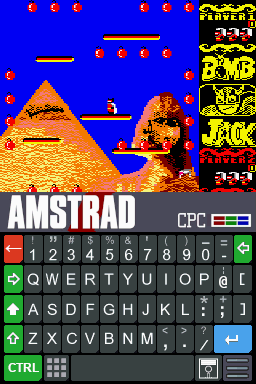
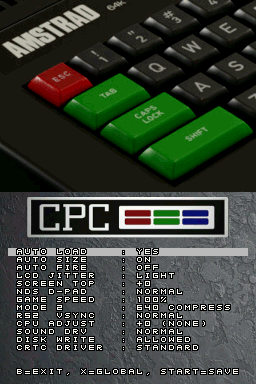
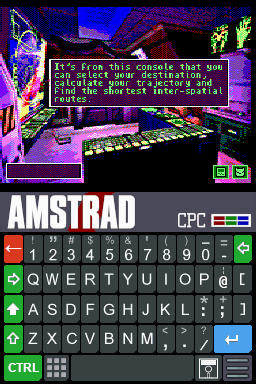
Known issues
- Pinball Dreams has graphical glitches on the opening lead-in screens... gameplay is better.
- R-Type Reloaded 128K does not load correctly except for the 3-disk version which does work (despite some loading screen issues - when the screen shows horizontal lines, insert disk 2).
- Megablasters has issues with the emulated CRTC type detection and won't start except for one version which I've added a patch for: The 2020 ENGLISH Re-Release version (4 disks).
- Enlightenment (aka Druid 2) has major graphical glitching. Cause is likely inaccurate CRTC emulation.
- Imperial Mahjongg does not run. Cause is likely inaccurate CRTC emulation.
- Turrican 128K works fine with the two disk version but the single disk version has issues.
Changelog
Version 1.3 2025/09/13
- Use CPM in title of .dsk file to launch game via |cpm.
- Improved FDC emulation so games like BAT load.
- Improved PPI emulation so keyboard scanning works in games like Barbarian.
- Fixed the map keys handling so changing the first key slot doesn't always revert back to 'A'.
- Other minor improvements and tweaks under the hood.
Version 1.2 2025/06/22
- Less pops clicks when going in/out of selecting games.
- Cleaner/Faster Disk Writes (less pause, better "DISK WRITE" notification).
- Improved Z80 timing - found a few more instructions that needed timing tweaks.
- Improved CRTC emulation - fixed regression on Pinball Dreams, etc. Back to emulation of Type 3.
- Fix for two-sided drive signal for FDC (nothing seemed to be affected by this... but better to be accurate).
- Improved pan/scan for Mode 2 - auto-center and smoother scroll.
- Improved offset handling - cleaner 1 pixel move and faster press-and-hold.
- Added ESC as a possible key map.
Version 1.1 2025/06/18
- New 'Advanced' CRTC driver that renders Prehistorik II and Super Cauldron (among others) playable. Should auto-detect.
- Megablasters 2020 Re-release (ENGLISH) is now supported - start by loading Disk A (Disk 0).
- SNA snapshots can now be up to 576K of RAM memory.
- Improved Mode 2 driver to better render graphics on the small screen.
- Improved Mode 0/1 driver so we don't swap too quickly between modes (less screen flash/shifts).
- Improved all CRT rendering so we have less graphical issues especially when moving from screen to screen. Games like Monty on the Run are good examples of how clean this is now.
- Lots of other little cleanups and improvements as time permitted.
Version 1.0 2025/06/13
- Improved Z80 / CRTC timing so more games run more correctly.
- Improved Mode 2 rendering so it's a little better positioned 'compressed' on the DS screen.
- Improved default key mapping that maps Y button to Joystick Fire 2 (used by many homebrews).
- Another round of improvements for FDC handling of two-sided disks. Orion Prime no longer warns of disk issues, Batman Forever 3.5" loads.
- Fixed the sound mute handler so that there are less frequent pops/clicks when loading up new games.
- Improved auto-load detection - more disks load the correct file more often.
- Lots of small cleanups and commenting of the code.
Version 0.9 2025/06/08
- Fix disk write-back so it doesn't potentially corrupt a .dsk file! Sorry about that.
- Improved save/load state so it preserves Dandanator carts and Extended Memory > 128K.
- More robust CRTC handling to fix games like Hypernoid Zero, Galactic Tomb 128K and Bomb Jack Extra Sugar.
- You can now put cmd in the title of the .dsk file to force a RUN command.
- Other cleanups, minor timing improvements and fixes as time allowed.
Version 0.8 2025/06/06
- Tweaks to the Z80 core timing to get it closer to real Amstrad performance. Fewer graphical glitches in games.
- Improved two-sided disk support.
- Memory expansion up to 512K is now supported - Mighty Steel Fighters now runs.
- Dandanator support for cart-banking (only - no EEPROM writes).
- Screen dimming of bottom screen added.
- Other minor cleanups and fixes as time allowed.
Version 0.7 2025/06/04
- Double sided disks now supported. Orion Prime in 3.5" floppy works!
- Disks now auto-persist back to the SD card when written.
- CPU Z80 timing improved - more games run more correctly.
- Better auto-filename support for launching disk games.
- Number pad added - press the number pad icon on the main keyboard.
- Mode 2 support improved - use PAN or COMPRESSED mode and upper screen region (the Amstrad Logo area) to pan.
- New Amstrad Croc top screen available - use Global Settings.
- Improved auto-scale in the X (horizontal) direction.
- Minor tweaks and bug fixes as time allowed.
Version 0.6 2025/06/02
- Cartridge .CPR support up to 512K.
- Disk support is now up to 3.5" 80-track maximums (720K).
- Multi-disk support added - you can swap disks mid-game via the menu.
- Cleanup of Z80 timings so more games run more correctly with fewer graphical glitching.
Version 0.5 2025/06/01
- First public beta. Enjoy!