
RS-GUI PopStationMD PSP
More actions
| RS-GUI PopStationMD | |
|---|---|
 | |
| General | |
| Author | Red Squirrel |
| Type | File Operation |
| Version | 3.0 |
| License | N/A |
| Last Updated | 2008/03/02 |
| Links | |
| Download | |
| Website | |
| Support Author | |
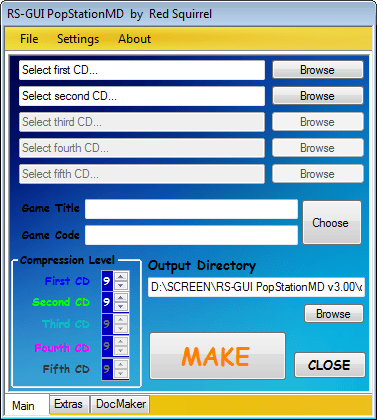
RS-GUI PopStationMD is a graphical user interface (GUI) designed to simplify the use of Dark_Alex's popstation_md command line tool. This GUI provides a more intuitive and user-friendly way to interact with the popstation_md tool, making it easier for users to convert PS1 games into a format that can be played on the PSP.
Please note that RS-GUI PopStationMD is a Windows-only program. It is not compatible with other operating systems such as macOS or Linux. If you’re using a non-Windows operating system, you’ll need to use the popstation_md command line tool directly or find a compatible GUI.
Installation
This program does not require a Windows-installation!
You must have .NET Frameworks 3.5 installed in your Windows, otherwise program will not work! You can download it free from Microsoft website!
Screenshots
Changelog
v3.0
- Added popstation.exe support, now 1CD PSX games can be converted too! Only one program to convert ALL PSX Games!
- Thanks to Brisma, no BASE.PBP or KEYS.BIN is required by popstation.exe
- Added the zero compression level for 1CD PSX games
- Added a Splash Screen with a security check for the presence of program's necessary files
- Possibility to disable and ri-enable aforesaid Splash Screen
- Added support for NRG and MDF CD images. Now program read these following formats: ISO, NRG, IMG, BIN and MDF!
- Now popstation.exe and popstation_md.exe will ask user to press any key before closing them, so users can understand what is the error which does not allow the eboot creation (if it exists!).
- Added a list of games titles-codes
- Possibility to search for a game title quickly from the listbox
- Auto-recognition of Game-ID from its title
- Added a security check for Game-ID correctness
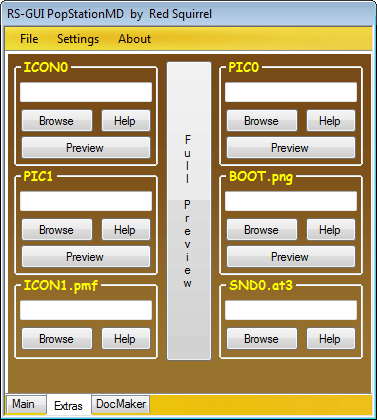
- Added a “real time” preview of eboot personalization
- Possibility to enable/disable aforesaid real time preview
- Added the possibility to insert any image as PIC0, PIC1 and ICON0! All formats and sizes are accepted! Program will resize and covert images automatically
- Added the possibility to choose the output folder name (Noone, Game Title and Game Code)
- Added a check for the true existence of selected image
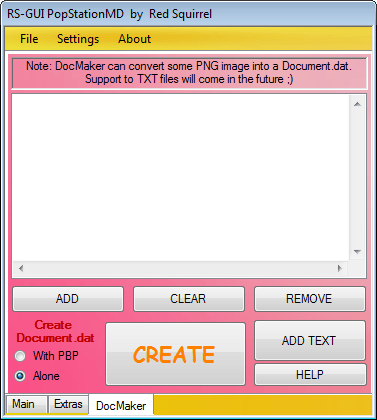
- Added the docmaker!
- Possibility to create a DOCUMENT.DAT standard alone or with the eboot itself
- Possibility to insert any image to DOCUMENT.DAT, program will resize and convert images automatically (so all formats and sizes are accepted!)
- Possibility to add, remove or clean the images list added to docmaker
- If DOCUMENT.DAT will be created together the eboot, it will created in the same folder of the eboot
- Many v2.0b bugs fixed
- Something other that I don't remember at the moment
v2.0b
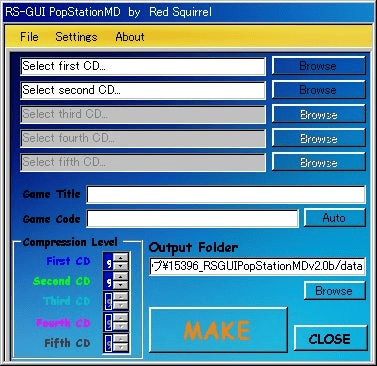
- Added support for .IMG, .CUE, .BIN
- No BASE.PBP required (thanks to Brisma!)
- Added Italian Translation
- Added French Translation
- Added Spanish Translation
- Added possibility to personalize the eboot with sounds, videos and images!
- Added a control on Images size!
- Added possibility to view a preview of every image!
- Added possibility to view a “total” preview of like eboot will appear on PSP menù!
- Fixed a bug that didn't allow to make eboot.pbp if in CD Image path there were spaces
- Fixed a bug that brought to a wrong calculation of Games Code
v1.0b
- GUI simple and easy
- Possibility to choose ISOs number to convert
- Possibility to choose compression level for each ISO
- Possibility to choose an output folder for the eboot.pbp (so directly the PSP too!)
- Auto-set of Code Games
Thanks
- To Dark_Alex for his popstation_md.exe
- To Brisma for his modified popstation_md.exe
- To 9600pro for his help and tests
- To ALL program translators (you can see the complete list in the program's credits).
- To users of PSP-Cheats.forumitalian.com and other PSP-forums for their support!
- To my girlfriend, the only that believe always in me.