
F1Dumper and Manager PSP
From GameBrew
More actions
| F1Dumper & Manager | |
|---|---|
 | |
| General | |
| Author | Mickael2054 |
| Type | System Tools |
| Version | 2.6 |
| License | MIT License |
| Last Updated | 2009/01/14 |
| Links | |
| Download | |
| Website | |
| Source | |
Lua script to dump, restore and modify PSP flash1 firmware files.
It was presented in the 1000$ pour la scène competition (Utility).
Note: This script has not been updated date for several years. It is shared as is. Use it only if you know what you are doing.
User guide
Menu options:
- Dump Flash1 - Copy your flash1 to your Memory Stick.
- Restore Flash1 / Dump Manager - Restores the chosen dump, allows you to read the Dump information, and deletes those that have become unnecessary.
- Format flash1 and reset all settings - Format flash1 and reboots at the end (Note: No warning is given, press Cross to initiate).
- Clean config.se - Delete Custom Firmware configuration files.
- Clean webbrowser files - Delete web browser settings files.
- Registry Hacks - Access Registry Hacks.
Controls
Main menu:
Up/Down - Select option
Cross - Confirm
Restore Flash1/Dumps Manager menu:
Up/Down - Choose the dump
Triangle - Clear the selected Dump
Square - Restore the selected dump
Start - Dump information
L+R - Restore dump numbering
Circle - Return to the main menu
Screenshots
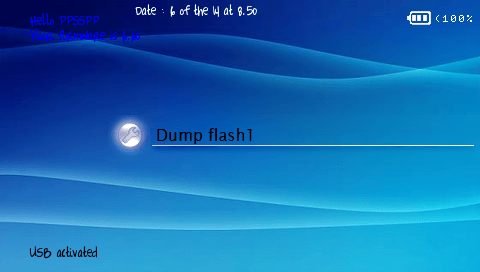
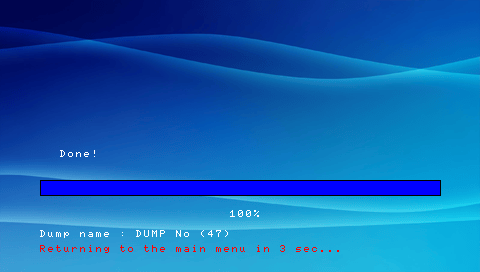
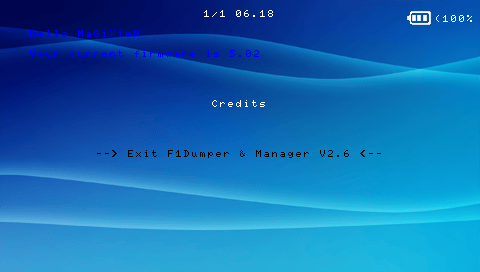
Changelog
V2.6
- At startup:
- Added "quickdump" mode, hold down the Power button during the gameboot and keep it that way until returning to the XMB to use this function.
- Check if the folder "ms0:/DUMPF1" exists; if not, it will be created.
- If you have installed the LPHM drivers in your flash1, a message will appear indicating that it is impossible to use the "format flash1" and "restore flash1" functions. They will be disabled in the main menu.
- File loading occurs during the display of the image on usage risks (no more black screen at the beginning).
- In the main menu:
- Revised menu interface (with display of previous/next option).
- Added the "Registry hack" submenu.
- USB mode is completely redesigned.
- In the new submenu:
- Added functions "Crack Parental Password," "Crack Wireless key," and "Browser homepage."
- In existing functions:
- Information on ongoing actions during different operations as well as a progress bar.
- Function improvements (more files copied/fewer bugs).
- The PSP restarts automatically at the end of operations.
- If you plug in the AC adapter while your battery is below 15%, you can still perform operations affecting flash1.
- In menus/submenus/dump lists/..., you can scroll the cursor without releasing the up/down buttons.
- In "Dumps Manager":
- Added the option to provide information about the dumps present on the MS.
- Added information about the dump in the confirmation when deleting it.
- Now if no dump is present on the MS, the PSP will display "No dump."
- Added the option to reset the dump numbers.
- Some people encountered a bug when deleting a dump, which is now fixed.
- Other:
- RAM optimization (fewer loaded images).
- Various other improvements.
- All sounds and fonts have been removed.
- The firmware display and date functions have been redone because in some cases those of the Lua player were buggy.
- Code completely redone (in the form of functions), updates will be easier to implement!
- All menu texts are stored in an array in the "functions.lua" script, making translations easier to accomplish.
V2.5
- A completely redesigned interface xmb.
- Displaying the battery-top right (with small battery%).
- Displaying the date and time.
- Information on ongoing activities at the various operations.
- Adding sounds in the menu- Left and right buttons to skip to the end / early menu.
- Fade images.
- Possibility to have as many dumps that we want on its MS (thus restoring choice).
- Optimization of operations (more files copied and less bugs).
- Adding the date in the "About this dump.txt".
- Various audits for more security (if the file exists).
- Checking files before erasing the flash1.
- Warning if the dump was done with a firmware of another generation "(1.XX/2.XX /...).
- Function "Dumps manager who can remove or restore a dump choice.
- CPU overclocked to 333 now.
- Changing the Lua Player HM.
- Improved USB mode.
- When the battery is less than 15%, it is impossible to dump / restore the flash.
- Optimization of RAM.
- Other improvements.
External links
- GitHub - https://github.com/mickael2054/F1Dumper-Manager
- GamerGen - https://www.gamergen.com/actualites/f1dumper-manager-pe-37924-1
- XtreamLua - http://www.xtreamlua.com/forums/viewtopic.php?f=4&t=4735 (archived)