
Psp2wpp-remote-conf Vita
From GameBrew
More actions
| psp2wpp-remote-conf | |
|---|---|
 | |
| General | |
| Author | Princess-of-Sleeping |
| Type | PC Utilities |
| Version | 1.0 |
| License | MIT License |
| Last Updated | 2024/02/29 |
| Links | |
| Download | |
| Website | |
| Source | |
psp2wpp-remote-conf is a Windows tool that allows you to configure waveparam on your PS Vita by connecting it via USB.
User guide
How to use:
- To use this tool, you will also need psp2waveviewer.
- Follow the instructions in the psp2wpp README for remote configuration.
- Temporarily disable plugins like udcd-uvc.skprx or PSMLogUSB.skprx if using USB on your PS Vita.
- Run psp2wpp-remote-conf.exe and connect your PS Vita and PC via USB.
- Start psp2waveviewer on your PS Vita in remote configuration mode.
Notes:
- If the connection becomes unstable due to a Bad sequence, unplug and reconnect the USB.
- You can use the saved waveparam.bin file with the psp2wpp plugin.
USB Driver for PC:
- If psp2wpp-remote-conf doesn't detect the connection between your PS Vita and PC via USB, you might need to install drivers like libusb.
- Install the driver using your preferred method.
- While installing the driver, your PS Vita will freeze completely. Do not turn it off until the driver installation is finished on your PC.
- After the driver installation is complete, press and hold the power button on your PS Vita to force a restart.
Screenshots
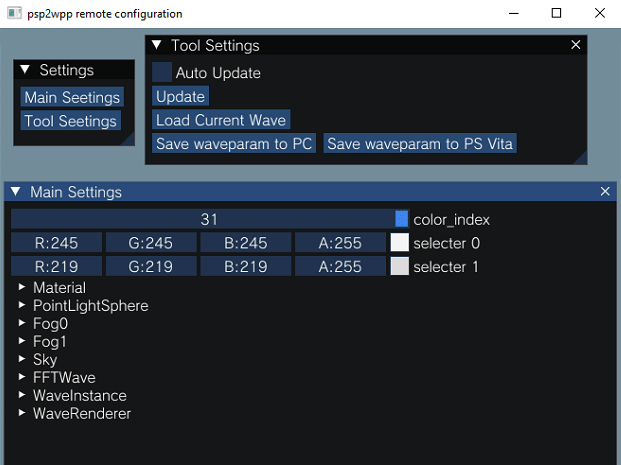
Changelog
v1.0
- First Release.
Credits
- Paddel06 for Beta testing.
- Cat And CreepNT for USB helping.
- Dear ImGui for Settings GUI.