
LodjurDS
More actions
| LodjurDS | |
|---|---|
 | |
| General | |
| Author | Fredrik Ahlström (FluBBa) |
| Type | Handheld |
| Version | 0.1.4 |
| License | Mixed |
| Last Updated | 2026/01/19 |
| Links | |
| Download | |
| Website | |
| Source | |
An Atari Lynx emulator for Nintendo DS(i)/3DS.
Installation
Note: You need a bios to be able to run games. It is not provided.
Create a folder named "lodjurds" in either the root of your flash card or in the data folder. This is where settings and save files end up.
Now put game/bios files into a folder where you have (Lynx) roms, max 768 games per folder, filenames must not be longer than 127 chars. You can use zip-files (as long as they use the deflate compression).
Depending on your flashcart you might have to DLDI patch the emulator.
User guide
When the emulator starts, you can either press L+R or tap on the screen to open up the menu.
Now you can use the cross or touchscreen to navigate the menus, A or double tap to select an option, B or the top of the screen to go back a step.
To select between the tabs use R & L or the touchscreen.
Menu
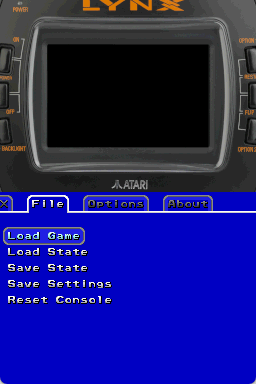
- File:
- Load Game: Select a game to load.
- Load State: Load a previously saved state of the currently running game.
- Save State: Save a state of the currently running game.
- Save Settings: Save the current settings.
- Reset Console: Reset the console.
- Quit Emulator: (If supported.)
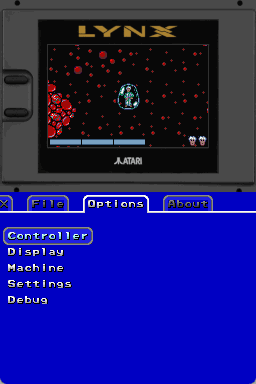
- Options:
- Controller:
- B Autofire: Select if you want autofire on button B.
- A Autofire: Select if you want autofire on button A.
- Swap A-B: Swap which NDS button is mapped to which Lynx button.
- Display:
- Screen: Select rotation & zoom.
- Gamma: Lets you change the gamma ("brightness").
- Contrast: Lets you change the contrast.
- Border: Change between console image and black.
- Machine:
- Machine: Select the emulated machine.
- Cpu Speed Hacks: Allow speed hacks.
- Select Bios: Load a Lynx Bios, needed.
- Sound: Enable/disable sound.
- Settings:
- Speed: Switch between speed modes.
- Normal: Game runs at it's normal speed.
- 200%: Game runs at double speed.
- Max: Games can run up to 4 times normal speed (might change).
- 50%: Game runs at half speed.
- Allow Refresh Change: Allow the Lynx to change NDS refresh rate.
- Autoload State: Toggle Savestate autoloading. Automagically load the savestate associated with the current game.
- Autosave Settings: This will save settings when leaving menu if any changes are made.
- Autopause Game: Toggle if the game should pause when opening the menu.
- Powersave 2nd Screen: If graphics/light should be turned off for the GUI screen when menu is not active.
- Emulator on Bottom: Select if top or bottom screen should be used for emulator, when menu is active emulator screen is allways on top.
- Speed: Switch between speed modes.
- Debug:
- Debug Output: Show FPS and logged text.
- Step Frame: Emulate one frame.
- Controller:
Controls
B/A - Lynx B/A
X - Lynx Option I
Y - Lynx Option II
Start - Lynx Pause
D-Pad - Lynx D-Pad
Screenshots
Changelog
V0.1.4 2026/01/19
- Added loading of bll (*.o) files.
- Added CPU differences between Lynx & Lynx II.
- Added Mikey & Suzy revision differences between Lynx & Lynx II.
- Added power off from code.
- Added some Suzy register mirrors.
- Fixed loading of odd sized lnx roms.
- Fixed Math flags.
- Fixed Timer7.
- Optimizations to rendering.
V0.1.2 2025/01/22
- Fixed initial palette.
- Fixed handling of CPU sleep/Suzy sprite paint.
- Better cycle counting.
V0.1.0 2025/01/05
- First real version.
- Most things should work.
V0.0.5 2024/12/21
- Only sound left to implement.
V0.0.3 2024/11/28
- Implemented Suzy in asm.
V0.0.2 2024/11/03
- Implemented most of Mikey in asm.
V0.0.1 2024/07/29
- Started coding on NDS version.
Credits
- Keith Wilkins for Handy source and info.
- Dr.Helius for test programs.
- 42Bastian for bug reports, test files & bll.enc.