
Game Time Calculator PSP
From GameBrew
More actions
| Game Time Calculator | |
|---|---|
 | |
| General | |
| Author | BigProMan |
| Type | Plugins |
| Version | 0.1 |
| License | Mixed |
| Last Updated | 2008/09/01 |
| Links | |
| Download | |
| Website | |
Game Time Calculator (French) is a PSP plugin that can track how much time you spend on your favorite games or homebrews.
Features
- You can enable it in GAME and POPS. (You can also enable it in VSH if you wish).
- A timer starts every time you launch a game.
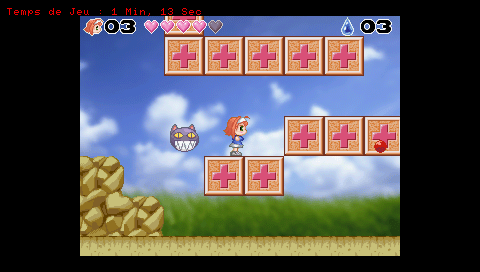
- You can view the time in real-time by simply pressing the Select button (the time will display in red at the top left of the screen).
- To save this time, activate the Hold button when you're about to exit the game. The time will be saved in a file corresponding to the current date, which will be created in the "GTC" folder (the plugin does this for you).
- You can check how much time you’ve played your games/homebrews each day,
Installation
Copy the plugin into ms0:/seplugins/.
In the seplugins folder, open game.txt and pop.txt (create them if they don't already exist) and add the following line:
ms0:/seplugins/Game_Time_Calculator.prx
Restart your PSP by holding the R button (this will take you to the Recovery Menu).
Choose the Plugins option and enable Game_Time_Calculator.prx for game.txt and pop.txt.
Controls
Select - View how long you've been playing (while in the game)
Hold - Save your time to ms0:/GTC/Date.txt (before exiting the game)
Screenshots
Compatibility
Tested on:
3.90 M33-3
4.01 M33-2
Known issues
Doesn't work with all the games.
External links
XtremLua - http://xtreamlua.com/modules.php?name=Forums&file=viewtopic&t=4183 (archived)