
PS4 Remote PKG Sender V2
From GameBrew
More actions
| PS4 Remote PKG Sender V2 | |
|---|---|
| File:Ps4remotepkgsender.png | |
| General | |
| Author | iref-use, Gkiokan |
| Type | Other PC Utilities |
| Version | 2.10.4 |
| License | Mixed |
| Last Updated | 2024/05/22 |
| Links | |
| Download | |
| Website | |
| Source | |
| Support Author | |

A remote PKG sender / installer inspired by @irefuse and is a refactored version of the original repository. It's based on Electron, Webpack, Vue, Express, Axios, Element-UI, and Node, and it doesn't have any extra dependencies.
Features
- Configure your server with your base path.
- Prepare Custom Server Configuration (build-in express, apache, nginx, custom, ...)
- Control the Server application by click and have it running in the background.
- Closing windows doesn't stop the Server but stops if you quit the application.
- Show a list of all Server side listed PKG's.
- Miscs download link to flatZ PS4 Remote Package Installer homebrew.
- Extended Menu and Tray Icon.
- Separate Server Window (Logs, Server Routes, Controls).
- Separate PS4 API Logs Window.
- Catch any possible Error on Request or Response with the RPI on your PS4.
- Scan base path (deep scan support) directory for fPKG's and serve them with the server.
- Search for titles through your found files.
- Add Served files to your Queue and install them on your PS4.
- Processing Center reflects any status changes in your server list, too.
- Set custom timeout and update interval with a slider.
- Added Seperate Changelog file and Troubleshooting Guide.
- Add a FAQ and Troubleshooting Area.
- Configuration values for timeout and heartbeat.
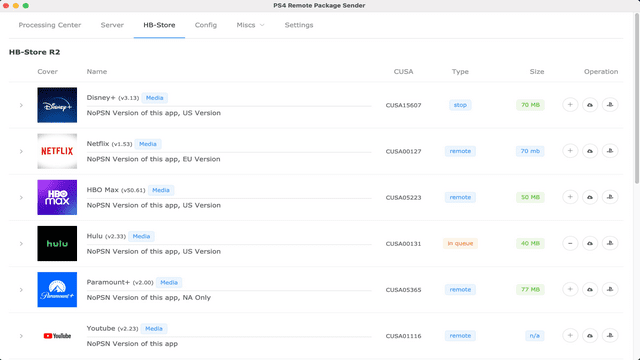
- Implement HB Store and direct install fPKG's.
- Queue Scanner (start next file in the queue after one is finished).
- Scroll To Top.
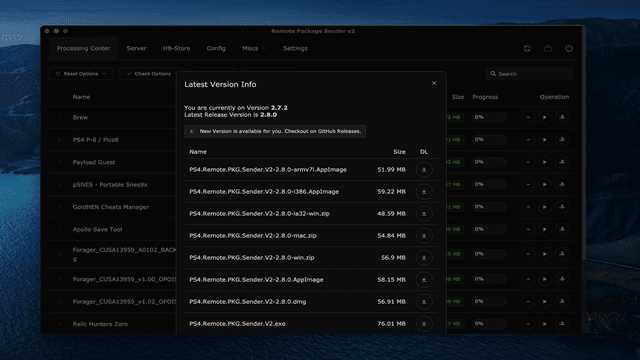
- Auto update checker for latest release version.
- Bulk Action for adding to Queue.
- Drag & Drop files and folders.
- RPSV2 API Service for dynamic configurations.
- Add PS5 Support.
- Add Queue Scanner Bulk Request Support for PS5.
User guide
On PS4:
- Start HEN v1.8+
- Start flatZ Remote Package Installer.
On PC:
- Start PS4 Package Sender V2.
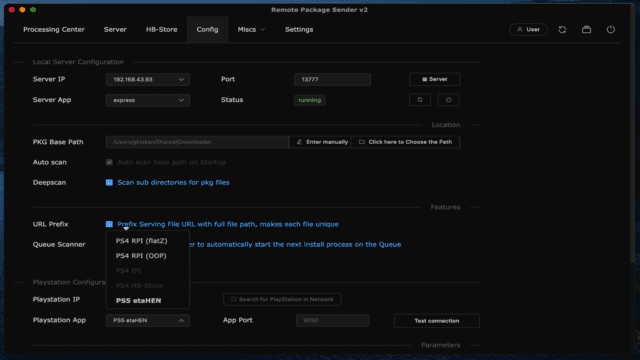
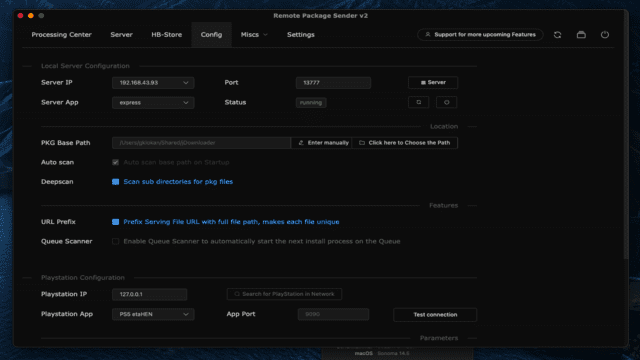
- Switch to Config and select your Networkinterface (IP Adress).
- Choose a Server Port if necessary and apply or restart the server.
- Choose your base path where your files are settled.
- Switch to Server and add your files to the queue (Processing Center).
- Start your install process with any of your files.
Troubleshooting:
- Your PS4 and PC have to be on the same Network.
- If you have connection issues, check your Router or Firewall.
- If you get timeout, RPI is not running on your PS4 or PS4 IP Adress is wrong or timeout to low.
- If you get Playstation not available error, check RPI on PS4 and restart it.
- If you get the White Screen of Dead, use the unpacked version.
- If you think there is an issue, please report it.
- Checkout the full Troubleshooting Guide
Screenshots
Media
Remote Package Sender V2 | Detailed Tutorial | Windows | Mac | High Speeds | Tutorial (Sam Daniel)
Changelog
v2.10.4
- The latest mac OS Version 14.4+ has a couple dependency changes that break the application.
- Fixed the dependencies and deprecations.
- Added HB-Store setting values as of a custom adress.
- Fixed Release links in the Update checker View.
v2.10.3
- This version has fixed HB-Store file URLs and enforces PS5 file URL if etaHEN is enabled.
- Reworked Queue Scanner with Bulk Request handling for PS5 to ensure it functions more closely to our expectations.
- Added also proper logging for Requests in the API logs.
v2.10.2
- This version has fixed HB-Store file URLs and enforces PS5 file URL if etaHEN is enabled.
- Added also proper logging for Requests in the API logs.
v2.10.1
- With 2.10.0+ we are the first Remote Package Sender that supports PKG Install though application requests.
- First prototyping works fine, but we might need more feedback on this to mark it as stable.
- Thanks to etaHEN (@LightningMods) and all the devs who was working on this - huge step forward.
v2.10.0
- etaHEN prototype build for PS5 Support.
- For internal BETA testing only!
v2.9.1
- It has been a long journey so far, and you have done well!
- With 53k Download as of August 2023, that's quite impressive.
- Thank you for using the Application. Any Support is appreciated and don't forget to check out my channels.
- In this update I've added the Bulk Action, Drag & Drop and the RPSV2 features.
- The Bulk action helps you do add all your server files to the Queue at once.
- You can Drag and Drop files and Folders from any place directly to the App now.
- Check out the User Button, it has a write up of the upcoming features in v2.10.* and recalls for Support.
- I've setup a Ko-Fi Goal that I will look for donations to continue on the listed features.
- One of the amazing feature will be Files from Hosts but this needs quite a bit of work due the custom API and DNS that is required.
- As always, have fun with the version and stay tuned!
v2.8.0
- This release includes further improvements, hot fixes and patches. Removed deprecations.
- I've also added some important security policies to components to make them compatible with the existing apis.
- You can edit the base path now directly in the Server Tab.
- Download remote items within a custom download window which has an animated loader view for itself.
- Beside that you can now check directly in the app if there is any new release and download it for your machine.
- There is a checkup on startup if you are on the latest release. This is a preparation for the later incoming auto-updater.
- Deprecated links for the Miscs > Downloads has been exchanged with existing ones and a new Remote Package Installer (on the ps4) OOP Edition of @njzydark has been added to the list of RPI alternatives for flatZ RPI, as it has the latest updates.
- A requested feature for scoll to top has been added, too. It will show up on a big list and allow you to scroll back quickly.
- The full Changelog can be seen as always on the official Changelog page. Also there are a couple new Troubleshooting Guide entries.
- Thanks @Masamune3210 for fixing some spellings on the Troubleshooting Guide.
v2.7.2-RC
- This is the final Release Candidate for the branch of v2.7.*.
- On top of the enhancements of v2.7.1 I have added further improvements and fixes for the Title Bar.
- You can now choose which style you prefer (mac or windows / linux).
- Direct View Access to the Local Server View and PS4 API Logs Dropdown added.
- Added the Logo into the Info View.
v2.7.1
- I am proudly presenting you the v2.7.1 with fully integrated HB-Store, Darkmode and Queue Scanner!
- Features that all of you wanted and now are working and making this app even better.
v2.6.0
- This is a pre-release because the darkmode is not fully finished (title bar still system based).
v2.5.2
- Fixed Header Position, it stay now there where it should stay if you have larger content.
- Fixed flashing on Configuration page which happens when you press enter for submit (not necessary).
- Improoved Troubleshooting Guide with the latest errors that happend to some users.
- You can remove items from the Queue.
- Added (experimental) direct link to the Queue. Activate the feature in your Settings first to try out.
- Added Downloads Area. If you want to have your app there, message me on Discord.
- Added (legacy) HB-Store Tab. Activate it in your Settings first.
- You can download the PKG's directly from the HB-Store tab and install them from your base_path if direct install does not work for you.
- The unstopable error popup should been fixed if break your app install process on the ps4 side.
- You can choose now if you want to have a serving path based on the filename or fullpath (Cyb1K request).
- Added Update and latest Commit Informations to the Settings view.
v2.5.0-pre-release
- This is a pre-release and not fully tested yet.
- HB-Store partially implemented.
- Stay tuned once this is ready.
v2.4.3-Beta
- Fixing the Storage creation error which causes the application crashes and endet up on the WhiteScreenOfDead.
- The solution that I've implement may delay the start in case of an error within 1-2 secs because
- I am creating the store in a while Loop and catching any accuring error and force it to recreate the store.
- Added also a application global errorHandler which should alert any other issue that accures.
- This should be ultimately kill any errors on windows ( which is the only Platform that had any problems yet ).
- Thanks for any feedback that helps me to fix the issues and make that tool better then ever.
- Spoiler: HB-Store implementation will be available in the next update v2.5.*
v2.4.2-Beta
- Further Improvements and optimizing Request Handling.
- Added custom timeout and interval values for updating task progress
- Added deeper logging on PS4 Operations and Responses
- Added Check Server Button on the Progress Center
- Added Check PS4 Connection on the Progress Center
- Added dedicated Changelog
- Added dedicated Troubleshooting Guide
- Added Changelog and Troubleshooting guide into the Application Menu
- Added extendable Table row on Server files to see file path and url
- Post-Patch fixed the throttle for win11 and the finished condition for installing and finished state.
v2.4.1-Beta
- Added errorCatcher for better debugging for everyone.
- Fixed the missing ps4 default port for the RPI which caused no Install Requests.
- Sorry for the mistake, that happend to me by rushing the configs and couldn't see the error on my dev machine until feedback comes in.
- Again, if you have any trouble on running the portable, then use the unpacked version.
Credits
- Thanks to flatz, Specter, xvortex, and all initial developers for their efford on the scene.
- Thanks to my primary testers CyB1K, mtnjustme, Masamune3210, hypermist.
- Thanks to Sam Daniel for the first full fledged Tutorial on windows and mac.
- Thanks to the awesome community and everyone else on their feedback that I am missing here.
- Mega thanks to my wife having patience while I develop this awesome tool.
External links
- Gbatemp - https://gbatemp.net/threads/remote-package-installer-v2-high-speed-transfers-step-by-step-detailed-tutorial.606127/
- PSXHax - https://www.psxhax.com/threads/ps4-remote-pkg-sender-v2-github-fork-by-gkiokan.11166/
- Github (Gkiokan) - https://github.com/Gkiokan/ps4-remote-pkg-sender
- Github (iref-use) - https://github.com/iref-use/ps4-remote-pkg-sender