NTRCCompiler 3DS: Difference between revisions
From GameBrew
More actions
No edit summary |
No edit summary |
||
| Line 5: | Line 5: | ||
|author=David Zocchi | |author=David Zocchi | ||
|lastupdated=2017/02/27 | |lastupdated=2017/02/27 | ||
|type= | |type=Hack Utilities | ||
|version=2.0 | |version=2.0 | ||
|license=Mixed | |license=Mixed | ||
Revision as of 03:03, 4 April 2022
| NTRCCompiler | |
|---|---|
 | |
| General | |
| Author | David Zocchi |
| Type | Hack Utilities |
| Version | 2.0 |
| License | Mixed |
| Last Updated | 2017/02/27 |
| Links | |
| Download | |
| Website | |
 |
This application has been obsoleted by one or more applications that serve the same purpose, but are more stable or maintained. |
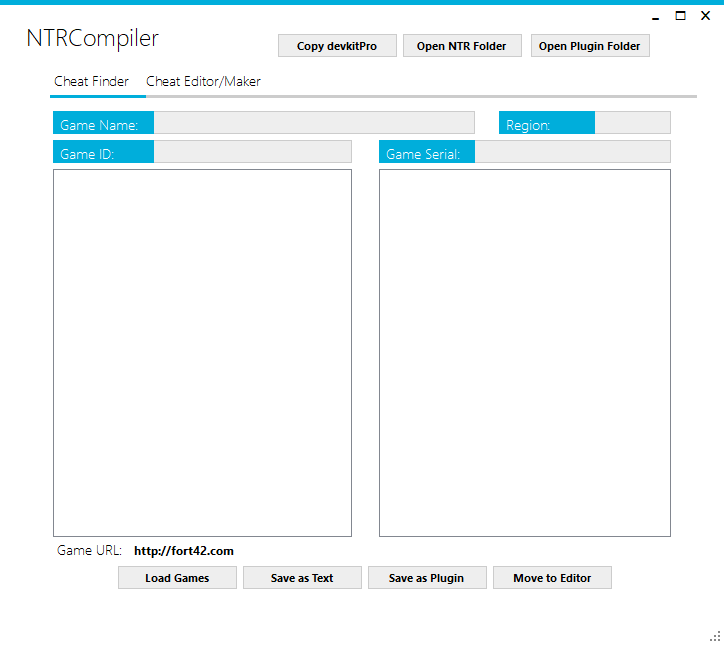
NTRCCompiler is a program for creating plugins.
Note: The program loads the database from Fort42, which is no longer a valid domain.
User guide
Prerequisites
- If you have devkitPro installed you don't need to do anything.
- If you don't then click the "copy devkitPro" button.
How to use
- Click Load Games (from Fort42).
- Click a Game you want.
- If you want to save as a Plugin for immediate use, click Save as Plugin, click open the plugin folder and move the cheat to your plugin folder.
- If you want to save for editing Later or for manual plugin making, Save as Text.
How to edit/make a cheat
- Move the file to the editor, or open a text file in the Cheat Editor Tab.
- Edit your codes.
- Save as text, or as a plugin.
Create plugin using text files
- Click open NTR folder.
- Drag the 0000000XXXXXX.txt file on to Gateshark2NTR.exe.
- It will ask for your name then it create the plugin in the plugin folder.
Screenshots