
3DS-Pico8: Difference between revisions
More actions
No edit summary |
No edit summary |
||
| Line 5: | Line 5: | ||
|author=Pixel-Pop | |author=Pixel-Pop | ||
|lastupdated=2020/06/09 | |lastupdated=2020/06/09 | ||
|type=Other | |type=Other Emulators | ||
|version=0.3 | |version=0.3 | ||
|license=Mixed | |license=Mixed | ||
|download=https://dlhb.gamebrew.org/ | |download=https://dlhb.gamebrew.org/3dshomebrews/3dspico8.7z | ||
|website=https://www.reddit.com/r/3dshacks/comments/hcr65h/when_grabbing_emulators_and_roms_for_your_system | |website=https://www.reddit.com/r/3dshacks/comments/hcr65h/when_grabbing_emulators_and_roms_for_your_system | ||
|source=https:// | |source=https://github.com/Pixel-Pop/3DS-Pico8 | ||
}} | }} | ||
PICO-8 is a virtual machine and game engine created by Lexaloffle Games. It is a fantasy video game console that mimics the limited graphical and sound capabilities of 8-bit systems of the 1980s. | |||
Pico8 is | 3DS-Pico8 is a work-in-progress homebrew application that allows you to play PICO-8 cartridges on your 3DS. Currently supports 3 cartridges and sound has not yet been implemented. | ||
==Installation== | |||
Version 0.3 supports the following cartridges, however it must be renamed to celeste.p8.png: | |||
* [https://www.lexaloffle.com/bbs/?pid=9994 Hello World] by zep. | |||
* | * [https://www.lexaloffle.com/bbs/?pid=16887 Rainy Day Friends] by Electric Gryphon. | ||
* | * [https://www.lexaloffle.com/bbs/?tid=2145 Celete] by Matt Thorson and Noel Berry. | ||
* | |||
Open the webpage. In the Pico8 webplayer, click Cart (in the bottom left corner) and save the image. | |||
Rename it to celeste.p8.png, create a folder named Pico8Carts on the root of your SD card and place the cartridge there. | |||
Place the 3DS-Pico8.3dsx in your 3ds folder, then run from the Homebrew Launcher. | |||
==Controls== | |||
D-Pad - Left, Right, Up, Down | |||
A - Pico-8 C/Z | |||
B - Pico-8 X | |||
Start - Exit the application | |||
==Screenshots== | |||
https://dlhb.gamebrew.org/3dshomebrews/3dspico83.png | |||
https://dlhb.gamebrew.org/3dshomebrews/3dspico84.png | |||
==Known issues== | |||
Only support 3 cartridges. No sound. | |||
== | ==Changelog== | ||
'''v0.3''' | |||
* Is able to play celeste.p8.png with minor graphical differences. Compatible with previous release carts (and potentially new carts) if they're renamed. | |||
'''v0.2''' | |||
* | * Plays rainyday.p8.png. | ||
'''v0.1''' | |||
* Only supports playing the Hello World cartridge. | |||
* [https://github.com/lua/lua Lua] | ==Credits== | ||
* [https://www.lexaloffle.com/pico-8.php Pico-8] | * [https://github.com/lua/lua Lua.] | ||
* [https://github.com/lvandeve/lodepng LodePNG] | * [https://www.lexaloffle.com/pico-8.php Pico-8.] | ||
* [https://github.com/lvandeve/lodepng LodePNG.] | |||
* [https://github.com/samhocevar/z8lua z8lua] - A lua version that supports features present in Pico-8, like compound assignment operators. | * [https://github.com/samhocevar/z8lua z8lua] - A lua version that supports features present in Pico-8, like compound assignment operators. | ||
* [https://discord.gg/C29hYvh Nintendo Homebrew Community] | * [https://discord.gg/C29hYvh Nintendo Homebrew Community.] | ||
* [https://discord.gg/MhQAzTw Pico-8 Community] | * [https://discord.gg/MhQAzTw Pico-8 Community.] | ||
==External links== | |||
* GitHub - https://github.com/Pixel-Pop/3DS-Pico8 | |||
* Reddit - https://www.reddit.com/r/3dshacks/comments/hcr65h/when_grabbing_emulators_and_roms_for_your_system | |||
[[Category:3DS homebrew emulators]] | |||
[[Category:Other 3DS homebrew emulators]] | |||
Revision as of 06:05, 30 December 2021
| 3DS-Pico8 | |
|---|---|
| File:3DS-Pico8.jpg | |
| General | |
| Author | Pixel-Pop |
| Type | Other Emulators |
| Version | 0.3 |
| License | Mixed |
| Last Updated | 2020/06/09 |
| Links | |
| Download | |
| Website | |
| Source | |

PICO-8 is a virtual machine and game engine created by Lexaloffle Games. It is a fantasy video game console that mimics the limited graphical and sound capabilities of 8-bit systems of the 1980s.
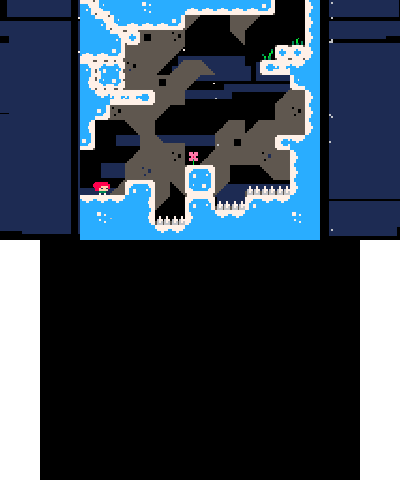
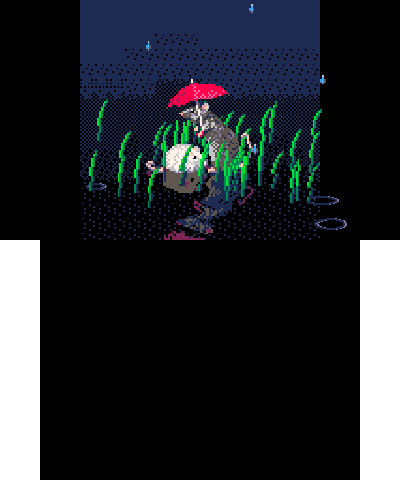
3DS-Pico8 is a work-in-progress homebrew application that allows you to play PICO-8 cartridges on your 3DS. Currently supports 3 cartridges and sound has not yet been implemented.
Installation
Version 0.3 supports the following cartridges, however it must be renamed to celeste.p8.png:
- Hello World by zep.
- Rainy Day Friends by Electric Gryphon.
- Celete by Matt Thorson and Noel Berry.
Open the webpage. In the Pico8 webplayer, click Cart (in the bottom left corner) and save the image.
Rename it to celeste.p8.png, create a folder named Pico8Carts on the root of your SD card and place the cartridge there.
Place the 3DS-Pico8.3dsx in your 3ds folder, then run from the Homebrew Launcher.
Controls
D-Pad - Left, Right, Up, Down
A - Pico-8 C/Z
B - Pico-8 X
Start - Exit the application
Screenshots
Known issues
Only support 3 cartridges. No sound.
Changelog
v0.3
- Is able to play celeste.p8.png with minor graphical differences. Compatible with previous release carts (and potentially new carts) if they're renamed.
v0.2
- Plays rainyday.p8.png.
v0.1
- Only supports playing the Hello World cartridge.
Credits
- Lua.
- Pico-8.
- LodePNG.
- z8lua - A lua version that supports features present in Pico-8, like compound assignment operators.
- Nintendo Homebrew Community.
- Pico-8 Community.