
NotifyMii 3DS: Difference between revisions
From GameBrew
More actions
m Text replacement - "| licence" to "| license" |
No edit summary |
||
| Line 1: | Line 1: | ||
{{Infobox 3DS Homebrews | {{Infobox 3DS Homebrews | ||
| title = NotifyMii | | title = NotifyMii | ||
| image = | | image = notifymii.png|250px | ||
| type = Utilities | | type = Utilities | ||
| version=v1.2 | | version=v1.2 final | ||
| lastupdated = 2016/05/24 | | lastupdated = 2016/05/24 | ||
| license = Mixed | | license = Mixed | ||
| author = Ryuzaki-MrL | | author = Ryuzaki-MrL | ||
| website = https://github.com/Ryuzaki-MrL/NotifyMii | | website = https://github.com/Ryuzaki-MrL/NotifyMii | ||
| download = https://dlhb.gamebrew.org/ | | download = https://dlhb.gamebrew.org/3dshomebrews/notifymii.7z | ||
| source = https://github.com/Ryuzaki-MrL/NotifyMii | | source = https://github.com/Ryuzaki-MrL/NotifyMii | ||
}} | }} | ||
NotifyMii is a notification manager for the 3DS. | |||
==Features== | |||
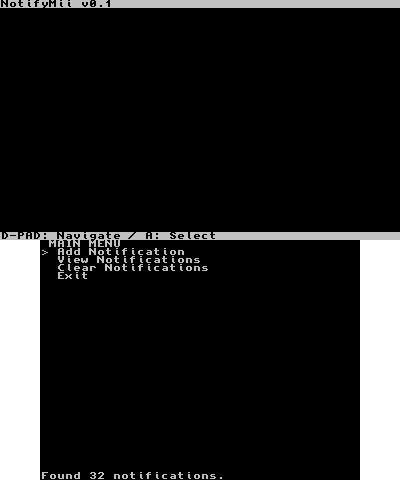
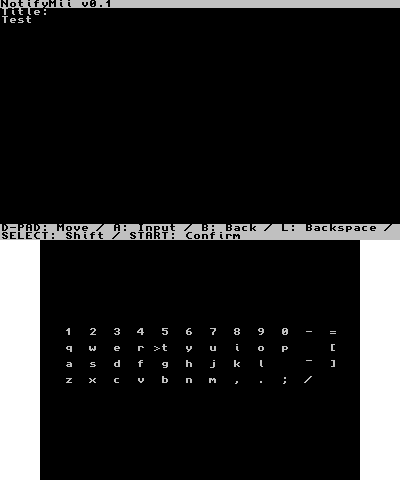
* Create your own custom notifications. | |||
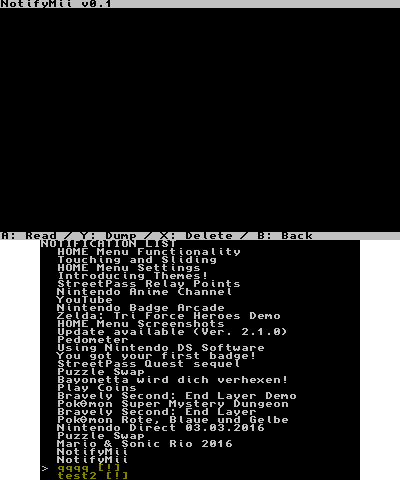
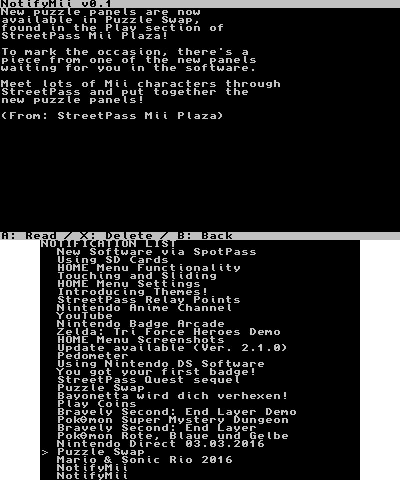
* Read and delete notifications. | |||
* Dump or delete all notifications at once. | |||
* Launch the app from which the notification was received. | |||
== | ==Installation== | ||
Available as 3DSX, CIA and 3DS. | |||
* CIA - Install the .cia with the CIA manager of your choice. | |||
* | * 3DSX - Use the .3dsx provided with the homebrew launcher. | ||
* | * 3DS - Copy to your SD card (for flashcards only). | ||
* | |||
== | ==User guide== | ||
* | ===Custom notifications=== | ||
* | * Message - To manually type a message, use a text file from the SD card as the message, or copy from another notification. Cannot exceed 6016 bytes (~5.8kb). | ||
* Image (optional) - You can select a JPG image from the SD card, or use an image from another notification. Should be exactly 400x240 and cannot exceed 50kb. | |||
* Process ID (optional) - You can select from which app the notification was received (no app = system notification). | |||
==Credits | ===Read and delete=== | ||
*Rinnegatamante, for the notification dumping code from Purgification and utf<->ascii functions from lpp-3ds. | * Notifications are automatically marked as read by NotifyMii upon reading. | ||
*Kerouz, for the app's banner and icon. | * You can also view a notification's image. | ||
*Smealum and many others, for ctrulib. | |||
*Steveice10, for buildtools. | ===Dump message and image=== | ||
*xerpi, for sf2dlib, sfillib and sftdlib. | * Messages are saved as HHMMSS_TITLE.txt. | ||
* Images are saved as HHMMSS_TITLE.jpg. | |||
* Both are saved to SD:/NotifyMii. | |||
==Screenshots== | |||
https://dlhb.gamebrew.org/3dshomebrews/notifymii.png | |||
https://dlhb.gamebrew.org/3dshomebrews/notifymii2.png | |||
https://dlhb.gamebrew.org/3dshomebrews/notifymii3.png | |||
https://dlhb.gamebrew.org/3dshomebrews/notifymii4.png | |||
==Changelog== | |||
'''v1.2''' | |||
What's new: | |||
* Major UI changes. | |||
* Uses the 3DS's software keyboard. | |||
* Support for viewing a notification's image. | |||
* Preview support for TXT and JPG files. | |||
* Installed title list will now display all title's names alongside their title ID. | |||
What's fixed: | |||
* Deleting a notification will no longer mess with other notifications. | |||
* Max image filesize is now 50kb instead of 128kb. | |||
==Credits== | |||
* Rinnegatamante, for the notification dumping code from Purgification and utf<->ascii functions from lpp-3ds. | |||
* Kerouz, for the app's banner and icon. | |||
* Smealum and many others, for ctrulib. | |||
* Steveice10, for buildtools. | |||
* xerpi, for sf2dlib, sfillib and sftdlib. | |||
==External inks== | |||
* GitHub - https://github.com/Ryuzaki-MrL/NotifyMii | |||
* GBAtemp - https://gbatemp.net/threads/release-notifymii-homebrew-notification-manager.423334 | |||
[[Category:3DS homebrew applications]] | |||
[[Category:Homebrew utility applications on 3DS]] | |||
Revision as of 12:09, 28 October 2021
| NotifyMii | |
|---|---|
 | |
| General | |
| Author | Ryuzaki-MrL |
| Type | Utilities |
| Version | v1.2 final |
| License | Mixed |
| Last Updated | 2016/05/24 |
| Links | |
| Download | |
| Website | |
| Source | |
NotifyMii is a notification manager for the 3DS.
Features
- Create your own custom notifications.
- Read and delete notifications.
- Dump or delete all notifications at once.
- Launch the app from which the notification was received.
Installation
Available as 3DSX, CIA and 3DS.
- CIA - Install the .cia with the CIA manager of your choice.
- 3DSX - Use the .3dsx provided with the homebrew launcher.
- 3DS - Copy to your SD card (for flashcards only).
User guide
Custom notifications
- Message - To manually type a message, use a text file from the SD card as the message, or copy from another notification. Cannot exceed 6016 bytes (~5.8kb).
- Image (optional) - You can select a JPG image from the SD card, or use an image from another notification. Should be exactly 400x240 and cannot exceed 50kb.
- Process ID (optional) - You can select from which app the notification was received (no app = system notification).
Read and delete
- Notifications are automatically marked as read by NotifyMii upon reading.
- You can also view a notification's image.
Dump message and image
- Messages are saved as HHMMSS_TITLE.txt.
- Images are saved as HHMMSS_TITLE.jpg.
- Both are saved to SD:/NotifyMii.
Screenshots
Changelog
v1.2
What's new:
- Major UI changes.
- Uses the 3DS's software keyboard.
- Support for viewing a notification's image.
- Preview support for TXT and JPG files.
- Installed title list will now display all title's names alongside their title ID.
What's fixed:
- Deleting a notification will no longer mess with other notifications.
- Max image filesize is now 50kb instead of 128kb.
Credits
- Rinnegatamante, for the notification dumping code from Purgification and utf<->ascii functions from lpp-3ds.
- Kerouz, for the app's banner and icon.
- Smealum and many others, for ctrulib.
- Steveice10, for buildtools.
- xerpi, for sf2dlib, sfillib and sftdlib.