SNEmulDS: Difference between revisions
From GameBrew
More actions
No edit summary |
No edit summary |
||
| Line 1: | Line 1: | ||
{{Infobox homebrew | {{Infobox homebrew | ||
| title = SNEmulDS | | title = SNEmulDS | ||
| image = | | image = https://dlhb.gamebrew.org/dshomebrew/snemulds.png | ||
| type = Console Emulator | | type = Console Emulator | ||
| version = 0.6 alpha | | version = 0.6 alpha | ||
| licence = Mixed | | licence = Mixed | ||
| author = archeid (Loopy) | | author = archeid (Loopy) | ||
| website = http://www.snemul.com/ds | | website = http://www.snemul.com/ds | ||
| download = | | download = https://dlhb.gamebrew.org/dshomebrew/snemulds.7z | ||
| source = http://code.google.com/p/snemuldsx | | source = http://code.google.com/p/snemuldsx | ||
}} | }} | ||
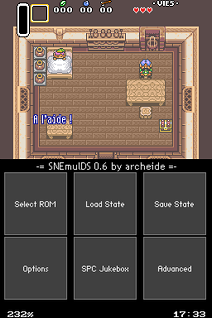
Nearly ten years after the heroic times of the first SNES emulators (SNEmul was one of them), the new console made by Nintendo, the Nintendo DS, offer new opportunites to turn alive again all those old games which probaby made the Super NES the best 2D game system of all time. | Nearly ten years after the heroic times of the first SNES emulators (SNEmul was one of them), the new console made by Nintendo, the Nintendo DS, offer new opportunites to turn alive again all those old games which probaby made the Super NES the best 2D game system of all time. | ||
SNEmulDS is partially based on [http://www.snemul.com/ds | SNEmulDS is partially based on [http://www.snemul.com/ds SNEmul], a SNES emulator for DOS and linux, which was the cooperative work of archeide & v0x. | ||
SNEmulDS includes [http://pocketspc.pocketheaven.com | SNEmulDS includes [http://pocketspc.pocketheaven.com PocketSPC], a SPC song player made by gladius. It also has integrated the CPU core from [http://www.forwardcoding.com/projects/snezzids/snezzids.html SnezziDS]. | ||
==Features== | ==Features== | ||
| Line 137: | Line 137: | ||
'''Q. Why SNEmulDS sound is bad?''' | '''Q. Why SNEmulDS sound is bad?''' | ||
SNEmulDS is not correctly synchronized with the SPC700 engine. Some new options in configuration file allow you to improve the sound (see SoundPortSync in CFG file). | SNEmulDS is not correctly synchronized with the SPC700 engine. | ||
Some new options in configuration file allow you to improve the sound (see SoundPortSync in CFG file). | |||
You can try the SPC jukebox instead, musics should be better. | You can try the SPC jukebox instead, musics should be better. | ||
| Line 147: | Line 149: | ||
'''Q. Why my game seems slow whereas SNEmulDS says the speed is over 80%?''' | '''Q. Why my game seems slow whereas SNEmulDS says the speed is over 80%?''' | ||
Most of the time, it comes from the speed hack. Not enough CPU cycles are given to the game, and it needs to use two frames instead of one. Set speed hacks No speed hack should help. | Most of the time, it comes from the speed hack. Not enough CPU cycles are given to the game, and it needs to use two frames instead of one. | ||
Set speed hacks No speed hack should help. | |||
'''Q. Game is too fast to play.''' | '''Q. Game is too fast to play.''' | ||
| Line 169: | Line 173: | ||
'''Q. How I can use my own ZSNES/SNES9X save states?''' | '''Q. How I can use my own ZSNES/SNES9X save states?''' | ||
You should be able to use your .SRM created by other emus. Be sure it is not compressed. Simply put the SRM file in the SNES directory, along with your ROM. | You should be able to use your .SRM created by other emus. Be sure it is not compressed. | ||
Simply put the SRM file in the SNES directory, along with your ROM. | |||
'''Q. Why do you not support packing, my card/flasher is not working with SNEmulDS?''' | '''Q. Why do you not support packing, my card/flasher is not working with SNEmulDS?''' | ||
| Line 175: | Line 181: | ||
SNEmul philosophy is easy to use. That means no pre-script, no packer, no patches, etc. | SNEmul philosophy is easy to use. That means no pre-script, no packer, no patches, etc. | ||
You put your ROMS, SRAMs, save states directly in your SNES directory and that's all. Moreover, by using a real filesytem development of specific features is much easier (especially large save states, SRAM saving, very large ROMs (4Mo) and multi ROMs support). | You put your ROMS, SRAMs, save states directly in your SNES directory and that's all. | ||
Moreover, by using a real filesytem development of specific features is much easier (especially large save states, SRAM saving, very large ROMs (4Mo) and multi ROMs support). | |||
==Screenshots== | |||
https://dlhb.gamebrew.org/dshomebrew/snemulds2.png | |||
https://dlhb.gamebrew.org/dshomebrew/snemulds3.png | |||
==Media== | ==Media== | ||
| Line 192: | Line 204: | ||
* Some other bugfixes and improvements in GUI. | * Some other bugfixes and improvements in GUI. | ||
==External links== | |||
* Official website - http://www.snemul.com/ds | |||
* Google Code - http://code.google.com/p/snemuldsx | |||
[[Category:DS homebrew emulators]] | [[Category:DS homebrew emulators]] | ||
[[Category:Homebrew console emulators on DS]] | [[Category:Homebrew console emulators on DS]] | ||