CellsDS: Difference between revisions
From GameBrew
More actions
No edit summary |
No edit summary |
||
| Line 27: | Line 27: | ||
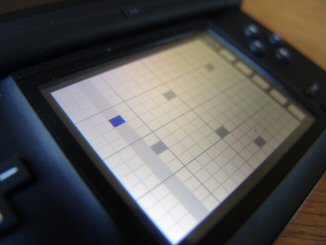
CellsDS is organized into 3 pages. | CellsDS is organized into 3 pages. | ||
'''Page | '''Page 1 - The Sequencer Page:''' | ||
* The first and most important page is the sequencer page. | |||
* The sequencer page is split between the grid (on the left) and the six engine buttons on the right. | |||
* Touching squares on the grid will place and remove notes. | |||
* Touching an engine button on the right selects an active layer. | |||
* All six layers run simultaneously during playback. Each layer is associated with its own engine (which is really just a fancy name for a Lua script). | |||
'''Page 2 - Clock Control:''' | |||
* Use this page to control the BPM (beats per minute) of the sequencer playback. | |||
* The BPM is approximate. | |||
'''Page 3 - Snapshots:''' | |||
* To save your current song along with all settings, use the Save feature on the save/load page. | |||
'''Page | * You may save up to 200 snapshot files. | ||
* Refer to the instructions on the Snapshots page for details. | |||
To save your current song along with all settings, use the Save feature on the save/load page. You may save up to 200 snapshot files. Refer to the instructions on the Snapshots page for details. | |||
==Controls== | ==Controls== | ||