Finger Monkey and Inverto Goose: Difference between revisions
From GameBrew
More actions
No edit summary |
No edit summary |
||
| Line 1: | Line 1: | ||
{{Infobox homebrew | {{Infobox homebrew | ||
| title = Finger Monkey and Inverto Goose in Happy Bunny Love Land | | title = Finger Monkey and Inverto Goose in Happy Bunny Love Land | ||
| image = | | image = https://dlhb.gamebrew.org/dshomebrew/fingermonkey.png | ||
| type = Platform | | type = Platform | ||
| version = | | version = 2006 | ||
| licence = Mixed | | licence = Mixed | ||
| author = Kung-Fu Fetus | | author = Kung-Fu Fetus | ||
| website = http://www.dcemu.co.uk/vbulletin/threads/32157-Finger-Monkey-and-Inverto-Goose | | website = http://www.dcemu.co.uk/vbulletin/threads/32157-Finger-Monkey-and-Inverto-Goose | ||
| download = | | download = https://dlhb.gamebrew.org/dshomebrew/fingermonkey.7z | ||
| source = | | source = | ||
}} | }} | ||
| Line 13: | Line 13: | ||
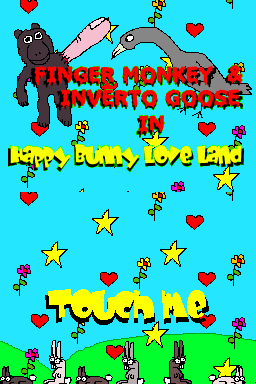
Finger Monkey and Inverto Goose in Happy Bunny Love Land is a DS homebrew platform game which uses shapes drawn on the touch screen to activate special moves and attacks. | Finger Monkey and Inverto Goose in Happy Bunny Love Land is a DS homebrew platform game which uses shapes drawn on the touch screen to activate special moves and attacks. | ||
It was submitted to the | It was submitted to the NEO Summer Coding Compo 2006. | ||
==Installation== | ==Installation== | ||
Use either version according to your device: | |||
* FMandIG.nds - For flashcard and emulators. | |||
* FMandIG.ds.gba - For Supercard (change the extension to .nds). | |||
==Controls== | ==Controls== | ||
| Line 30: | Line 26: | ||
Use the touchscreen to draw shapes to do attacks and special moves. | Use the touchscreen to draw shapes to do attacks and special moves. | ||
==Screenshots== | |||
https://dlhb.gamebrew.org/dshomebrew/fingermonkey2.png | |||
https://dlhb.gamebrew.org/dshomebrew/fingermonkey3.png | |||
==Media== | ==Media== | ||
'''NDS Game: Finger Monkey and Inverto Goose''' ([https://www.youtube.com/watch?v=nhMhXWO_7oQ KungFuFetus]) <br> | |||
<youtube>nhMhXWO_7oQ</youtube> | <youtube>nhMhXWO_7oQ</youtube> | ||
| Line 40: | Line 41: | ||
When using emulator Dualis DS, touchscreen background colour appears black instead of sky blue. | When using emulator Dualis DS, touchscreen background colour appears black instead of sky blue. | ||
==External links== | |||
* DCEmu - http://www.dcemu.co.uk/vbulletin/threads/32157-Finger-Monkey-and-Inverto-Goose | |||
* NeoFlash - https://www.neoflash.com/forum/index.php?topic=2946.0 | |||
[[Category:DS homebrew games]] | [[Category:DS homebrew games]] | ||
[[Category:Homebrew platform games on DS]] | [[Category:Homebrew platform games on DS]] | ||