FlashcarDS: Difference between revisions
From GameBrew
More actions
No edit summary |
No edit summary |
||
| Line 1: | Line 1: | ||
{{Infobox homebrew | {{Infobox homebrew | ||
| title = flashcarDS | | title = flashcarDS | ||
| image = | | image = https://dlhb.gamebrew.org/dshomebrew/flashcards.png | ||
| type = Other | | type = Other | ||
| version = 0.3 | | version = 0.3 | ||
| licence = Mixed | | licence = Mixed | ||
| author = nfinite | | author = nfinite | ||
| website = http://thenfinite.com/projects/flashcards | | website = http://thenfinite.com/projects/flashcards | ||
| download = | | download = https://dlhb.gamebrew.org/dshomebrew/flashcards.7z | ||
| source = | | source = | ||
}} | }} | ||
| Line 24: | Line 24: | ||
'''For Emulator:''' | '''For Emulator:''' | ||
In DeSmuMe, go to Emulation > GBA slot. | In DeSmuMe, go to Emulation> GBA slot. | ||
Select Compact Flash from the pull down menu. | Select Compact Flash from the pull down menu. | ||
| Line 31: | Line 31: | ||
==User guide== | ==User guide== | ||
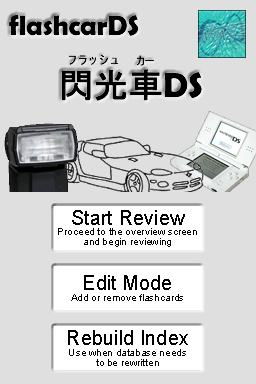
'''Main Menu''' | '''Main Menu:''' | ||
A message would appear telling to rebuild the database, which is what it does. | |||
'''Study Mode''' | '''Overview Screen:''' | ||
Choose writing automatically switches to inverted (can be adjusted). | |||
'''Study Mode:''' | |||
Select multiple decks if they are available. | |||
* Blank means you forgot or was wrong. | * Blank means you forgot or was wrong. | ||
* At the end of the review you will be asked if want to commit changes. | * At the end of the review you will be asked if want to commit changes. | ||
* Select no to repeat the same session. | * Select no to repeat the same session. | ||
'''Edit Mode''' | '''Edit Mode:''' | ||
From top to bottom, icons on the left are as follows. | |||
* Clear card face. | * Clear card face. | ||
* Clear both front and back. | * Clear both front and back. | ||
| Line 47: | Line 55: | ||
* Undo - Only one level of undo, no redo. | * Undo - Only one level of undo, no redo. | ||
On the left, you can toggle to edit the front or back of the card. Save is used to apply the drawn changes; if you press Start without saving, changes won't be applied. | On the left, you can toggle to edit the front or back of the card. | ||
Save is used to apply the drawn changes; if you press Start without saving, changes won't be applied. | |||
==Controls== | ==Controls== | ||
| Line 76: | Line 86: | ||
==Changelog== | ==Changelog== | ||
'''Version 0.3 13 | '''Version 0.3 2010/09/13''' | ||
* Added multiple deck support. | * Added multiple deck support. | ||
* Ability to create new decks. | * Ability to create new decks. | ||
| Line 84: | Line 94: | ||
* Due to stylus jumping. | * Due to stylus jumping. | ||
'''Version 0.2 21 | '''Version 0.2 2010/08/21''' | ||
* Now using a true SRS algorithm based on the SuperMemo 2 algorithm. | * Now using a true SRS algorithm based on the SuperMemo 2 algorithm. | ||
* Use the Rebuild Index option on the main menu to make decks from v0.1 compatible with the new revision. | * Use the Rebuild Index option on the main menu to make decks from v0.1 compatible with the new revision. | ||
* Fixed bug in database saving. | * Fixed bug in database saving. | ||
'''Version 0.1 20 | '''Version 0.1 2010/08/20''' | ||
* First release. | * First release. | ||
* Not really bug tested. | * Not really bug tested. | ||
==External links== | |||
* Author's website - http://thenfinite.com/projects/flashcards | |||
[[Category:DS homebrew applications]] | [[Category:DS homebrew applications]] | ||
[[Category:Other DS applications]] | [[Category:Other DS applications]] | ||