ToneSynthDS: Difference between revisions
From GameBrew
More actions
No edit summary |
No edit summary |
||
| Line 21: | Line 21: | ||
==User guide== | ==User guide== | ||
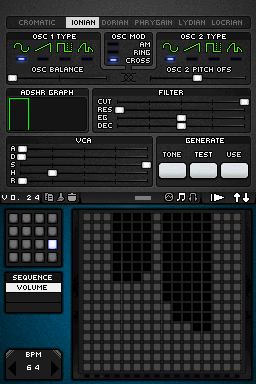
You can change the top and bottom screen to access all the settings by pressing the arrows in the upper right corner. | |||
'''Create a sequence of melody:''' | |||
* Each square is a measure of time horizontally, whereas vertically is the height of the note (with the possibility to put up to 16 in each measure). | |||
* Use the small grid in each sequence to create similar or completely different melodies (single or multiple scores). | |||
* When the melody is playing, the play button will change into a rectangle that will serve to stop playback. | |||
''' | '''Changing playback speed, volume and pitch:''' | ||
* You can increase BPM, located in the lower left corner, up to 250b/m. | |||
* The small grid at the bottom can switch between sequence and volume, and change volume of each note. | |||
* Use the Tone/Test/Use buttons to change the pitch. | |||
The small grid at the bottom can switch between sequence and volume, and change volume of each note. | |||
Test | |||
==Controls== | ==Controls== | ||