ToneSynthDS: Difference between revisions
From GameBrew
More actions
No edit summary |
No edit summary |
||
| Line 21: | Line 21: | ||
==User guide== | ==User guide== | ||
'''Create a sequence of melody | '''Create a sequence of melody (single score):''' | ||
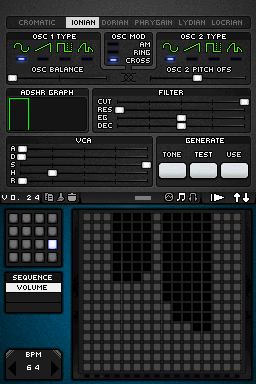
Made through the large grid, horizontally, each square is a measure (time), and vertically, is the height of the note (high or low) with possibility to put up to 16 in each measure. | |||
''' | '''Create melody (multiple scores): | ||
The first thing is to know how to change the score, use the small grid in each sequence to similar or completely different melodies. | |||
''' | '''Play/Pause:''' | ||
When the melody is playing, it will change into a rectangle that will serve to stop playback. | |||
'''Change the playback pitch''' | '''Change playback speed:''' | ||
Increase the number located in the lower left corner (BPM), with up to 250b/m. | |||
'''Change the volume of a note:''' | |||
In the screenshots below the small grid can switch between sequence and volume, and change volume of each note. | |||
'''Changing Screens:''' | |||
You can change the top screen with the bottom, so able to change the settings on the normal screen, press the arrows that appear in the upper right corner. | |||
'''Change the playback pitch:''' | |||
Test button will show a few seconds what the tone you are using doing, Tone button to adjust, and the button Use is to play the melody with that tone. | |||
==Controls== | ==Controls== | ||
| Line 55: | Line 69: | ||
==Changelog== | ==Changelog== | ||
'''Version 0.24 2009 | '''Version 0.24 2009/11/16 ''' | ||
* Copy, paste (and clear) for every editor type. | * Copy, paste (and clear) for every editor type. | ||
* Song editor. The columns represent a set of the patterns. The bottom value is the first pattern and the top is the last. You can set 16 different pattern in one "song pattern". You can change between the "song patterns" as you do it with the regular patterns (in pattern editor). If you push the play button, the first pattern that will be played is the pattern that determinated by the first column. At the end of that pattern the next pattern will be the one that determinated by the second column, and so on. After the last column is played the next pattern will be used from the first column of the second "song pattern", and so on. | * Song editor. The columns represent a set of the patterns. The bottom value is the first pattern and the top is the last. You can set 16 different pattern in one "song pattern". You can change between the "song patterns" as you do it with the regular patterns (in pattern editor). If you push the play button, the first pattern that will be played is the pattern that determinated by the first column. At the end of that pattern the next pattern will be the one that determinated by the second column, and so on. After the last column is played the next pattern will be used from the first column of the second "song pattern", and so on. | ||