GlitchDS: Difference between revisions
From GameBrew
More actions
No edit summary |
No edit summary |
||
| Line 1: | Line 1: | ||
{{Infobox homebrew | {{Infobox homebrew | ||
| title = glitchDS | | title = glitchDS | ||
| image = | | image = https://dlhb.gamebrew.org/dshomebrew/glitchds.jpg | ||
| type = Music Application | | type = Music Application | ||
| version = 1.4 | | version = 1.4 | ||
| licence = Mixed | | licence = Mixed | ||
| author = Clone45 | | author = Clone45 | ||
| website = http://www.glitchds.com/about/glitchds | | website = http://www.glitchds.com/about/glitchds | ||
| download = | | download = https://dlhb.gamebrew.org/dshomebrew/glitchds.7z | ||
| source = | | source = | ||
}} | }} | ||
| Line 26: | Line 26: | ||
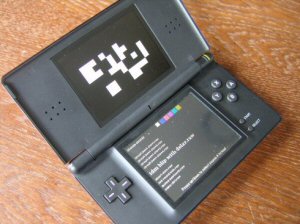
glitchDS is organized into different pages. | glitchDS is organized into different pages. | ||
* Sequencer Control - It has a 32 step sequencer based on the Game of Life. After 32 mutations, the sequence starts over. | |||
* Trigger Configuration - How does the sequencer know when to play a sound? Triggers! It specifies what should happen when a node on the sequencer graph changes from 0 (black) to 1 (white). | |||
* Choose Sounds - You can assign a sound to one of the swatches (otherwise known as the little colored boxes at the top of the screen). | |||
* Clock Control - Allows you to set the BPM (beats per minute) of the sequence playback. The BPM is approximate. | |||
* Frequency Modulation - You can modify the frequency (pitch) of each sound via the frequency modulation page. | |||
* Distortion Settings - A rapid fluctuation of the sound's frequency. | |||
* Save/Load - Save current song along with all settings. | |||
Further details can be found from the [http://www.glitchds.com/documentation/glitchds official site]. | |||
Further details can be found from the [http://www.glitchds.com/documentation/glitchds | |||
==Controls== | ==Controls== | ||
| Line 114: | Line 108: | ||
Left - Save current song settings as a new version of selected snapshot file | Left - Save current song settings as a new version of selected snapshot file | ||
==Screenshots== | |||
https://dlhb.gamebrew.org/dshomebrew/glitchds2.png | |||
https://dlhb.gamebrew.org/dshomebrew/glitchds3.png | |||
https://dlhb.gamebrew.org/dshomebrew/glitchds4.png | |||
https://dlhb.gamebrew.org/dshomebrew/glitchds5.png | |||
==Media== | ==Media== | ||
'''Demo'''<br> | '''Demo''' ([https://www.youtube.com/watch?v=H0WheXZGGTE Bret Truchan]) <br> | ||
<youtube>H0WheXZGGTE</youtube> | <youtube>H0WheXZGGTE</youtube> | ||
'''Demo 2'''<br> | '''Demo 2''' ([https://www.youtube.com/watch?v=VLtR-SI2lt0 Bret Truchan]) <br> | ||
<youtube>VLtR-SI2lt0</youtube> | <youtube>VLtR-SI2lt0</youtube> | ||
| Line 132: | Line 133: | ||
EZ Flash 5 after patching the DLDI driver <br> | EZ Flash 5 after patching the DLDI driver <br> | ||
==External links== | |||
* Official website - http://www.glitchds.com/about/glitchds | |||
[[Category:DS homebrew applications]] | [[Category:DS homebrew applications]] | ||
[[Category:Music homebrews on DS]] | [[Category:Music homebrews on DS]] | ||