C64psp: Difference between revisions
From GameBrew
More actions
No edit summary |
|||
| Line 27: | Line 27: | ||
==User guide== | ==User guide== | ||
===Load games (T64, D64)=== | |||
Open the image selection screen, choose the image to Autoload. | Open the image selection screen, choose the image to Autoload. | ||
| Line 37: | Line 36: | ||
LOAD"game name",8 | LOAD"game name",8 | ||
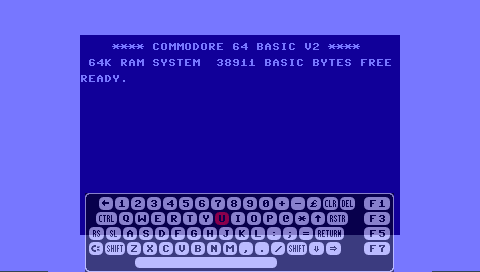
===Virtual keyboard=== | |||
Some games may require keyboard input which you can also toggle the virtual keyboard whilst in game. | Some games may require keyboard input which you can also toggle the virtual keyboard whilst in game. | ||
===Screen Mode=== | |||
* Unstretched. | * Unstretched. | ||
* Stretched with horizontal and vertical borders. | * Stretched with horizontal and vertical borders. | ||
| Line 47: | Line 45: | ||
* Stretched with no borders. | * Stretched with no borders. | ||
===Resource list=== | |||
* [http://www.zzap64.co.uk The Def Guide to Zzap! 64.] | * [http://www.zzap64.co.uk The Def Guide to Zzap! 64.] | ||
* [http://www.c64.com c64.com.] | * [http://www.c64.com c64.com.] | ||
| Line 61: | Line 59: | ||
c64psp is a PSP port of the Frodo C64 emulator, any game that works on FrodoPC should work on c64psp. | c64psp is a PSP port of the Frodo C64 emulator, any game that works on FrodoPC should work on c64psp. | ||
You may also try to find an alternative image. | You may also try to find an alternative image. | ||
==Controls== | ==Controls== | ||