DaedalusX64 PSP: Difference between revisions
From GameBrew
More actions
Created page with "{{Infobox PSP homebrew | title = DaedalusX64 | image = https://dlhb.gamebrew.org/psphomebrew/daedalusx64.png|250px | type = Console | version = 1.1.8 (23 Oct 2019) | licence..." Tag: visualeditor |
Tag: visualeditor |
||
| Line 28: | Line 28: | ||
'''Load Rom files (V86, Z64, ROM):''' | '''Load Rom files (V86, Z64, ROM):''' | ||
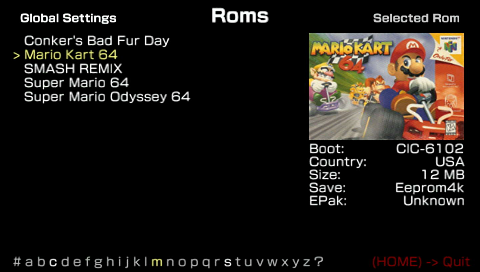
Roms can be placed in two locations, either the Daedalus Folder Rom directory or you can create a directory in the root of the memory stick (e.g. F:/N64/). Daedalus supports most rom formats (V64, Z64, ROM etc). | |||
Zipped roms are also supported, however if zipped the rom will extract itself onto the memory stick anyway so it defeats the purpose of having a zipped rom. If you are running low on space, it is recommended that you extract the rom you want into the Rom Directory. | |||
Compatibility List can be found [https://daedalusx64.fandom.com/wiki/DaedalusX64_Compatibility_List here]. | |||
'''Preview Pictures:''' | '''Preview Pictures:''' | ||
All previews are included in a stable release or on subversion. | |||
Preview pictures can be found in /Resources/Preview/ which you can modify to your liking. The Pictures are required to be in PNG and 4:3 aspect ratio. | |||
To let Daedalusx64 know which picture to use for each rom, you need to add a line to the corresponding entry in the main roms.ini file, with this format | |||
Preview=<filename.png> | |||
'''Save Games:''' | '''Save Games:''' | ||
All the save game types are currently supported, if you have issues saving any game, check the roms.ini and make sure the save type is correct. | |||
Save games are created with the same name as the rom file (in /Daedalusx64/SaveGames/). | |||
Note that for performance reasons Daedalus only saves out modified save game every 60 vbl. | |||
'''Save States:''' | '''Save States:''' | ||
All the save states are created using this name format: SaveSlotXX.ss (XX can be from 0 to 63). Save States are saved by default at /Daedalusx64/SaveStates/<gamename>/. | |||
But you can also create this directory ms0:/n64/SaveSates/ and Daedalus will use this directory for save state creation and loading. | |||
In total there's 64 slots for save states, each game has its own 64 slots to choose. You can delete any save state easily, just choose the slot you want to delete and press square and then press triangle to confirm. | |||
'''Pause menu:''' | '''Pause menu:''' | ||
You can use the Pause Menu to take screenshots and reset the emulator to the main menu. | |||
Screenshots are saved under the /Dumps/<gamename>/ScreenShots/ directory in the Daedalus folder on your Memory Stick. | |||
'''Key mappings:''' | '''Key mappings:''' | ||
Daedalusx allows user-configurable controls to be specified. The desired controls can be chosen from the Rom Settings screen. | |||
In order to define your own controller configuration you need to add a new .ini file to the /Daedalus/ControllerConfigs/ directory. | |||
There are a few examples provided which should give an overview of what is possible. | |||
==Controls== | ==Controls== | ||