Ultimate VSH Menu PSP: Difference between revisions
From GameBrew
More actions
Created page with "{{Infobox PSP homebrew | title = Ultimate VSH Menu | image = https://dlhb.gamebrew.org/psphomebrew/UltimateVSHMenu.jpg|250px | type = Plugins | version = final | licence = Mix..." |
No edit summary |
||
| Line 1: | Line 1: | ||
{{Infobox PSP homebrew | {{Infobox PSP homebrew | ||
| title = Ultimate VSH Menu | | title = Ultimate VSH Menu | ||
| image = https://dlhb.gamebrew.org/psphomebrew/ | | image = https://dlhb.gamebrew.org/psphomebrew/ultimatevshmenu.jpg|250px | ||
| type = | | type = Utilities | ||
| version = final | | version = final (13 Aug 2010) | ||
| licence = Mixed | | licence = Mixed | ||
| author = Total_Noob | | author = Total_Noob | ||
| website = https:// | | website = https://web.archive.org/web/20210207054334/https://www.neoflash.com/forum/index.php?topic=6265.0 | ||
| download = https://dlhb.gamebrew.org/psphomebrew/ | | download = https://dlhb.gamebrew.org/psphomebrew/ultimatevshmenu.7z | ||
| source = | | source = | ||
}} | }} | ||
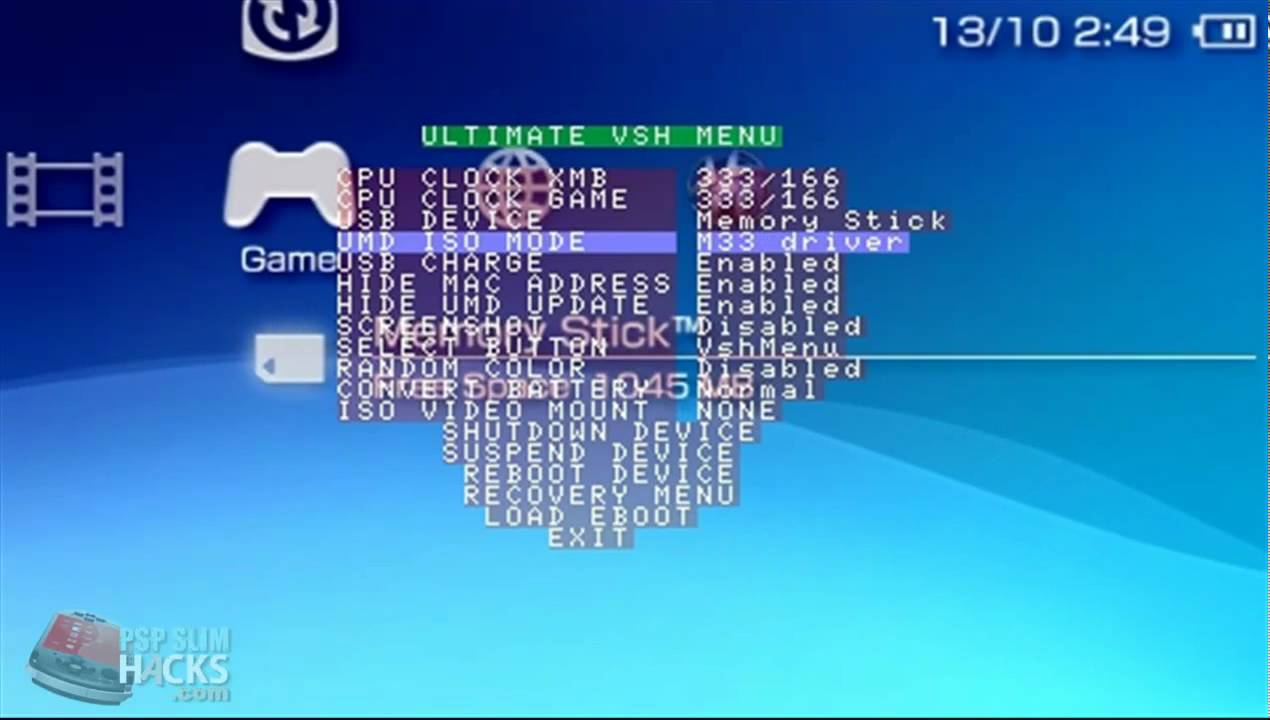
Ultimate VSH Menu is an advanced VSH Menu for CFW 5.XX. There are many useful features, like hide UMD update icon, skip gameboot or load Recovery menu. | Ultimate VSH Menu is an advanced VSH Menu for CFW 5.XX. There are many useful features, like hide UMD update icon, skip gameboot or load Recovery menu. | ||
| Line 16: | Line 15: | ||
It was participated in the Neo Retro Coding Compo 2010 (Retro APP). | It was participated in the Neo Retro Coding Compo 2010 (Retro APP). | ||
Features | ==Features== | ||
* All features of the official VSH Menu. | |||
* Slim Colors Patch by Bubbletune integrated (remember to also flash 13-27.bmp). | |||
* Ability to hide the MAC address in the System Information. | |||
* Possibility to hide the UMD update icon. | |||
* Skip gameboot can be enabled or disabled (will save ~4sec). | |||
* Convert battery option is available in the VSH Menu (convert battery to Pandora, Autoboot or Normal). | |||
* Option to suspend the device. | |||
* VSH Recovery can be opened in the VSH Menu. | |||
* Ability to quickly exit the recovery. | |||
* Recovery can reboot by holding R and going to exit (useful for VSH plugins and other configurations). | |||
* VSH Recovery can be loaded from the Memory Stick (ms0:/seplugins/vshrecovery.prx). | |||
* Compatibility with Lockdown by Torch. | |||
Installation | ==Installation== | ||
Copy the PSP folder to the root of your Memory Stick and launch Ultimate VSH Menu Installer. | Copy the PSP folder to the root of your Memory Stick and launch Ultimate VSH Menu Installer. | ||
User guide | ==User guide== | ||
CPU Clock XMB | {| class="wikitable" | ||
|- | |||
! colspan="2" style="text-align:center;" | Menu options | |||
|- | |||
| CPU Clock XMB || Choose the processor's speed in XMB. | |||
|- | |||
| CPU Clock GAME || Choose the processor's speed in GAME. | |||
|- | |||
| USB Device || Choose between MS, Fo ,F1 F2 F3, and UMD in USB mode. | |||
|- | |||
| UMD ISO Mode || Choose between diffrrents ISO launching ways (Normal, OE ISOFs, M33 Driver, Sony NP9660) | |||
|- | |||
| USB Charge || Choose weather or not to charge battery from USB. | |||
|- | |||
| Hide MAC Adress || Hide or show the PSP MAC Adress. | |||
|- | |||
| Hide UMD Update || Hide Update Icon from UND. | |||
|- | |||
| Select Button || Can be used for either Recovery menu, VSH Menu, or nothing. | |||
|- | |||
| Convert Battery || If the PSP can make it, this option can convert your battery in a pandora one or restore it to a normal one. | |||
|- | |||
| ISO Video Mount || Mount/ unmount an ISO from UMD Video. | |||
|- | |||
| Shutodwn Device || Shutdown PSP. | |||
|- | |||
| Suspend Device || Suspend PSP. | |||
|- | |||
| Reboot device || Reboot PSP. | |||
|- | |||
| Recovery Menu || Open the Recovery menu directly from VSH. | |||
|- | |||
|} | |||
==Controls== | |||
Select - Launch from XMB/Go to Recovery menu/Do nothing (depends on setting) | |||
Left+Right+Square - Change Select button setting | |||
Up/Down - Choose between option in menu | |||
Reight/Left - Change value in one option | |||
Cross - Confirm | |||
Select/Home - Quickly exit the Recovery menu | |||
==Media== | |||
'''Ultimate VSH Menu Final''' ([https://www.youtube.com/watch?v=NEnZnPyt2cM FlorianSupermann]) <br> | |||
<youtube>NEnZnPyt2cM</youtube> | |||
==Compatibility== | |||
All PSP with a 5.xx Custom Firmware (even PSP-2000v3 and PSP-3000): | |||
5.00M33 <br> | |||
5.02GEN <br> | |||
5.03GEN <br> | |||
5.50GEN <br> | |||
==Changelog== | |||
'''Final Version''' | |||
* Removed the option to take screenshot. | |||
* Suppressed the option of random colors. | |||
* Suppressed the option to load EBOOT.PBP. | |||
* Added option to skip Gameboot. | |||
* Now you can exit VshRecovery by pressing the Select or Home button. | |||
* Now if we press R-Trigger when exiting VshRecovery, the PSP will reboot (Useful to activate or deactivate plugins). | |||
'''Revised Version''' | |||
* Fixed various bugs. | |||
* Support for Custom Firmware 5.50 Gen. | |||
* Compatibility with Custom Firmware 5.50 MHU. | |||
* Compatibility with PSP-3000. | |||
==Credits== | |||
Thanks to Dark_AleX for his awesome work for the PSP scene. | |||
Thanks to Bubbletune for his Slim Colors Patch src. | |||
Thanks to SilverSpring for the reversed battery functions. | |||
==External links== | |||
* NeoFlash - [https://web.archive.org/web/20210207054334/https://www.neoflash.com/forum/index.php?topic=6265.0 https://www.neoflash.com/forum/index.php?topic=6265.0] (archived) | |||
* GitHub - https://github.com/theheroGAC/Ultimate-VSH-Menu-Revised | |||
[[Category:PSP homebrew applications]] | |||
[[Category:Homebrew utility applications on PSP]] | |||