
3DSlibris: Difference between revisions
More actions
No edit summary |
No edit summary |
||
| Line 19: | Line 19: | ||
== Features == | == Features == | ||
* | * Reads ebooks and manga on Nintendo 3DS hardware and Azahar. | ||
* | * Library browser with grid and list views, cover thumbnails, metadata titles, and touch navigation. | ||
* Six reading themes with matching splash screens and reader gradients. | |||
* | * Supported formats: <code>EPUB</code>, <code>FB2</code>, <code>TXT</code>, <code>RTF</code>, <code>ODT</code>, <code>MOBI</code>, <code>PDF</code>, <code>CBZ</code> and <code>XPS</code>. | ||
* | * <code>EPUB</code> reflow with TOC support, bookmarks, <code>go to page</code>, cached pagination, and broad inline/block formatting support. | ||
* | * Fixed-layout viewer for manga and document formats (<code>CBZ</code>, <code>PDF</code> and <code>XPS</code>) with zoom, pan, outline navigation, and full-page preview. | ||
* Bundled fallback fonts for broader language coverage (Latin, Cyrillic, Greek, CJK, Arabic, Hebrew, Thai, and more). | |||
* | |||
* | |||
== Installation == | == Installation == | ||
Recommended install: | Recommended install (.cia via Universal-Updater): | ||
* Install 3dslibris from [[Universal-Updater 3DS|Universal-Updater]]. | |||
* Launch it once so sdmc:/3ds/3dslibris/ is created if needed. | |||
* Copy your books to sdmc:/3ds/3dslibris/book/. | |||
* Launch the installed title. | |||
Manual install (3dsx): | |||
* Download <code>3dslibris-sdmc.zip</code> from [https://github.com/RigleGit/3dslibris/releases GitHub Releases]. | * Download <code>3dslibris-sdmc.zip</code> from [https://github.com/RigleGit/3dslibris/releases GitHub Releases]. | ||
* Extract that zip into the root of your SD card, so it expands into <code>sdmc:/</code>. | * Extract that zip into the root of your SD card, so it expands into <code>sdmc:/</code>. | ||
| Line 37: | Line 40: | ||
* Launch <code>sdmc:/3ds/3dslibris/3dslibris.3dsx</code> from Homebrew Launcher. | * Launch <code>sdmc:/3ds/3dslibris/3dslibris.3dsx</code> from Homebrew Launcher. | ||
Manual install (.cia): | |||
* Install <code>3dslibris.cia</code>. | * Install <code>3dslibris.cia</code>. | ||
* Launch the installed title once so it creates <code>sdmc:/3ds/3dslibris/</code> if needed. | * Launch the installed title once so it creates <code>sdmc:/3ds/3dslibris/</code> if needed. | ||
* Put your books in <code>sdmc:/3ds/3dslibris/book/</code>. | * Put your books in <code>sdmc:/3ds/3dslibris/book/</code>. | ||
* Launch the installed title. | * Launch the installed title. | ||
Notes: | Notes: | ||
* The <code>.cia</code> includes default <code>font/</code> and <code>resources/</code> assets in <code>RomFS</code>. | |||
* Books are read from <code>sdmc:/3ds/3dslibris/book/</code> and optionally <code>romfs:/3ds/3dslibris/book/</code>. | |||
* If the same filename exists in both places, the SD version wins. | |||
* Releases also provide <code>3dslibris-debug.3dsx</code> and <code>3dslibris-debug.cia</code>, which enable verbose logging to <code>sdmc:/3ds/3dslibris/3dslibris.log</code>. | |||
==Supported formats== | |||
Strong support: | |||
* <code>EPUB</code>: EPUB2 and EPUB3 reflow, NAV and NCX TOC support, cached pagination, bookmarks, configurable fonts, and broad inline/block formatting support. | |||
== Supported formats == | |||
* <code>EPUB</code> | |||
Good support: | |||
* <code>FB2</code> | * <code>FB2</code> | ||
* <code>TXT</code> | * <code>TXT</code> | ||
| Line 107: | Line 62: | ||
* <code>ODT</code> | * <code>ODT</code> | ||
Experimental or best-effort: | |||
* <code>MOBI</code> | * <code>MOBI</code>: can be slow on first open, TOC quality depends on file structure, and some files may fall back to safer but more limited parsing. | ||
* <code>PDF</code>: viewer mode with zoomed reading area and full-page preview. | |||
* <code>CBZ</code>: viewer mode for manga and image-based books. | |||
* <code>XPS</code>: viewer mode with the same fixed-layout reader controls. | |||
* <code>PDF</code> | |||
* <code>CBZ</code> | |||
* <code>XPS</code> | |||
== | == Limitations == | ||
* No DRM support. | * No DRM support. | ||
* EPUB is a reflow renderer, not a full browser engine. Complex CSS, JavaScript, multi-column layouts, and wide tables are simplified. | |||
* EPUB tables are converted into text-oriented blocks for readability on 3DS screens. | |||
* SVG support in EPUB is limited to common wrappers that reference supported raster images. | |||
* Some malformed EPUB anchors and MOBI tables of contents can produce approximate navigation. | |||
* Large or malformed MOBI files may open slowly or lose some rich formatting in safer fallback paths. | |||
* After changing layout-related settings such as font size, spacing, orientation, or some format-specific options, reopening the current book may be necessary. | |||
== Controls == | == Controls == | ||
=== Library | === Library === | ||
D-Pad - Move | D-Pad - Move selection | ||
A - Open the selected book | A - Open the selected book | ||
L / R - Jump to the previous or next library page | L/R - Jump to the previous or next library page | ||
Touch - Tap a book to select it, tap it again to open it | Touch - Tap a book to select it, tap it again to open it | ||
Y / Select - Open settings | Y/Select - Open "General" settings | ||
=== | === Standard reading === | ||
A/B/L/R - Turn pages | A/B/L/R - Turn pages | ||
| Line 157: | Line 98: | ||
X - Change background color | X - Change background color | ||
Select - Settings | Select - Open "BOOK" Settings | ||
Start - Return to library | Start - Return to library | ||
| Line 163: | Line 104: | ||
Touch UI for library, settings, index, bookmarks, font menus... | Touch UI for library, settings, index, bookmarks, font menus... | ||
=== PDF / CBZ / XPS | === Fixed-layout (PDF / CBZ / XPS) === | ||
A - Zoom in | A - Zoom in | ||
B - Zoom out | B - Zoom out | ||
Left/Right - Previous | Left/Right - Previous/Next page | ||
Up/Down - Next | Up/Down - Next/Previous chapter when the document exposes an outline; otherwise previous or next page | ||
Touch - Move the viewport by tapping or dragging on the page preview | Touch - Move the viewport by tapping or dragging on the page preview | ||
Select - Open settings | Select - Open "BOOK" settings | ||
Start - Return to library | Start - Return to library | ||
Revision as of 06:41, 27 April 2026
| 3DSlibris | |
|---|---|
 | |
| General | |
| Author | Rigle |
| Type | Utilities |
| Version | 2.5.0 |
| License | GPL-2.0 |
| Last Updated | 2026/04/24 |
| Links | |
| Download | |
| Website | |
| Source | |
Nintendo 3DS homebrew ebook reader based on the original Nintendo DS project dslibris.
3dslibris ports the original architecture to libctru, keeps the fast text-first reading model, and adds practical 3DS UX improvements (grid library, cover thumbs, indexed navigation, procedural UI skin, orientation-aware touch, etc.).
The current .cia packaging flow is based on the same makerom/bannertool process used by Universal-Updater, adapted to this project's assets and release layout.
Features
- Reads ebooks and manga on Nintendo 3DS hardware and Azahar.
- Library browser with grid and list views, cover thumbnails, metadata titles, and touch navigation.
- Six reading themes with matching splash screens and reader gradients.
- Supported formats:
EPUB,FB2,TXT,RTF,ODT,MOBI,PDF,CBZandXPS. EPUBreflow with TOC support, bookmarks,go to page, cached pagination, and broad inline/block formatting support.- Fixed-layout viewer for manga and document formats (
CBZ,PDFandXPS) with zoom, pan, outline navigation, and full-page preview. - Bundled fallback fonts for broader language coverage (Latin, Cyrillic, Greek, CJK, Arabic, Hebrew, Thai, and more).
Installation
Recommended install (.cia via Universal-Updater):
- Install 3dslibris from Universal-Updater.
- Launch it once so sdmc:/3ds/3dslibris/ is created if needed.
- Copy your books to sdmc:/3ds/3dslibris/book/.
- Launch the installed title.
Manual install (3dsx):
- Download
3dslibris-sdmc.zipfrom GitHub Releases. - Extract that zip into the root of your SD card, so it expands into
sdmc:/. - Put your books in
sdmc:/3ds/3dslibris/book/. - Launch
sdmc:/3ds/3dslibris/3dslibris.3dsxfrom Homebrew Launcher.
Manual install (.cia):
- Install
3dslibris.cia. - Launch the installed title once so it creates
sdmc:/3ds/3dslibris/if needed. - Put your books in
sdmc:/3ds/3dslibris/book/. - Launch the installed title.
Notes:
- The
.ciaincludes defaultfont/andresources/assets inRomFS. - Books are read from
sdmc:/3ds/3dslibris/book/and optionallyromfs:/3ds/3dslibris/book/. - If the same filename exists in both places, the SD version wins.
- Releases also provide
3dslibris-debug.3dsxand3dslibris-debug.cia, which enable verbose logging tosdmc:/3ds/3dslibris/3dslibris.log.
Supported formats
Strong support:
EPUB: EPUB2 and EPUB3 reflow, NAV and NCX TOC support, cached pagination, bookmarks, configurable fonts, and broad inline/block formatting support.
Good support:
FB2TXTRTFODT
Experimental or best-effort:
MOBI: can be slow on first open, TOC quality depends on file structure, and some files may fall back to safer but more limited parsing.PDF: viewer mode with zoomed reading area and full-page preview.CBZ: viewer mode for manga and image-based books.XPS: viewer mode with the same fixed-layout reader controls.
Limitations
- No DRM support.
- EPUB is a reflow renderer, not a full browser engine. Complex CSS, JavaScript, multi-column layouts, and wide tables are simplified.
- EPUB tables are converted into text-oriented blocks for readability on 3DS screens.
- SVG support in EPUB is limited to common wrappers that reference supported raster images.
- Some malformed EPUB anchors and MOBI tables of contents can produce approximate navigation.
- Large or malformed MOBI files may open slowly or lose some rich formatting in safer fallback paths.
- After changing layout-related settings such as font size, spacing, orientation, or some format-specific options, reopening the current book may be necessary.
Controls
Library
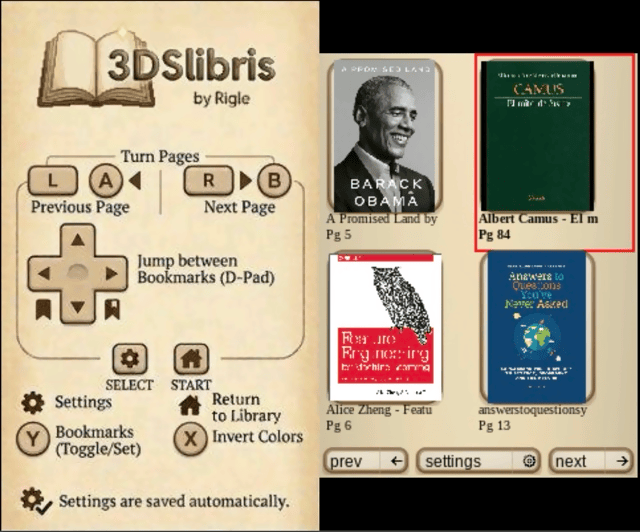
D-Pad - Move selection
A - Open the selected book
L/R - Jump to the previous or next library page
Touch - Tap a book to select it, tap it again to open it
Y/Select - Open "General" settings
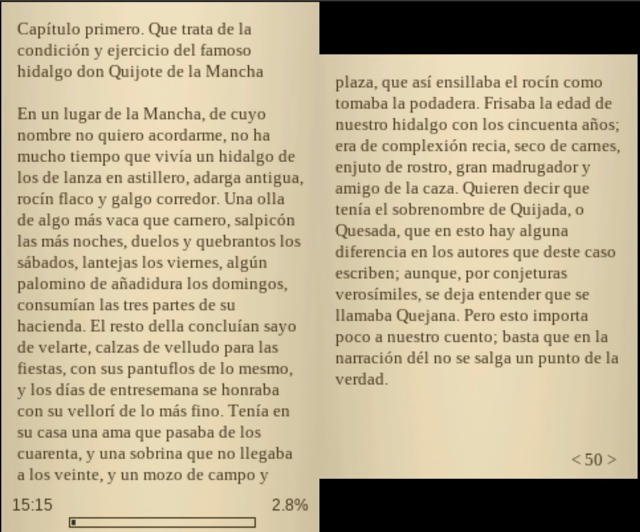
Standard reading
A/B/L/R - Turn pages
D-Pad Left/Right - Jump between bookmarks
Y - Toggle bookmark
X - Change background color
Select - Open "BOOK" Settings
Start - Return to library
Touch UI for library, settings, index, bookmarks, font menus...
Fixed-layout (PDF / CBZ / XPS)
A - Zoom in
B - Zoom out
Left/Right - Previous/Next page
Up/Down - Next/Previous chapter when the document exposes an outline; otherwise previous or next page
Touch - Move the viewport by tapping or dragging on the page preview
Select - Open "BOOK" settings
Start - Return to library
Screenshots
Changelog
v2.5.0
- Highlights
- Text alignment support:
text-align: centerandtext-align: rightare now honoured in EPUB reflow. Each paragraph emits an alignment token that the draw routine uses to compute per-line offset, so wrapped lines stay correctly aligned across the whole paragraph. - Performance improvements: EPUB CSS scanning now reads only the
<head>section of each spine document, reducing zip I/O on large books (~1 second less loading time). A single zip handle is recycled across all spine CSS scans (~20% less loading time). Plain text pagination eliminates per-line heap allocation. First-time EPUB cover extraction is ~3× faster on old 3DS via MuPDF subsampled thumbnail decode.
- Text alignment support:
- Included fixes and behavior changes
- Browser return and suspend handling stabilized: returning from the reader to the library now correctly resumes browser jobs and handles applet suspend/resume, avoiding tearing down in-flight async opens during HOME suspension.
- Gallery covers clipped correctly: cover thumbnails in gallery view are clipped to the rounded frame, preventing image pixels from bleeding outside the card border.
- PDF HOME button crash fixed: PDF file parsing is now split into independently cancellable steps, each with an APT yield point, so pressing HOME during PDF loading is handled cleanly instead of causing a console restart.
- Large EPUB page limit raised: the maximum pages in memory raised from 5,000 to 25,000 (cache guard to 50,000), fixing books that stopped loading halfway through.
- HR overflow tracking fixed: parser and renderer now agree on vertical position after
<hr>rules, preventing text overlap after horizontal rules. - PagedListMenu overflow fixed: pagination indices changed from
u8tou16so menus with more than 255 entries no longer wrap and corrupt the page list. - SDMC zip trimmed:
3dslibris-sdmc.zipnow contains only SD card runtime files; the.3dsxbuilds are separate release assets instead of being duplicated inside the zip.
v2.4.2
- Highlights
- Stability and crash-fix release: addresses several null dereference, divide-by-zero, out-of-bounds, and infinite-loop issues identified on real hardware.
- Included fixes and behavior changes
- FontManager null dereference crash fixed:
GetFace()now usesfind()and returnsNULLfor missing style keys instead of silently inserting a null entry viaoperator[]; all callers guard againstNULLbefore dereferencing. - Division by zero in browser marquee fixed: the background color averaging loop now guards against zero-dimension covers before dividing.
- Degenerate layout when font height is zero fixed: a
line_heightfloor of 10 pixels is enforced so menus do not collapse to unreadable or non-interactive rows when no valid face is loaded. - Out-of-bounds touch in empty list menus fixed:
PagedListMenu::HandleTouchInput()now returns early when the button vector is empty, avoiding an out-of-bounds read. - Infinite loop in text wrapping fixed:
WrapTextToLines()now forces a minimum advance of 1 byte so the loop always makes progress on zero-width or unrecognised code points.
- FontManager null dereference crash fixed:
v2.4.1
- Highlights
- Crash-at-boot fix:
FontMenuis constructed duringApp::App()before fonts are loaded. CallingGetHeight()andGetAdvance()through the null font manager cascaded into a heap Data Abort immediately at startup. Both methods now return safe defaults until the font manager is initialised.
- Crash-at-boot fix:
v2.4.0
- Highlights
- Six-color theme system: the app now supports six palette-based color themes (light, sepia, dark, and three more), each controlling text, background, UI chrome, and cover overlays consistently across all views.
- Dark/light splash screen variants: the startup splash now uses a dark or light version that matches the active color mode.
- Cycle themes with X in the browser: press
Xin the library view to cycle through color modes without opening the settings menu. - Gradient backgrounds in reader mode: the top and bottom strips of the reading view now use a smooth gradient instead of a flat color.
- Improved bookmark menu: entries now show a preview of the page text alongside the bookmark position.
- Improved chapter menu: chapter titles wrap to up to three lines so long titles are no longer truncated.
- Dynamic row heights in PagedListMenu: the shared paged-list component now sizes rows dynamically per page so entries always fit the available screen space.
- Browser warmup re-enabled: cover extraction now runs incrementally on idle frames (3 ms budget), so covers populate without stalling the UI.
- Included fixes and behavior changes
- EPUB NAV spine ordering fixed: chapter detection now correctly follows the
<spine>order from the OPF manifest rather than assuming document order. - Marquee background color fixed: the browser grid marquee now correctly tracks the active dark theme background instead of always using the light color.
- Long font filenames wrap in FontMenu: font file paths too long for a single line now wrap cleanly instead of being clipped.
- EPUB NAV spine ordering fixed: chapter detection now correctly follows the
v2.3.2
- Highlights
- MOBI structured TOC restored: the HTML-to-text position map is now built during safe-extractor parsing, so structured TOC entries are resolved to accurate page numbers instead of falling back to linear estimation.
- MOBI inline images restored: images embedded in MOBI HTML are now registered and rendered in the reading view; previously the safe extractor wired up no callbacks and all inline images were silently dropped.
- MOBI page cache re-enabled: the second open of a large MOBI now loads from cache in roughly 3.7 s instead of re-parsing for roughly 9 s.
- Browser grid covers load on view toggle: switching from list to grid view now immediately loads covers for the visible page instead of showing empty slots until the next navigation event.
- EPUB large PNG covers decode via libpng: covers larger than 4 MB now use a direct libpng thumbnail path that scales to 85×115 px while keeping peak memory low.
- EPUB SVG covers rendered via MuPDF: SVG cover images are rasterized at thumbnail size using the MuPDF fitz renderer instead of being skipped or incorrectly decoded.
v2.3.1
- Highlights
- All background workers disabled for this release: fixed-layout rendering (PDF, CBZ), MOBI finalization, and browser warmup all run synchronously on the main thread, trading some speed for confirmed reliability on real hardware.
- Reading direction toggle for fixed-layout documents: PDF, CBZ, and XPS now have a per-book
reading directiontoggle inBOOKsettings. Switch betweenLeft to right(default, western) andRight to left(manga, Arabic, Hebrew). - Book opening and switching are much harder to break: stale open sessions are gated more carefully, browser-side background work is paused at the right time, and the transition between books no longer relies on timing-sensitive state.
- PDF and CBZ now render at zoom-correct resolution: in synchronous mode the interactive tile is rendered immediately after the preview, so zoomed-in content is sharp rather than upscaled from the preview bitmap.
- MOBI crash on reopen is fixed: a large contiguous heap reservation during text merging could
std::terminateon a fragmented 3DS heap after a prior book close; the reservation is removed and the string now grows incrementally.
- Included fixes and behavior changes
- EPUB inline image metadata retried on zip open failure: if
unzOpenfails due to transient memory pressure,metadata_probedis left false so the next frame retries instead of permanently marking the image as unloadable. - Book vector capacity released on close:
pagesandchaptersvectors now swap with an empty vector onBook::Close(), actually freeing capacity rather than just clearing size. - Opening a book is cancellable and session-safe: an in-progress open can now be cancelled with
B,Start, orSelect, and switching books no longer depends on stale callbacks or unfinished work from the previous session.
- EPUB inline image metadata retried on zip open failure: if
v2.3.0
- Highlights
GENERALandBOOKsettings are now separated cleanly: global preferences stay in the library settings menu, while book-specific actions appear only when you open settings during reading.- New
go to pageslider popup: books now expose a dedicated page-jump control fromBOOKsettings, with visible page number feedback and both touch and button-based adjustment.
- Included fixes and behavior changes
- The in-book settings menu is more coherent: global options such as
clock format,color mode, andlibrary viewno longer appear mixed into the per-book menu. go to pageis tuned for 3DS controls: touch chooses the page directly,Left/Rightmoves by one page,Up/DownandL/Rmove in larger jumps,Aconfirms, andB/Select/Startcancel.- Left-handed orientation remains supported: the new slider and the updated settings separation continue to use the existing orientation-aware input mapping.
- Recent EPUB compatibility fixes remain included: cosmetic hidden pagebreak spans are ignored, and CSS list marker suppression such as
list-style-type: noneis still honored.
- The in-book settings menu is more coherent: global options such as
v2.2.2
- Highlights
- Cosmetic EPUB pagebreak markers no longer disturb pagination: hidden
epub:type="pagebreak"/role="doc-pagebreak"spans are now ignored when they are purely decorative, so they no longer create bogus breaks in the reflowed text. - CSS-hidden list markers are now respected: lists styled with
list-style-type: noneorlist-style: noneno longer show bullets or numbers in 3dslibris when those rules come from EPUB CSS.
- Cosmetic EPUB pagebreak markers no longer disturb pagination: hidden
- Included fixes and behavior changes
- EPUB parser hidden-content handling is more robust: the parser now distinguishes between useful structural content and hidden print-parity markers that should not affect reading flow.
- List marker suppression now works from class-based CSS too: this is no longer limited to inline styles or a few hardcoded class names.
- The EPUB rendering fixture was updated: the test book now includes a non-hardcoded
ornamentlesslist case so the behavior can be validated in both automated tests and on hardware.
v2.2.1
- Highlights
- Optional library list view: settings now let you switch the browser between the existing cover gallery and a DSLibris-style list view that loads only titles, starts faster, and is easier to navigate on large libraries.
- List view is fully integrated: the new mode is saved in the XML preferences, works even with no book currently open, supports vertical navigation, and keeps the existing browser flow intact.
- Long titles are handled better in the list: list rows now use the dedicated presentation path introduced for this feature, with clearer rendering and spacing for long display names.
- Debug and release CIA builds can coexist:
3dslibris-debug.cianow uses its own Title ID/Product Code so it installs separately instead of overwriting the release build.
- Included fixes and behavior changes
- Browser presentation is split cleanly by mode: grid and list rendering now live in separate presentation files while
app_browser.cppremains the coordinator for shared navigation and actions. - Preformatted host wrapping stays correct: the host-side regression fix for hard wrapping in preformatted text is included in this release train.
- Release automation still publishes the full artifact set: the release workflow continues to generate and attach both CIA variants, both 3DSX variants, the SD package, and the source tarball.
- Browser presentation is split cleanly by mode: grid and list rendering now live in separate presentation files while
v2.1.0
- Highlights
- Configurable EPUB monospace flow restored and expanded:
pre/codenow reflow with the active monospace font instead of measuring with the serif text face, preserving readable code blocks while keeping the new configurable mono font path. - Monospace variants now render correctly: EPUB content can distinguish regular, bold, italic, and bold-italic monospace text instead of collapsing everything to one mono style.
- More EPUB block semantics are supported: lists, nested ordered lists,
blockquote,aside,caption,figure,dl/dd, and basic table linearization now render as readable reflow blocks instead of collapsing into generic paragraph flow. - EPUB inline formatting support is broader: underline, strikethrough, overline, superscript, subscript, dotted/dashed/wavy underline styles, and common CSS-driven emphasis patterns are now recognized more consistently.
- Hidden EPUB accessibility text is ignored: common hidden-text patterns such as
visually-hidden,aria-hidden, and equivalent inline CSS are no longer shown as visible body text. - Styled punctuation stays attached to the surrounding text: closing
!/?and opening¡/¿are handled more safely across inline style boundaries, avoiding the worst split cases in Spanish text. - EPUB index labels are cleaner: chapter menus now prefer simpler labels instead of concatenating multiple headings into one noisy entry.
- EPUB page cache writes are safer: page cache files now save with the actual layout parameters used for pagination instead of stale zeroed values, avoiding invalid cache entries after fresh opens.
- Bundled quickstart and SD docs are clearer about where books go: the release package now makes the
sdmc:/3ds/3dslibris/book/path more explicit, since this is still the most common user setup question. - Book view renderer recovery is more defensive: entering or reopening a book now resets the text renderer state more aggressively, which should reduce rare cases where visible glyphs disappear until the app is restarted.
- Configurable EPUB monospace flow restored and expanded:
v2.0.4
- Highlights
- Bookmarks and last-read page persistence fixed: prefs XML writing now escapes attribute values correctly and sanitizes invalid control characters, so filenames like
... & ...no longer break3dslibris.xmlparsing on startup. - CIA library source handling improved: the app now discovers books from both
sdmc:/3ds/3dslibris/bookandromfs:/3ds/3dslibris/book, with SD entries taking priority when names overlap. - Left-handed page screen order corrected: reflow reading now inverts first and second reading screens correctly in left-handed orientation.
- Orientation-relative library D-Pad navigation: grid navigation now follows console orientation in both modes so directional input matches visual movement in right-handed and left-handed layouts.
- Startup diagnostics improved: prefs load failures are now logged with an explicit warning instead of failing silently.
- EPUB emphasis compatibility improved: the parser now recognizes bold/italic expressed via common
styleandclassCSS patterns, not only semantic tags. - Release pipeline stability improved: debug MOBI builds now include the correct reporter definitions so
debug-3dsxcompiles reliably in CI/release workflows.
- Bookmarks and last-read page persistence fixed: prefs XML writing now escapes attribute values correctly and sanitizes invalid control characters, so filenames like
v2.0.3
- Highlights
- Fixed bundled RomFS for
.ciabuilds — the installable build now actually includes its bundled fonts and UI resources, instead of staging them locally but omitting them from the final CIA package. - Fixed the CIA-only startup crash — a null cache entry in the text/font teardown path could trigger an ARM11 data abort during early startup failure; font initialization and cache cleanup are now hardened.
- Better runtime asset fallback — bundled fonts and resources are resolved safely between SD and RomFS, so
.ciainstalls no longer depend on a manualfont/orresources/copy to boot. - Stable fatal boot screens — missing-book and startup error screens no longer flicker between old and new frames while waiting for Start.
- Clearer first-run behavior — if no books are present, the app now shows a stable message telling you to copy your EPUB, FB2, TXT, RTF, or ODT files into
sdmc:/3ds/3dslibris/book. - CIA build validation added to CI — GitHub Actions now builds and verifies the
.ciapath as well, including checks that the staged RomFS contains the bundled runtime files.
- Fixed bundled RomFS for
- Included reader functionality
- MuPDF-backed PDF, CBZ, and XPS support
- Progressive fixed-layout rendering
- Asynchronous/deferred MOBI open on New 3DS
- Generated library cover thumbnails
- Bundled runtime assets for
.ciainstalls
v2.0.2
- Highlights
- Fixed CIA startup on hardware and Azahar: the packaged NCCH code is now emitted without compression, avoiding the startup crash seen in previous
2.0.1CIA builds. - No change to reader features: this is a packaging-focused release intended to restore a working installable build.
- Clean CIA build path: the local CIA build also includes the small
book_io.cppdeclaration fix required for a clean rebuild.
- Fixed CIA startup on hardware and Azahar: the packaged NCCH code is now emitted without compression, avoiding the startup crash seen in previous
v2.0.1
- Highlights
- Full branch catch-up release:
v2.0.1includes the missing commits that were finished after the originalv2.0.0tag, so the public release now matches the maintained main line. - Centralized runtime paths: SD, cache, and related filesystem paths now live in a shared path layer instead of being duplicated across subsystems.
- Cleaner repo structure: shared helpers were reorganized, legacy duplicate files were removed after the move, and bundled
expatsources now live underthird_party/. - MOBI cache code split out cleanly: page-cache serialization and invalidation logic now live in a dedicated MOBI cache module instead of being embedded in the larger common book I/O unit.
- Improved native test ergonomics: the text-layout and Unicode tests now reuse a shared native build helper instead of each script compiling the same dependency objects manually.
- Expanded technical documentation: the repository now includes architecture notes plus local NDS/3DS hardware reference material derived from GBATek for future maintenance work.
- Full branch catch-up release:
- Included reader functionality (from the v2.0.0 line)
- MuPDF-backed PDF, CBZ, and XPS support
- Progressive fixed-layout rendering with preview-first display
- Asynchronous/deferred MOBI open on New 3DS
- Generated library cover thumbnails for EPUB, FB2, MOBI, PDF, and CBZ
- Bundled runtime assets for
.ciainstalls
v2.0.0
- Highlights
- PDF, CBZ, and XPS reading: open PDF documents, comic books (CBZ), and XPS files with zoom, full-page preview on the bottom screen, and outline navigation when available.
- Progressive page loading: a preview of the page is shown immediately, then it refines to full quality in the background.
- Faster on New 3DS: page rendering for PDF and CBZ runs on a separate processor core, keeping the UI responsive. Old 3DS still works with automatic fallback.
- MOBI books open without freezing the UI on New 3DS thanks to asynchronous processing: you can start reading while the rest of the book finishes loading in the background.
- Library covers now work for every format: EPUB, FB2, MOBI, PDF, and CBZ all show actual page thumbnails instead of placeholders.
- All 1.1.x improvements included: inline images in MOBI and EPUB, faster image-heavy books, better text rendering, and more accurate MOBI table of contents.
- No more manual SD card setup for
.ciainstalls: fonts and UI resources are built in. - More stable startup: problematic MOBI files no longer cause crashes, and the app stays on a clear error screen instead of flickering between states when something goes wrong.
v1.1.0
- Highlights
- Library navigation: you can now move the selection around the book grid with the D-Pad and press A to open.
- Images inside EPUB and MOBI books now display correctly: small icons, wide separators, and full-size figures no longer take up the entire screen or disappear.
- EPUB books with lots of images open noticeably faster thanks to internal optimizations in how images are loaded from the archive.
- Library cover thumbnails for MOBI books generate faster on subsequent visits since cover data is now remembered between sessions.
- No more manual SD card setup for
.ciainstalls: the.cianow includes all required fonts and UI resources, so a plain install from the Homebrew Menu is enough. - Better text rendering across all formats: improved line breaking, proper handling of special characters, and font sizes that can no longer be set to values that break pagination.
- Code blocks and <code></code> <pre></pre> sections in EPUBs now wrap properly instead of running off the edge of the screen.
- MOBI books benefit from multiple fixes: more accurate table of contents, better plain-text wrapping that matches how real books read, and support for HUFF/CDIC compressed files.
v1.0.3
- Highlights
- Pressing right on settings rows such as font size and paragraph spacing now increases the value.
- Pressing left now decreases the value, matching the on-screen arrows and touch layout.
- Horizontal navigation inside the settings list is aligned with the same left/right direction.
- The main browser splash now shows the app version centered at the bottom of the left screen.
- Changing font size, paragraph spacing, orientation, or reading fonts no longer tries to repaginate the book inside the settings menu.
- When layout-related settings change, the app shows a warning and applies the new layout after reopening the current book.
- MOBI parsing is more resilient against empty or corrupt files and now shows a readable error instead of a raw numeric failure.
- MOBI books now have an optional per-book
line wrap fixfor badly converted files that hard-wrap normal prose into many short blocks. - The
.ciapackaging flow was rebuilt around the samemakerom/bannertoolprocess used by Universal-Updater. - Previous
1.0.3test.ciabuilds could install but fail to boot because the packaged exheader ended up with an invalid main-thread priority. - The generated
.cianow boots correctly on original hardware and in Azahar.
- Known bug
- When a book is reopened after a layout change, or after toggling the per-book MOBI
line wrap fix, reading position and existing bookmarks are remapped approximately and may land a few pages away from their original location. - Some malformed MOBI files still contain source encoding or OCR artifacts that cannot be repaired fully by the reader.
- When a book is reopened after a layout change, or after toggling the per-book MOBI
v1.0.2
- Highlights
- Startup now stops with clear install guidance if required runtime files are missing from the SD card.
- The error message tells users to download and extract
3dslibris-sdmc.zipand shows the expectedsdmc:/3ds/3dslibris/layout. - The README now explains installation step by step for the
.3dsx+ SD package flow.
v1.0.1
- Highlights
- EPUB cold opens are now much faster on large books by indexing ZIP entries before spine parsing.
- In real tests with Don Quijote, cold open time dropped from about 50.5s to about 7.2s, roughly a 7x improvement.
- Releases now include
3dslibris-debug.3dsx, which enables verbose diagnostic logging in3dslibris.log.
- Notes
- The debug build is intended for troubleshooting and performance investigation.
- EPUB TOC resolution remains separate from the main open path and was not the main cause of the previous cold-open slowdown.
v1.0.0
- First release.
Credits
- Original
dslibris: Ray Haleblian - 3DS port and maintenance: Rigle