
3DSlibris: Difference between revisions
More actions
No edit summary |
No edit summary |
||
| Line 168: | Line 168: | ||
https://dlhb.gamebrew.org/3dshomebrews/images/3dslibris3.png | https://dlhb.gamebrew.org/3dshomebrews/images/3dslibris3.png | ||
== Changelog == | == Changelog == | ||
Revision as of 04:22, 9 April 2026
| 3DSlibris | |
|---|---|
 | |
| General | |
| Author | Rigle |
| Type | Utilities |
| Version | 2.0.4 |
| License | GPL-2.0 |
| Last Updated | 2026/04/03 |
| Links | |
| Download | |
| Website | |
| Source | |
Nintendo 3DS homebrew ebook reader based on the original Nintendo DS project dslibris.
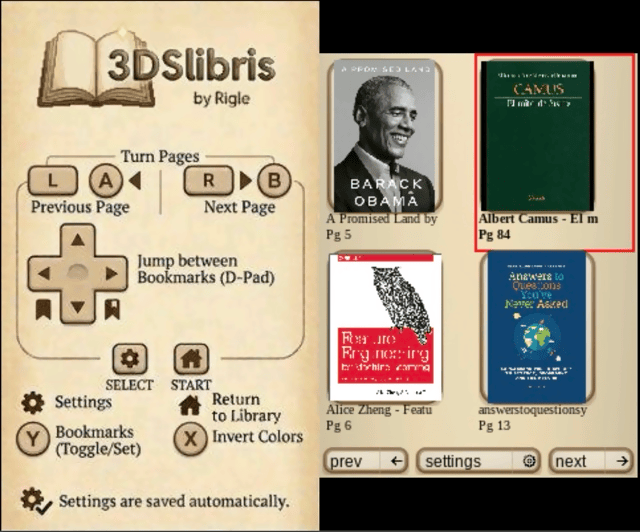
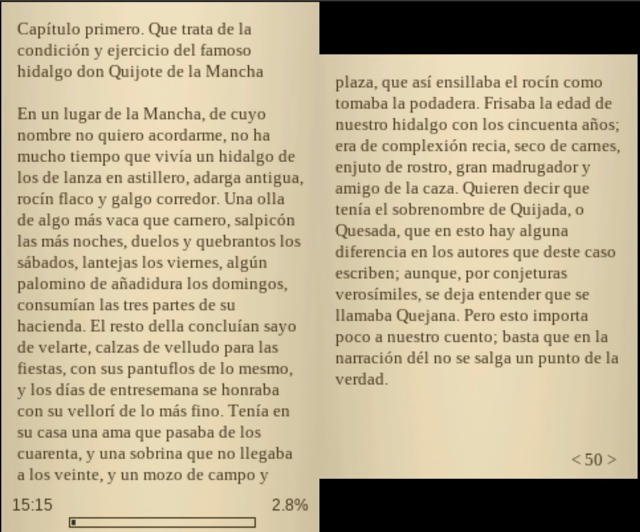
3dslibris ports the original architecture to libctru, keeps the fast text-first reading model, and adds practical 3DS UX improvements (grid library, cover thumbs, indexed navigation, procedural UI skin, orientation-aware touch, etc.).
The current .cia packaging flow is based on the same makerom/bannertool process used by Universal-Updater, adapted to this project's assets and release layout.
Features
- Custom fonts.
- Bookmarks.
- Table of contents/index support.
- Left- and right-handed layouts.
- Three color modes: Daylight, Night, and Book.
- Strong EPUB support.
- Good FB2, TXT, RTF and ODT support.
- Experimental MOBI support.
- PDF, CBZ, and XPS viewing (MuPDF-backed).
Installation
Recommended install:
- Download
3dslibris-sdmc.zipfrom GitHub Releases. - Extract that zip into the root of your SD card, so it expands into
sdmc:/. - Put your books in
sdmc:/3ds/3dslibris/book/. - Launch
sdmc:/3ds/3dslibris/3dslibris.3dsxfrom Homebrew Launcher.
Alternative install:
- Install
3dslibris.cia. - Launch the installed title once so it creates
sdmc:/3ds/3dslibris/if needed. - Put your books in
sdmc:/3ds/3dslibris/book/. - Launch the installed title.
Important:
- The
.ciabundles the defaultfont/andresources/runtime assets inside RomFS, so it can boot without manually extracting3dslibris-sdmc.zip. - Books are discovered from
sdmc:/3ds/3dslibris/book/andromfs:/3ds/3dslibris/book/. - If the same filename exists in both places, SD takes priority.
3dslibris-sdmc.zipis still the recommended install for.3dsx, and it remains useful if you want the same runtime files laid out explicitly on SD.3dslibris-debug.3dsxuses the same SD layout and writes verbose diagnostics tosdmc:/3ds/3dslibris/3dslibris.log.- The
.ciabuild uses the Universal-Updater-style packaging flow and now also validates the bundled RomFS path in GitHub Actions.
Generated install package targets:
make package-sdmcstagesdist/sdmc/...with3dslibris.3dsxincludedmake zip-sdmccreatesdist/3dslibris-sdmc.zipmake ciacreates3dslibris.ciamake source-releasecreatesdist/3dslibris-source.tar.gz- GitHub Releases: pushing a tag like
v2.0.4triggers.github/workflows/release.ymland attaches3dslibris.cia,3dslibris.3dsx,3dslibris-debug.3dsx,dist/3dslibris-sdmc.zip, anddist/3dslibris-source.tar.gzto the release
Bundled runtime files:
sdmc/3ds/3dslibris/resources/splash.jpgsdmc/3ds/3dslibris/resources/ui/icons/png/*.pngsdmc/3ds/3dslibris/book/README.mdsdmc/3ds/3dslibris/font/README.mdsdmc/3ds/3dslibris/font/Liberation*.ttfsdmc/3ds/3dslibris/font/OFL-1.1.txt
Notes:
- Homebrew Launcher path: keep the app at
sdmc:/3ds/3dslibris/3dslibris.3dsx - Debug build path: keep
3dslibris-debug.3dsxin the samesdmc:/3ds/3dslibris/folder if you want verbose logs - Default Liberation fonts are bundled in the SD package for
.3dsx, and inside RomFS for.cia - You can replace them with other
.ttf,.otf, or.ttcfonts if you want to customize the reading/UI typefaces - Runtime files such as
3dslibris.xml,3dslibris.log, andcache/*are created by the app on first run
sdmc:/3ds/3dslibris/3dslibris.3dsx
sdmc:/3ds/3dslibris/book/*.epub|*.fb2|*.txt|*.rtf|*.odt|*.mobi
sdmc:/3ds/3dslibris/font/*.ttf
sdmc:/3ds/3dslibris/resources/splash.jpg
sdmc:/3ds/3dslibris/resources/ui/icons/png/{back,gear,home,next,prev}.png
Supported formats
Strong support
EPUB(EPUB2 + EPUB3 NAV/NCX parsing with robust fallbacks)
Good support (text-oriented)
FB2TXTRTFODT
Experimental / best-effort
MOBI- First open can be slow on large books (decompress + parse + pagination)
- Subsequent opens are accelerated by persistent page cache
- TOC quality is heuristic for many files (can be approximate)
- Inline MOBI images now reuse the same smart
inline / band / pagelayout pipeline used by EPUB/FB2, with better caption flow on mixed photo spreads - Includes an optional per-book
line wrap fixfor badly converted files that hard-wrap prose line by line, while preserving embedded image markers during cleanup - Empty or corrupt books are reported with a readable error instead of a raw numeric code
PDF- Viewer-only path with MuPDF-backed rendering
- Top screen shows a zoomed page region; bottom screen shows the full-page preview and viewport box
- Uses the shared fixed-layout reader controls documented below
- PDF-enabled builds in this branch are distributed with AGPL-driven notice and source-release requirements; see the license section below
CBZ- Viewer-only path with MuPDF-backed image-page rendering
- Uses the shared fixed-layout reader controls documented below
XPS- Viewer-only path with MuPDF-backed rendering
- Uses the shared fixed-layout reader controls documented below
Known limitations
- Some EPUB files have malformed anchors; index jumps can be approximate when source metadata is broken.
- MOBI TOC extraction depends on file structure and may omit or merge entries in some books.
- MOBI inline images depend on recoverable image references in the source markup, including the zero-padded
recindexvalues commonly found in Kindle-generated books; malformed files can still miss some images. - Some malformed MOBI sources still contain encoding or OCR artifacts that cannot be repaired reliably on the reader side.
- After changing font size, paragraph spacing, orientation, reading fonts, or the per-book MOBI
line wrap fix, reopen the current book to apply the new layout. - Reading position and existing bookmarks are remapped approximately after that reopen and can shift a few pages from their original location.
- No DRM support.
Controls
Library controls
D-Pad - Move the current selection around the library grid
A - Open the selected book
L / R - Jump to the previous or next library page
Touch - Tap a book to select it, tap it again to open it
Y / Select - Open settings
Default reading controls
A/B/L/R - Turn pages
D-Pad Left/Right - Jump between bookmarks
Y - Toggle bookmark
X - Change background color
Select - Settings
Start - Return to library
Touch UI for library, settings, index, bookmarks, font menus...
PDF / CBZ / XPS controls
A - Zoom in
B - Zoom out
Left/Right - Previous or next page
Up/Down - Next or previous chapter when the document exposes an outline; otherwise previous or next page
Touch - Move the viewport by tapping or dragging on the page preview
Select - Open settings
Start - Return to library
Screenshots
Changelog
v2.0.4
- Highlights
- Bookmarks and last-read page persistence fixed: prefs XML writing now escapes attribute values correctly and sanitizes invalid control characters, so filenames like
... & ...no longer break3dslibris.xmlparsing on startup. - CIA library source handling improved: the app now discovers books from both
sdmc:/3ds/3dslibris/bookandromfs:/3ds/3dslibris/book, with SD entries taking priority when names overlap. - Left-handed page screen order corrected: reflow reading now inverts first and second reading screens correctly in left-handed orientation.
- Orientation-relative library D-Pad navigation: grid navigation now follows console orientation in both modes so directional input matches visual movement in right-handed and left-handed layouts.
- Startup diagnostics improved: prefs load failures are now logged with an explicit warning instead of failing silently.
- EPUB emphasis compatibility improved: the parser now recognizes bold/italic expressed via common
styleandclassCSS patterns, not only semantic tags. - Release pipeline stability improved: debug MOBI builds now include the correct reporter definitions so
debug-3dsxcompiles reliably in CI/release workflows.
- Bookmarks and last-read page persistence fixed: prefs XML writing now escapes attribute values correctly and sanitizes invalid control characters, so filenames like
v2.0.3
- Highlights
- Fixed bundled RomFS for
.ciabuilds — the installable build now actually includes its bundled fonts and UI resources, instead of staging them locally but omitting them from the final CIA package. - Fixed the CIA-only startup crash — a null cache entry in the text/font teardown path could trigger an ARM11 data abort during early startup failure; font initialization and cache cleanup are now hardened.
- Better runtime asset fallback — bundled fonts and resources are resolved safely between SD and RomFS, so
.ciainstalls no longer depend on a manualfont/orresources/copy to boot. - Stable fatal boot screens — missing-book and startup error screens no longer flicker between old and new frames while waiting for Start.
- Clearer first-run behavior — if no books are present, the app now shows a stable message telling you to copy your EPUB, FB2, TXT, RTF, or ODT files into
sdmc:/3ds/3dslibris/book. - CIA build validation added to CI — GitHub Actions now builds and verifies the
.ciapath as well, including checks that the staged RomFS contains the bundled runtime files.
- Fixed bundled RomFS for
- Included reader functionality
- MuPDF-backed PDF, CBZ, and XPS support
- Progressive fixed-layout rendering
- Asynchronous/deferred MOBI open on New 3DS
- Generated library cover thumbnails
- Bundled runtime assets for
.ciainstalls
v2.0.2
- Highlights
- Fixed CIA startup on hardware and Azahar: the packaged NCCH code is now emitted without compression, avoiding the startup crash seen in previous
2.0.1CIA builds. - No change to reader features: this is a packaging-focused release intended to restore a working installable build.
- Clean CIA build path: the local CIA build also includes the small
book_io.cppdeclaration fix required for a clean rebuild.
- Fixed CIA startup on hardware and Azahar: the packaged NCCH code is now emitted without compression, avoiding the startup crash seen in previous
v2.0.1
- Highlights
- Full branch catch-up release:
v2.0.1includes the missing commits that were finished after the originalv2.0.0tag, so the public release now matches the maintained main line. - Centralized runtime paths: SD, cache, and related filesystem paths now live in a shared path layer instead of being duplicated across subsystems.
- Cleaner repo structure: shared helpers were reorganized, legacy duplicate files were removed after the move, and bundled
expatsources now live underthird_party/. - MOBI cache code split out cleanly: page-cache serialization and invalidation logic now live in a dedicated MOBI cache module instead of being embedded in the larger common book I/O unit.
- Improved native test ergonomics: the text-layout and Unicode tests now reuse a shared native build helper instead of each script compiling the same dependency objects manually.
- Expanded technical documentation: the repository now includes architecture notes plus local NDS/3DS hardware reference material derived from GBATek for future maintenance work.
- Full branch catch-up release:
- Included reader functionality (from the v2.0.0 line)
- MuPDF-backed PDF, CBZ, and XPS support
- Progressive fixed-layout rendering with preview-first display
- Asynchronous/deferred MOBI open on New 3DS
- Generated library cover thumbnails for EPUB, FB2, MOBI, PDF, and CBZ
- Bundled runtime assets for
.ciainstalls
v2.0.0
- Highlights
- PDF, CBZ, and XPS reading: open PDF documents, comic books (CBZ), and XPS files with zoom, full-page preview on the bottom screen, and outline navigation when available.
- Progressive page loading: a preview of the page is shown immediately, then it refines to full quality in the background.
- Faster on New 3DS: page rendering for PDF and CBZ runs on a separate processor core, keeping the UI responsive. Old 3DS still works with automatic fallback.
- MOBI books open without freezing the UI on New 3DS thanks to asynchronous processing: you can start reading while the rest of the book finishes loading in the background.
- Library covers now work for every format: EPUB, FB2, MOBI, PDF, and CBZ all show actual page thumbnails instead of placeholders.
- All 1.1.x improvements included: inline images in MOBI and EPUB, faster image-heavy books, better text rendering, and more accurate MOBI table of contents.
- No more manual SD card setup for
.ciainstalls: fonts and UI resources are built in. - More stable startup: problematic MOBI files no longer cause crashes, and the app stays on a clear error screen instead of flickering between states when something goes wrong.
v1.1.0
- Highlights
- Library navigation: you can now move the selection around the book grid with the D-Pad and press A to open.
- Images inside EPUB and MOBI books now display correctly: small icons, wide separators, and full-size figures no longer take up the entire screen or disappear.
- EPUB books with lots of images open noticeably faster thanks to internal optimizations in how images are loaded from the archive.
- Library cover thumbnails for MOBI books generate faster on subsequent visits since cover data is now remembered between sessions.
- No more manual SD card setup for
.ciainstalls: the.cianow includes all required fonts and UI resources, so a plain install from the Homebrew Menu is enough. - Better text rendering across all formats: improved line breaking, proper handling of special characters, and font sizes that can no longer be set to values that break pagination.
- Code blocks and <code></code> <pre></pre> sections in EPUBs now wrap properly instead of running off the edge of the screen.
- MOBI books benefit from multiple fixes: more accurate table of contents, better plain-text wrapping that matches how real books read, and support for HUFF/CDIC compressed files.
v1.0.3
- Highlights
- Pressing right on settings rows such as font size and paragraph spacing now increases the value.
- Pressing left now decreases the value, matching the on-screen arrows and touch layout.
- Horizontal navigation inside the settings list is aligned with the same left/right direction.
- The main browser splash now shows the app version centered at the bottom of the left screen.
- Changing font size, paragraph spacing, orientation, or reading fonts no longer tries to repaginate the book inside the settings menu.
- When layout-related settings change, the app shows a warning and applies the new layout after reopening the current book.
- MOBI parsing is more resilient against empty or corrupt files and now shows a readable error instead of a raw numeric failure.
- MOBI books now have an optional per-book
line wrap fixfor badly converted files that hard-wrap normal prose into many short blocks. - The
.ciapackaging flow was rebuilt around the samemakerom/bannertoolprocess used by Universal-Updater. - Previous
1.0.3test.ciabuilds could install but fail to boot because the packaged exheader ended up with an invalid main-thread priority. - The generated
.cianow boots correctly on original hardware and in Azahar.
- Known bug
- When a book is reopened after a layout change, or after toggling the per-book MOBI
line wrap fix, reading position and existing bookmarks are remapped approximately and may land a few pages away from their original location. - Some malformed MOBI files still contain source encoding or OCR artifacts that cannot be repaired fully by the reader.
- When a book is reopened after a layout change, or after toggling the per-book MOBI
v1.0.2
- Highlights
- Startup now stops with clear install guidance if required runtime files are missing from the SD card.
- The error message tells users to download and extract
3dslibris-sdmc.zipand shows the expectedsdmc:/3ds/3dslibris/layout. - The README now explains installation step by step for the
.3dsx+ SD package flow.
v1.0.1
- Highlights
- EPUB cold opens are now much faster on large books by indexing ZIP entries before spine parsing.
- In real tests with Don Quijote, cold open time dropped from about 50.5s to about 7.2s, roughly a 7x improvement.
- Releases now include
3dslibris-debug.3dsx, which enables verbose diagnostic logging in3dslibris.log.
- Notes
- The debug build is intended for troubleshooting and performance investigation.
- EPUB TOC resolution remains separate from the main open path and was not the main cause of the previous cold-open slowdown.
v1.0.0
- First release.
Credits
- Original
dslibris: Ray Haleblian - 3DS port and maintenance: Rigle