
3DSlibris: Difference between revisions
More actions
No edit summary |
No edit summary |
||
| Line 4: | Line 4: | ||
|description=eBook Reader. Port of dslibris. | |description=eBook Reader. Port of dslibris. | ||
|author=Rigle | |author=Rigle | ||
|lastupdated=2026/03 | |lastupdated=2026/04/03 | ||
|type=Utilities | |type=Utilities | ||
|version= | |version=2.0.4 | ||
|license=GPL-2.0 | |license=GPL-2.0 | ||
|download=https://github.com/RigleGit/3dslibris/releases | |download=https://github.com/RigleGit/3dslibris/releases | ||
| Line 12: | Line 12: | ||
|source=https://github.com/RigleGit/3dslibris | |source=https://github.com/RigleGit/3dslibris | ||
}} | }} | ||
Nintendo 3DS homebrew ebook reader based on the original Nintendo DS | Nintendo 3DS homebrew ebook reader based on the original Nintendo DS project [[DSlibris|dslibris]]. | ||
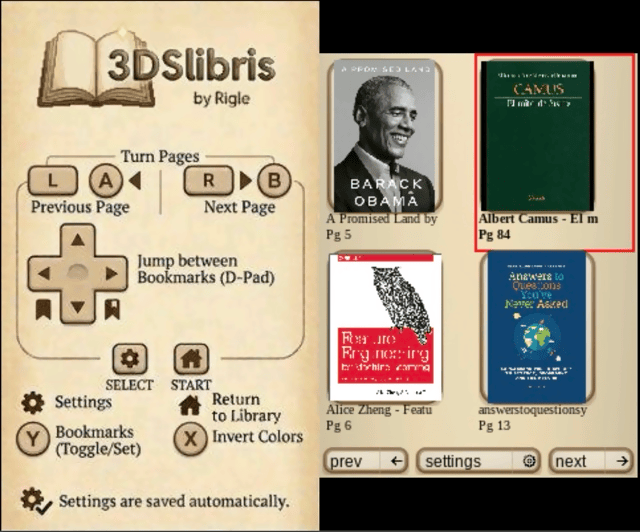
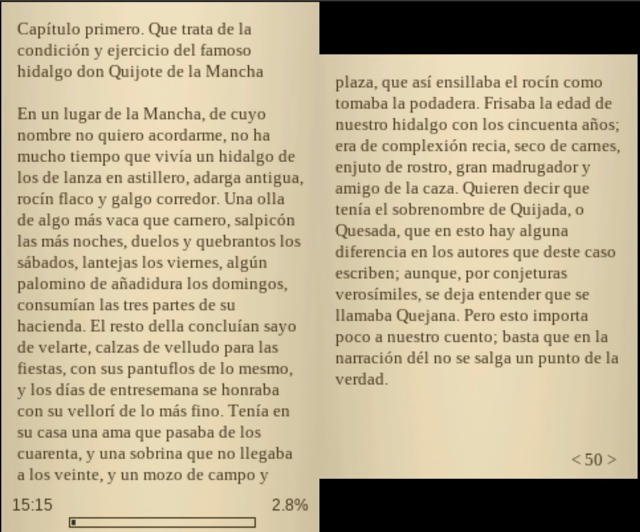
<code>3dslibris</code> | <code>3dslibris</code> ports the original architecture to <code>libctru</code>, keeps the fast text-first reading model, and adds practical 3DS UX improvements (grid library, cover thumbs, indexed navigation, procedural UI skin, orientation-aware touch, etc.). | ||
The | The current <code>.cia</code> packaging flow is based on the same <code>makerom</code>/<code>bannertool</code> process used by [[Universal-Updater 3DS|Universal-Updater]], adapted to this project's assets and release layout. | ||
== Features == | == Features == | ||
| Line 27: | Line 27: | ||
* Good FB2, TXT, RTF and ODT support. | * Good FB2, TXT, RTF and ODT support. | ||
* Experimental MOBI support. | * Experimental MOBI support. | ||
* PDF, CBZ, and XPS viewing (MuPDF-backed). | |||
== Installation == | == Installation == | ||
Recommended install: | Recommended install: | ||
* | * Download <code>3dslibris-sdmc.zip</code> from [https://github.com/RigleGit/3dslibris/releases GitHub Releases]. | ||
* Extract that zip into the root of your SD card, so it expands | * Extract that zip into the root of your SD card, so it expands into <code>sdmc:/</code>. | ||
* Put your books | * Put your books in <code>sdmc:/3ds/3dslibris/book/</code>. | ||
* | * Launch <code>sdmc:/3ds/3dslibris/3dslibris.3dsx</code> from Homebrew Launcher. | ||
Alternative install: | Alternative install: | ||
* | * Install <code>3dslibris.cia</code>. | ||
* | * Launch the installed title once so it creates <code>sdmc:/3ds/3dslibris/</code> if needed. | ||
* Put your books | * Put your books in <code>sdmc:/3ds/3dslibris/book/</code>. | ||
* Launch the installed title. | |||
Important: | Important: | ||
* | * The <code>.cia</code> bundles the default <code>font/</code> and <code>resources/</code> runtime assets inside RomFS, so it can boot without manually extracting <code>3dslibris-sdmc.zip</code>. | ||
* If | * Books are discovered from <code>sdmc:/3ds/3dslibris/book/</code> and <code>romfs:/3ds/3dslibris/book/</code>. | ||
* <code>3dslibris-debug.3dsx</code> | * If the same filename exists in both places, SD takes priority. | ||
* | * <code>3dslibris-sdmc.zip</code> is still the recommended install for <code>.3dsx</code>, and it remains useful if you want the same runtime files laid out explicitly on SD. | ||
* <code>3dslibris-debug.3dsx</code> uses the same SD layout and writes verbose diagnostics to <code>sdmc:/3ds/3dslibris/3dslibris.log</code>. | |||
* The <code>.cia</code> build uses the Universal-Updater-style packaging flow and now also validates the bundled RomFS path in GitHub Actions. | |||
Generated install package targets: | Generated install package targets: | ||
* <code>make package-sdmc</code> | * <code>make package-sdmc</code> stages <code>dist/sdmc/...</code> with <code>3dslibris.3dsx</code> included | ||
* <code>make zip-sdmc</code> | * <code>make zip-sdmc</code> creates <code>dist/3dslibris-sdmc.zip</code> | ||
* <code>make cia</code> | * <code>make cia</code> creates <code>3dslibris.cia</code> | ||
* GitHub Releases: pushing a tag | * <code>make source-release</code> creates <code>dist/3dslibris-source.tar.gz</code> | ||
* GitHub Releases: pushing a tag like <code>v2.0.4</code> triggers <code>.github/workflows/release.yml</code> and attaches <code>3dslibris.cia</code>, <code>3dslibris.3dsx</code>, <code>3dslibris-debug.3dsx</code>, <code>dist/3dslibris-sdmc.zip</code>, and <code>dist/3dslibris-source.tar.gz</code> to the release | |||
Bundled runtime files: | Bundled runtime files: | ||
| Line 67: | Line 72: | ||
Notes: | Notes: | ||
* Homebrew Launcher path: keep the app | * Homebrew Launcher path: keep the app at <code>sdmc:/3ds/3dslibris/3dslibris.3dsx</code> | ||
* Debug build path: | * Debug build path: keep <code>3dslibris-debug.3dsx</code> in the same <code>sdmc:/3ds/3dslibris/</code> folder if you want verbose logs | ||
* Default Liberation fonts are bundled | * Default Liberation fonts are bundled in the SD package for <code>.3dsx</code>, and inside RomFS for <code>.cia</code> | ||
* You can replace them with | * You can replace them with other <code>.ttf</code>, <code>.otf</code>, or <code>.ttc</code> fonts if you want to customize the reading/UI typefaces | ||
* Runtime files such | * Runtime files such as <code>3dslibris.xml</code>, <code>3dslibris.log</code>, and <code>cache/*</code> are created by the app on first run | ||
<pre>sdmc:/3ds/3dslibris/3dslibris.3dsx | <pre>sdmc:/3ds/3dslibris/3dslibris.3dsx | ||
| Line 80: | Line 85: | ||
== Supported formats == | == Supported formats == | ||
=== Strong support === | === Strong support === | ||
* <code>EPUB</code> | * <code>EPUB</code> (EPUB2 + EPUB3 NAV/NCX parsing with robust fallbacks) | ||
=== Good support (text-oriented) === | === Good support (text-oriented) === | ||
| Line 93: | Line 98: | ||
** Subsequent opens are accelerated by persistent page cache | ** Subsequent opens are accelerated by persistent page cache | ||
** TOC quality is heuristic for many files (can be approximate) | ** TOC quality is heuristic for many files (can be approximate) | ||
** Includes an optional per- | ** Inline MOBI images now reuse the same smart <code>inline / band / page</code> layout pipeline used by EPUB/FB2, with better caption flow on mixed photo spreads | ||
** Includes an optional per-book <code>line wrap fix</code> for badly converted files that hard-wrap prose line by line, while preserving embedded image markers during cleanup | |||
** Empty or corrupt books are reported with a readable error instead of a raw numeric code | ** Empty or corrupt books are reported with a readable error instead of a raw numeric code | ||
* <code>PDF</code> | |||
** Viewer-only path with MuPDF-backed rendering | |||
** Top screen shows a zoomed page region; bottom screen shows the full-page preview and viewport box | |||
** Uses the shared fixed-layout reader controls documented below | |||
** PDF-enabled builds in this branch are distributed with AGPL-driven notice and source-release requirements; see the license section below | |||
* <code>CBZ</code> | |||
** Viewer-only path with MuPDF-backed image-page rendering | |||
** Uses the shared fixed-layout reader controls documented below | |||
* <code>XPS</code> | |||
** Viewer-only path with MuPDF-backed rendering | |||
** Uses the shared fixed-layout reader controls documented below | |||
== Known limitations == | == Known limitations == | ||
* Some EPUB files have malformed anchors; index jumps can be approximate when source metadata is broken. | * Some EPUB files have malformed anchors; index jumps can be approximate when source metadata is broken. | ||
* MOBI TOC extraction depends on file structure and may omit or merge entries in some books. | * MOBI TOC extraction depends on file structure and may omit or merge entries in some books. | ||
* MOBI inline images depend on recoverable image references in the source markup, including the zero-padded <code>recindex</code> values commonly found in Kindle-generated books; malformed files can still miss some images. | |||
* Some malformed MOBI sources still contain encoding or OCR artifacts that cannot be repaired reliably on the reader side. | * Some malformed MOBI sources still contain encoding or OCR artifacts that cannot be repaired reliably on the reader side. | ||
* After changing font size, paragraph spacing, orientation, reading fonts, or the per-book | * After changing font size, paragraph spacing, orientation, reading fonts, or the per-book MOBI <code>line wrap fix</code>, reopen the current book to apply the new layout. | ||
* Reading position and existing bookmarks are remapped approximately after that reopen and can shift a few pages from their original location. | * Reading position and existing bookmarks are remapped approximately after that reopen and can shift a few pages from their original location. | ||
* No DRM support. | * No DRM support. | ||
== Controls == | == Controls == | ||
=== Library controls === | |||
D-Pad - Move the current selection around the library grid | |||
A - Open the selected book | |||
L / R - Jump to the previous or next library page | |||
Touch - Tap a book to select it, tap it again to open it | |||
Y / Select - Open settings | |||
=== Default reading controls === | |||
A/B/L/R - Turn pages | A/B/L/R - Turn pages | ||
| Line 118: | Line 148: | ||
Touch UI for library, settings, index, bookmarks, font menus... | Touch UI for library, settings, index, bookmarks, font menus... | ||
=== PDF / CBZ / XPS controls === | |||
A - Zoom in | |||
B - Zoom out | |||
Left/Right - Previous or next page | |||
Up/Down - Next or previous chapter when the document exposes an outline; otherwise previous or next page | |||
Touch - Move the viewport by tapping or dragging on the page preview | |||
Select - Open settings | |||
Start - Return to library | |||
== Screenshots == | == Screenshots == | ||
| Line 128: | Line 173: | ||
== Changelog == | == Changelog == | ||
'''v2.0.4''' | |||
* Highlights | |||
** Bookmarks and last-read page persistence fixed: prefs XML writing now escapes attribute values correctly and sanitizes invalid control characters, so filenames like <code>... & ...</code> no longer break <code>3dslibris.xml</code> parsing on startup. | |||
** CIA library source handling improved: the app now discovers books from both <code>sdmc:/3ds/3dslibris/book</code> and <code>romfs:/3ds/3dslibris/book</code>, with SD entries taking priority when names overlap. | |||
** Left-handed page screen order corrected: reflow reading now inverts first and second reading screens correctly in left-handed orientation. | |||
** Orientation-relative library D-Pad navigation: grid navigation now follows console orientation in both modes so directional input matches visual movement in right-handed and left-handed layouts. | |||
** Startup diagnostics improved: prefs load failures are now logged with an explicit warning instead of failing silently. | |||
** EPUB emphasis compatibility improved: the parser now recognizes bold/italic expressed via common <code>style</code> and <code>class</code> CSS patterns, not only semantic tags. | |||
** Release pipeline stability improved: debug MOBI builds now include the correct reporter definitions so <code>debug-3dsx</code> compiles reliably in CI/release workflows. | |||
'''v2.0.3''' | |||
* Highlights | |||
** Fixed bundled RomFS for <code>.cia</code> builds — the installable build now actually includes its bundled fonts and UI resources, instead of staging them locally but omitting them from the final CIA package. | |||
** Fixed the CIA-only startup crash — a null cache entry in the text/font teardown path could trigger an ARM11 data abort during early startup failure; font initialization and cache cleanup are now hardened. | |||
** Better runtime asset fallback — bundled fonts and resources are resolved safely between SD and RomFS, so <code>.cia</code> installs no longer depend on a manual <code>font/</code> or <code>resources/</code> copy to boot. | |||
** Stable fatal boot screens — missing-book and startup error screens no longer flicker between old and new frames while waiting for Start. | |||
** Clearer first-run behavior — if no books are present, the app now shows a stable message telling you to copy your EPUB, FB2, TXT, RTF, or ODT files into <code>sdmc:/3ds/3dslibris/book</code>. | |||
** CIA build validation added to CI — GitHub Actions now builds and verifies the <code>.cia</code> path as well, including checks that the staged RomFS contains the bundled runtime files. | |||
* Included reader functionality | |||
** MuPDF-backed PDF, CBZ, and XPS support | |||
** Progressive fixed-layout rendering | |||
** Asynchronous/deferred MOBI open on New 3DS | |||
** Generated library cover thumbnails | |||
** Bundled runtime assets for <code>.cia</code> installs | |||
'''v2.0.2''' | |||
* Highlights | |||
** Fixed CIA startup on hardware and Azahar: the packaged NCCH code is now emitted without compression, avoiding the startup crash seen in previous <code>2.0.1</code> CIA builds. | |||
** No change to reader features: this is a packaging-focused release intended to restore a working installable build. | |||
** Clean CIA build path: the local CIA build also includes the small <code>book_io.cpp</code> declaration fix required for a clean rebuild. | |||
'''v2.0.1''' | |||
* Highlights | |||
** Full branch catch-up release: <code>v2.0.1</code> includes the missing commits that were finished after the original <code>v2.0.0</code> tag, so the public release now matches the maintained main line. | |||
** Centralized runtime paths: SD, cache, and related filesystem paths now live in a shared path layer instead of being duplicated across subsystems. | |||
** Cleaner repo structure: shared helpers were reorganized, legacy duplicate files were removed after the move, and bundled <code>expat</code> sources now live under <code>third_party/</code>. | |||
** MOBI cache code split out cleanly: page-cache serialization and invalidation logic now live in a dedicated MOBI cache module instead of being embedded in the larger common book I/O unit. | |||
** Improved native test ergonomics: the text-layout and Unicode tests now reuse a shared native build helper instead of each script compiling the same dependency objects manually. | |||
** Expanded technical documentation: the repository now includes architecture notes plus local NDS/3DS hardware reference material derived from GBATek for future maintenance work. | |||
* Included reader functionality (from the v2.0.0 line) | |||
** MuPDF-backed PDF, CBZ, and XPS support | |||
** Progressive fixed-layout rendering with preview-first display | |||
** Asynchronous/deferred MOBI open on New 3DS | |||
** Generated library cover thumbnails for EPUB, FB2, MOBI, PDF, and CBZ | |||
** Bundled runtime assets for <code>.cia</code> installs | |||
'''v2.0.0''' | |||
* Highlights | |||
** PDF, CBZ, and XPS reading: open PDF documents, comic books (CBZ), and XPS files with zoom, full-page preview on the bottom screen, and outline navigation when available. | |||
** Progressive page loading: a preview of the page is shown immediately, then it refines to full quality in the background. | |||
** Faster on New 3DS: page rendering for PDF and CBZ runs on a separate processor core, keeping the UI responsive. Old 3DS still works with automatic fallback. | |||
** MOBI books open without freezing the UI on New 3DS thanks to asynchronous processing: you can start reading while the rest of the book finishes loading in the background. | |||
** Library covers now work for every format: EPUB, FB2, MOBI, PDF, and CBZ all show actual page thumbnails instead of placeholders. | |||
** All 1.1.x improvements included: inline images in MOBI and EPUB, faster image-heavy books, better text rendering, and more accurate MOBI table of contents. | |||
** No more manual SD card setup for <code>.cia</code> installs: fonts and UI resources are built in. | |||
** More stable startup: problematic MOBI files no longer cause crashes, and the app stays on a clear error screen instead of flickering between states when something goes wrong. | |||
'''v1.1.0''' | |||
* Highlights | |||
** Library navigation: you can now move the selection around the book grid with the D-Pad and press A to open. | |||
** Images inside EPUB and MOBI books now display correctly: small icons, wide separators, and full-size figures no longer take up the entire screen or disappear. | |||
** EPUB books with lots of images open noticeably faster thanks to internal optimizations in how images are loaded from the archive. | |||
** Library cover thumbnails for MOBI books generate faster on subsequent visits since cover data is now remembered between sessions. | |||
** No more manual SD card setup for <code>.cia</code> installs: the <code>.cia</code> now includes all required fonts and UI resources, so a plain install from the Homebrew Menu is enough. | |||
** Better text rendering across all formats: improved line breaking, proper handling of special characters, and font sizes that can no longer be set to values that break pagination. | |||
** Code blocks and <code><pre></code> sections in EPUBs now wrap properly instead of running off the edge of the screen. | |||
** MOBI books benefit from multiple fixes: more accurate table of contents, better plain-text wrapping that matches how real books read, and support for HUFF/CDIC compressed files. | |||
'''v1.0.3''' | '''v1.0.3''' | ||
* Highlights | * Highlights | ||
| Line 137: | Line 250: | ||
** When layout-related settings change, the app shows a warning and applies the new layout after reopening the current book. | ** When layout-related settings change, the app shows a warning and applies the new layout after reopening the current book. | ||
** MOBI parsing is more resilient against empty or corrupt files and now shows a readable error instead of a raw numeric failure. | ** MOBI parsing is more resilient against empty or corrupt files and now shows a readable error instead of a raw numeric failure. | ||
** MOBI books now have an optional per- | ** MOBI books now have an optional per-book <code>line wrap fix</code> for badly converted files that hard-wrap normal prose into many short blocks. | ||
** | ** The <code>.cia</code> packaging flow was rebuilt around the same <code>makerom</code>/<code>bannertool</code> process used by Universal-Updater. | ||
** | ** Previous <code>1.0.3</code> test <code>.cia</code> builds could install but fail to boot because the packaged exheader ended up with an invalid main-thread priority. | ||
** The | ** The generated <code>.cia</code> now boots correctly on original hardware and in Azahar. | ||
* Known bug | * Known bug | ||
** When a book is reopened after a layout change, or after toggling the per-book | ** When a book is reopened after a layout change, or after toggling the per-book MOBI <code>line wrap fix</code>, reading position and existing bookmarks are remapped approximately and may land a few pages away from their original location. | ||
** Some malformed MOBI files still contain source encoding or OCR artifacts that cannot be repaired fully by the reader. | ** Some malformed MOBI files still contain source encoding or OCR artifacts that cannot be repaired fully by the reader. | ||
| Line 148: | Line 261: | ||
* Highlights | * Highlights | ||
** Startup now stops with clear install guidance if required runtime files are missing from the SD card. | ** Startup now stops with clear install guidance if required runtime files are missing from the SD card. | ||
** The error message tells users to download and | ** The error message tells users to download and extract <code>3dslibris-sdmc.zip</code> and shows the expected <code>sdmc:/3ds/3dslibris/</code> layout. | ||
** The README now explains installation step by step for | ** The README now explains installation step by step for the <code>.3dsx</code> + SD package flow. | ||
'''v1.0.1''' | '''v1.0.1''' | ||
* Highlights | * Highlights | ||
** EPUB cold opens are now much faster on large books by indexing ZIP entries before spine parsing. | ** EPUB cold opens are now much faster on large books by indexing ZIP entries before spine parsing. | ||
** In real tests | ** In real tests with ''Don Quijote'', cold open time dropped from about 50.5s to about 7.2s, roughly a 7x improvement. | ||
** Releases now | ** Releases now include <code>3dslibris-debug.3dsx</code>, which enables verbose diagnostic logging in <code>3dslibris.log</code>. | ||
* Notes | * Notes | ||
** The debug build is intended for troubleshooting and performance investigation. | ** The debug build is intended for troubleshooting and performance investigation. | ||
| Line 164: | Line 277: | ||
== Credits == | == Credits == | ||
* | * Original <code>dslibris</code>: Ray Haleblian | ||
* 3DS port and maintenance: | * 3DS port and maintenance: [https://rigle.dev/ Rigle] | ||
== External links == | == External links == | ||
* GitHub - https://github.com/RigleGit/3dslibris | * GitHub - https://github.com/RigleGit/3dslibris | ||
* GBAtemp - https://gbatemp.net/threads/release-ebook-reader-for-nintendo-3ds-3dslibris-dslibris-port.680297/ | * GBAtemp - https://gbatemp.net/threads/release-ebook-reader-for-nintendo-3ds-3dslibris-dslibris-port.680297/ | ||
Revision as of 05:04, 5 April 2026
| 3DSlibris | |
|---|---|
 | |
| General | |
| Author | Rigle |
| Type | Utilities |
| Version | 2.0.4 |
| License | GPL-2.0 |
| Last Updated | 2026/04/03 |
| Links | |
| Download | |
| Website | |
| Source | |
Nintendo 3DS homebrew ebook reader based on the original Nintendo DS project dslibris.
3dslibris ports the original architecture to libctru, keeps the fast text-first reading model, and adds practical 3DS UX improvements (grid library, cover thumbs, indexed navigation, procedural UI skin, orientation-aware touch, etc.).
The current .cia packaging flow is based on the same makerom/bannertool process used by Universal-Updater, adapted to this project's assets and release layout.
Features
- Custom fonts.
- Bookmarks.
- Table of contents/index support.
- Left- and right-handed layouts.
- Three color modes: Daylight, Night, and Book.
- Strong EPUB support.
- Good FB2, TXT, RTF and ODT support.
- Experimental MOBI support.
- PDF, CBZ, and XPS viewing (MuPDF-backed).
Installation
Recommended install:
- Download
3dslibris-sdmc.zipfrom GitHub Releases. - Extract that zip into the root of your SD card, so it expands into
sdmc:/. - Put your books in
sdmc:/3ds/3dslibris/book/. - Launch
sdmc:/3ds/3dslibris/3dslibris.3dsxfrom Homebrew Launcher.
Alternative install:
- Install
3dslibris.cia. - Launch the installed title once so it creates
sdmc:/3ds/3dslibris/if needed. - Put your books in
sdmc:/3ds/3dslibris/book/. - Launch the installed title.
Important:
- The
.ciabundles the defaultfont/andresources/runtime assets inside RomFS, so it can boot without manually extracting3dslibris-sdmc.zip. - Books are discovered from
sdmc:/3ds/3dslibris/book/andromfs:/3ds/3dslibris/book/. - If the same filename exists in both places, SD takes priority.
3dslibris-sdmc.zipis still the recommended install for.3dsx, and it remains useful if you want the same runtime files laid out explicitly on SD.3dslibris-debug.3dsxuses the same SD layout and writes verbose diagnostics tosdmc:/3ds/3dslibris/3dslibris.log.- The
.ciabuild uses the Universal-Updater-style packaging flow and now also validates the bundled RomFS path in GitHub Actions.
Generated install package targets:
make package-sdmcstagesdist/sdmc/...with3dslibris.3dsxincludedmake zip-sdmccreatesdist/3dslibris-sdmc.zipmake ciacreates3dslibris.ciamake source-releasecreatesdist/3dslibris-source.tar.gz- GitHub Releases: pushing a tag like
v2.0.4triggers.github/workflows/release.ymland attaches3dslibris.cia,3dslibris.3dsx,3dslibris-debug.3dsx,dist/3dslibris-sdmc.zip, anddist/3dslibris-source.tar.gzto the release
Bundled runtime files:
sdmc/3ds/3dslibris/resources/splash.jpgsdmc/3ds/3dslibris/resources/ui/icons/png/*.pngsdmc/3ds/3dslibris/book/README.mdsdmc/3ds/3dslibris/font/README.mdsdmc/3ds/3dslibris/font/Liberation*.ttfsdmc/3ds/3dslibris/font/OFL-1.1.txt
Notes:
- Homebrew Launcher path: keep the app at
sdmc:/3ds/3dslibris/3dslibris.3dsx - Debug build path: keep
3dslibris-debug.3dsxin the samesdmc:/3ds/3dslibris/folder if you want verbose logs - Default Liberation fonts are bundled in the SD package for
.3dsx, and inside RomFS for.cia - You can replace them with other
.ttf,.otf, or.ttcfonts if you want to customize the reading/UI typefaces - Runtime files such as
3dslibris.xml,3dslibris.log, andcache/*are created by the app on first run
sdmc:/3ds/3dslibris/3dslibris.3dsx
sdmc:/3ds/3dslibris/book/*.epub|*.fb2|*.txt|*.rtf|*.odt|*.mobi
sdmc:/3ds/3dslibris/font/*.ttf
sdmc:/3ds/3dslibris/resources/splash.jpg
sdmc:/3ds/3dslibris/resources/ui/icons/png/{back,gear,home,next,prev}.png
Supported formats
Strong support
EPUB(EPUB2 + EPUB3 NAV/NCX parsing with robust fallbacks)
Good support (text-oriented)
FB2TXTRTFODT
Experimental / best-effort
MOBI- First open can be slow on large books (decompress + parse + pagination)
- Subsequent opens are accelerated by persistent page cache
- TOC quality is heuristic for many files (can be approximate)
- Inline MOBI images now reuse the same smart
inline / band / pagelayout pipeline used by EPUB/FB2, with better caption flow on mixed photo spreads - Includes an optional per-book
line wrap fixfor badly converted files that hard-wrap prose line by line, while preserving embedded image markers during cleanup - Empty or corrupt books are reported with a readable error instead of a raw numeric code
PDF- Viewer-only path with MuPDF-backed rendering
- Top screen shows a zoomed page region; bottom screen shows the full-page preview and viewport box
- Uses the shared fixed-layout reader controls documented below
- PDF-enabled builds in this branch are distributed with AGPL-driven notice and source-release requirements; see the license section below
CBZ- Viewer-only path with MuPDF-backed image-page rendering
- Uses the shared fixed-layout reader controls documented below
XPS- Viewer-only path with MuPDF-backed rendering
- Uses the shared fixed-layout reader controls documented below
Known limitations
- Some EPUB files have malformed anchors; index jumps can be approximate when source metadata is broken.
- MOBI TOC extraction depends on file structure and may omit or merge entries in some books.
- MOBI inline images depend on recoverable image references in the source markup, including the zero-padded
recindexvalues commonly found in Kindle-generated books; malformed files can still miss some images. - Some malformed MOBI sources still contain encoding or OCR artifacts that cannot be repaired reliably on the reader side.
- After changing font size, paragraph spacing, orientation, reading fonts, or the per-book MOBI
line wrap fix, reopen the current book to apply the new layout. - Reading position and existing bookmarks are remapped approximately after that reopen and can shift a few pages from their original location.
- No DRM support.
Controls
Library controls
D-Pad - Move the current selection around the library grid
A - Open the selected book
L / R - Jump to the previous or next library page
Touch - Tap a book to select it, tap it again to open it
Y / Select - Open settings
Default reading controls
A/B/L/R - Turn pages
D-Pad Left/Right - Jump between bookmarks
Y - Toggle bookmark
X - Change background color
Select - Settings
Start - Return to library
Touch UI for library, settings, index, bookmarks, font menus...
PDF / CBZ / XPS controls
A - Zoom in
B - Zoom out
Left/Right - Previous or next page
Up/Down - Next or previous chapter when the document exposes an outline; otherwise previous or next page
Touch - Move the viewport by tapping or dragging on the page preview
Select - Open settings
Start - Return to library
Screenshots
Known issues
Changelog
v2.0.4
- Highlights
- Bookmarks and last-read page persistence fixed: prefs XML writing now escapes attribute values correctly and sanitizes invalid control characters, so filenames like
... & ...no longer break3dslibris.xmlparsing on startup. - CIA library source handling improved: the app now discovers books from both
sdmc:/3ds/3dslibris/bookandromfs:/3ds/3dslibris/book, with SD entries taking priority when names overlap. - Left-handed page screen order corrected: reflow reading now inverts first and second reading screens correctly in left-handed orientation.
- Orientation-relative library D-Pad navigation: grid navigation now follows console orientation in both modes so directional input matches visual movement in right-handed and left-handed layouts.
- Startup diagnostics improved: prefs load failures are now logged with an explicit warning instead of failing silently.
- EPUB emphasis compatibility improved: the parser now recognizes bold/italic expressed via common
styleandclassCSS patterns, not only semantic tags. - Release pipeline stability improved: debug MOBI builds now include the correct reporter definitions so
debug-3dsxcompiles reliably in CI/release workflows.
- Bookmarks and last-read page persistence fixed: prefs XML writing now escapes attribute values correctly and sanitizes invalid control characters, so filenames like
v2.0.3
- Highlights
- Fixed bundled RomFS for
.ciabuilds — the installable build now actually includes its bundled fonts and UI resources, instead of staging them locally but omitting them from the final CIA package. - Fixed the CIA-only startup crash — a null cache entry in the text/font teardown path could trigger an ARM11 data abort during early startup failure; font initialization and cache cleanup are now hardened.
- Better runtime asset fallback — bundled fonts and resources are resolved safely between SD and RomFS, so
.ciainstalls no longer depend on a manualfont/orresources/copy to boot. - Stable fatal boot screens — missing-book and startup error screens no longer flicker between old and new frames while waiting for Start.
- Clearer first-run behavior — if no books are present, the app now shows a stable message telling you to copy your EPUB, FB2, TXT, RTF, or ODT files into
sdmc:/3ds/3dslibris/book. - CIA build validation added to CI — GitHub Actions now builds and verifies the
.ciapath as well, including checks that the staged RomFS contains the bundled runtime files.
- Fixed bundled RomFS for
- Included reader functionality
- MuPDF-backed PDF, CBZ, and XPS support
- Progressive fixed-layout rendering
- Asynchronous/deferred MOBI open on New 3DS
- Generated library cover thumbnails
- Bundled runtime assets for
.ciainstalls
v2.0.2
- Highlights
- Fixed CIA startup on hardware and Azahar: the packaged NCCH code is now emitted without compression, avoiding the startup crash seen in previous
2.0.1CIA builds. - No change to reader features: this is a packaging-focused release intended to restore a working installable build.
- Clean CIA build path: the local CIA build also includes the small
book_io.cppdeclaration fix required for a clean rebuild.
- Fixed CIA startup on hardware and Azahar: the packaged NCCH code is now emitted without compression, avoiding the startup crash seen in previous
v2.0.1
- Highlights
- Full branch catch-up release:
v2.0.1includes the missing commits that were finished after the originalv2.0.0tag, so the public release now matches the maintained main line. - Centralized runtime paths: SD, cache, and related filesystem paths now live in a shared path layer instead of being duplicated across subsystems.
- Cleaner repo structure: shared helpers were reorganized, legacy duplicate files were removed after the move, and bundled
expatsources now live underthird_party/. - MOBI cache code split out cleanly: page-cache serialization and invalidation logic now live in a dedicated MOBI cache module instead of being embedded in the larger common book I/O unit.
- Improved native test ergonomics: the text-layout and Unicode tests now reuse a shared native build helper instead of each script compiling the same dependency objects manually.
- Expanded technical documentation: the repository now includes architecture notes plus local NDS/3DS hardware reference material derived from GBATek for future maintenance work.
- Full branch catch-up release:
- Included reader functionality (from the v2.0.0 line)
- MuPDF-backed PDF, CBZ, and XPS support
- Progressive fixed-layout rendering with preview-first display
- Asynchronous/deferred MOBI open on New 3DS
- Generated library cover thumbnails for EPUB, FB2, MOBI, PDF, and CBZ
- Bundled runtime assets for
.ciainstalls
v2.0.0
- Highlights
- PDF, CBZ, and XPS reading: open PDF documents, comic books (CBZ), and XPS files with zoom, full-page preview on the bottom screen, and outline navigation when available.
- Progressive page loading: a preview of the page is shown immediately, then it refines to full quality in the background.
- Faster on New 3DS: page rendering for PDF and CBZ runs on a separate processor core, keeping the UI responsive. Old 3DS still works with automatic fallback.
- MOBI books open without freezing the UI on New 3DS thanks to asynchronous processing: you can start reading while the rest of the book finishes loading in the background.
- Library covers now work for every format: EPUB, FB2, MOBI, PDF, and CBZ all show actual page thumbnails instead of placeholders.
- All 1.1.x improvements included: inline images in MOBI and EPUB, faster image-heavy books, better text rendering, and more accurate MOBI table of contents.
- No more manual SD card setup for
.ciainstalls: fonts and UI resources are built in. - More stable startup: problematic MOBI files no longer cause crashes, and the app stays on a clear error screen instead of flickering between states when something goes wrong.
v1.1.0
- Highlights
- Library navigation: you can now move the selection around the book grid with the D-Pad and press A to open.
- Images inside EPUB and MOBI books now display correctly: small icons, wide separators, and full-size figures no longer take up the entire screen or disappear.
- EPUB books with lots of images open noticeably faster thanks to internal optimizations in how images are loaded from the archive.
- Library cover thumbnails for MOBI books generate faster on subsequent visits since cover data is now remembered between sessions.
- No more manual SD card setup for
.ciainstalls: the.cianow includes all required fonts and UI resources, so a plain install from the Homebrew Menu is enough. - Better text rendering across all formats: improved line breaking, proper handling of special characters, and font sizes that can no longer be set to values that break pagination.
- Code blocks and
sections in EPUBs now wrap properly instead of running off the edge of the screen.
** MOBI books benefit from multiple fixes: more accurate table of contents, better plain-text wrapping that matches how real books read, and support for HUFF/CDIC compressed files.
v1.0.3
* Highlights
** Pressing right on settings rows such as font size and paragraph spacing now increases the value.
** Pressing left now decreases the value, matching the on-screen arrows and touch layout.
** Horizontal navigation inside the settings list is aligned with the same left/right direction.
** The main browser splash now shows the app version centered at the bottom of the left screen.
** Changing font size, paragraph spacing, orientation, or reading fonts no longer tries to repaginate the book inside the settings menu.
** When layout-related settings change, the app shows a warning and applies the new layout after reopening the current book.
** MOBI parsing is more resilient against empty or corrupt files and now shows a readable error instead of a raw numeric failure.
** MOBI books now have an optional per-book line wrap fix for badly converted files that hard-wrap normal prose into many short blocks.
** The .cia packaging flow was rebuilt around the same makerom/bannertool process used by Universal-Updater.
** Previous 1.0.3 test .cia builds could install but fail to boot because the packaged exheader ended up with an invalid main-thread priority.
** The generated .cia now boots correctly on original hardware and in Azahar.
* Known bug
** When a book is reopened after a layout change, or after toggling the per-book MOBI line wrap fix, reading position and existing bookmarks are remapped approximately and may land a few pages away from their original location.
** Some malformed MOBI files still contain source encoding or OCR artifacts that cannot be repaired fully by the reader.
v1.0.2
* Highlights
** Startup now stops with clear install guidance if required runtime files are missing from the SD card.
** The error message tells users to download and extract 3dslibris-sdmc.zip and shows the expected sdmc:/3ds/3dslibris/ layout.
** The README now explains installation step by step for the .3dsx + SD package flow.
v1.0.1
* Highlights
** EPUB cold opens are now much faster on large books by indexing ZIP entries before spine parsing.
** In real tests with Don Quijote, cold open time dropped from about 50.5s to about 7.2s, roughly a 7x improvement.
** Releases now include 3dslibris-debug.3dsx, which enables verbose diagnostic logging in 3dslibris.log.
* Notes
** The debug build is intended for troubleshooting and performance investigation.
** EPUB TOC resolution remains separate from the main open path and was not the main cause of the previous cold-open slowdown.
v1.0.0
* First release.
Credits
* Original dslibris: Ray Haleblian
* 3DS port and maintenance: Rigle
External links
* GitHub - https://github.com/RigleGit/3dslibris * GBAtemp - https://gbatemp.net/threads/release-ebook-reader-for-nintendo-3ds-3dslibris-dslibris-port.680297/