
3DSlibris: Difference between revisions
More actions
Created page with "{{Infobox 3DS Homebrews |title=3DSlibris |image=3dslibris.png |description=eBook Reader. Port of dslibris. |author=Rigle |lastupdated=2026/03/14 |type=Utilities |version=1.0.3 |license=GPL-2.0 |download=https://github.com/RigleGit/3dslibris/releases |website=https://github.com/RigleGit/3dslibris |source=https://github.com/RigleGit/3dslibris }} Nintendo 3DS homebrew ebook reader based on the original Nintendo DS project dslibris. <code>3dslibris</code> por..." |
No edit summary |
||
| Line 123: | Line 123: | ||
https://dlhb.gamebrew.org/3dshomebrews/images/3dslibris3.png | https://dlhb.gamebrew.org/3dshomebrews/images/3dslibris3.png | ||
== Known issues == | |||
https://github.com/RigleGit/3dslibris/issues | |||
== Changelog == | == Changelog == | ||
Revision as of 09:55, 16 March 2026
| 3DSlibris | |
|---|---|
 | |
| General | |
| Author | Rigle |
| Type | Utilities |
| Version | 1.0.3 |
| License | GPL-2.0 |
| Last Updated | 2026/03/14 |
| Links | |
| Download | |
| Website | |
| Source | |
Nintendo 3DS homebrew ebook reader based on the original Nintendo DS project dslibris.
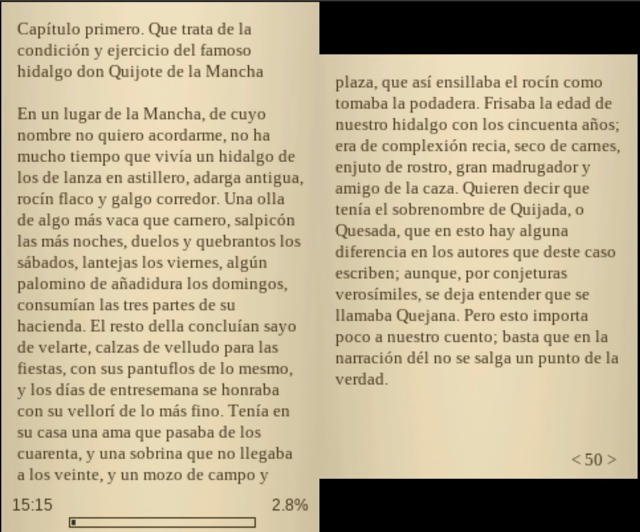
3dslibris ports the original architecture to libctru, keeps the fast text-first reading model, and adds practical 3DS UX improvements (grid library, cover thumbs, indexed navigation, procedural UI skin, orientation-aware touch, etc.).
The current .cia packaging flow is based on the same makerom/bannertool process used by Universal-Updater, adapted to this project's assets and release layout.
Features
- Custom fonts.
- Bookmarks.
- Table of contents/index support.
- Left- and right-handed layouts.
- Three color modes: Daylight, Night, and Book.
- Strong EPUB support.
- Good FB2, TXT, RTF and ODT support.
- Experimental MOBI support.
Installation
Recommended install:
- Download
3dslibris-sdmc.zipfrom GitHub Releases. - Extract that zip into the root of your SD card, so it expands into
sdmc:/. - Put your books in
sdmc:/3ds/3dslibris/book/. - Launch
sdmc:/3ds/3dslibris/3dslibris.3dsxfrom Homebrew Launcher.
Alternative install:
- Install
3dslibris.cia. - Keep the same runtime folders on SD, including
sdmc:/3ds/3dslibris/font/andsdmc:/3ds/3dslibris/resources/. - Put your books in
sdmc:/3ds/3dslibris/book/.
Important:
- Keep the packaged
font/andresources/folders exactly insidesdmc:/3ds/3dslibris/. - If those runtime files are missing,
3dslibrisnow stops at boot and tells you to reinstall3dslibris-sdmc.zip. 3dslibris-debug.3dsxuses the same SD layout and writes verbose diagnostics tosdmc:/3ds/3dslibris/3dslibris.log.- The
.ciabuild uses the Universal-Updater-style packaging flow, but the runtime SD layout is the same as the.3dsxinstall.
Generated install package targets:
make package-sdmcstagesdist/sdmc/...with3dslibris.3dsxincludedmake zip-sdmccreatesdist/3dslibris-sdmc.zipmake ciacreates3dslibris.cia- GitHub Releases: pushing a tag like
v1.0.3triggers.github/workflows/release.ymland attaches3dslibris.cia,3dslibris.3dsx,3dslibris-debug.3dsx, anddist/3dslibris-sdmc.zipto the release
Bundled runtime files:
sdmc/3ds/3dslibris/resources/splash.jpgsdmc/3ds/3dslibris/resources/ui/icons/png/*.pngsdmc/3ds/3dslibris/book/README.mdsdmc/3ds/3dslibris/font/README.mdsdmc/3ds/3dslibris/font/Liberation*.ttfsdmc/3ds/3dslibris/font/OFL-1.1.txt
Notes:
- Homebrew Launcher path: keep the app at
sdmc:/3ds/3dslibris/3dslibris.3dsx - Debug build path: keep
3dslibris-debug.3dsxin the samesdmc:/3ds/3dslibris/folder if you want verbose logs - Default Liberation fonts are bundled in
sdmc:/3ds/3dslibris/font/ - You can replace them with other
.ttf,.otf, or.ttcfonts if you want to customize the reading/UI typefaces - Runtime files such as
3dslibris.xml,3dslibris.log, andcache/*are created by the app on first run
sdmc:/3ds/3dslibris/3dslibris.3dsx
sdmc:/3ds/3dslibris/book/*.epub|*.fb2|*.txt|*.rtf|*.odt|*.mobi
sdmc:/3ds/3dslibris/font/*.ttf
sdmc:/3ds/3dslibris/resources/splash.jpg
sdmc:/3ds/3dslibris/resources/ui/icons/png/{back,gear,home,next,prev}.png
Supported formats
Strong support
EPUB(EPUB2 + EPUB3 NAV/NCX parsing with robust fallbacks)
Good support (text-oriented)
FB2TXTRTFODT
Experimental / best-effort
MOBI- First open can be slow on large books (decompress + parse + pagination)
- Subsequent opens are accelerated by persistent page cache
- TOC quality is heuristic for many files (can be approximate)
- Includes an optional per-book
line wrap fixfor badly converted files that hard-wrap prose line by line - Empty or corrupt books are reported with a readable error instead of a raw numeric code
Known limitations
- Some EPUB files have malformed anchors; index jumps can be approximate when source metadata is broken.
- MOBI TOC extraction depends on file structure and may omit or merge entries in some books.
- Some malformed MOBI sources still contain encoding or OCR artifacts that cannot be repaired reliably on the reader side.
- After changing font size, paragraph spacing, orientation, reading fonts, or the per-book MOBI
line wrap fix, reopen the current book to apply the new layout. - Reading position and existing bookmarks are remapped approximately after that reopen and can shift a few pages from their original location.
- No DRM support.
Controls
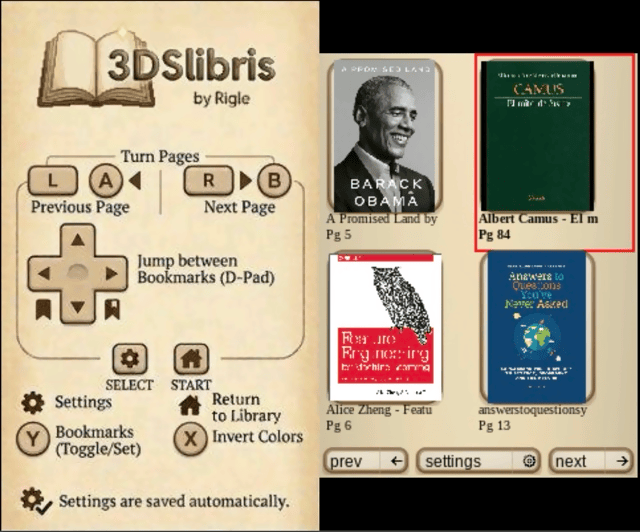
A/B/L/R - Turn pages
D-Pad Left/Right - Jump between bookmarks
Y - Toggle bookmark
X - Change background color
Select - Settings
Start - Return to library
Touch UI for library, settings, index, bookmarks, font menus...
Screenshots
Known issues
Changelog
v1.0.3
- Highlights
- Pressing right on settings rows such as font size and paragraph spacing now increases the value.
- Pressing left now decreases the value, matching the on-screen arrows and touch layout.
- Horizontal navigation inside the settings list is aligned with the same left/right direction.
- The main browser splash now shows the app version centered at the bottom of the left screen.
- Changing font size, paragraph spacing, orientation, or reading fonts no longer tries to repaginate the book inside the settings menu.
- When layout-related settings change, the app shows a warning and applies the new layout after reopening the current book.
- MOBI parsing is more resilient against empty or corrupt files and now shows a readable error instead of a raw numeric failure.
- MOBI books now have an optional per-book
line wrap fixfor badly converted files that hard-wrap normal prose into many short blocks. - The
.ciapackaging flow was rebuilt around the samemakerom/bannertoolprocess used by Universal-Updater. - Previous
1.0.3test.ciabuilds could install but fail to boot because the packaged exheader ended up with an invalid main-thread priority. - The generated
.cianow boots correctly on original hardware and in Azahar.
- Known bug
- When a book is reopened after a layout change, or after toggling the per-book MOBI
line wrap fix, reading position and existing bookmarks are remapped approximately and may land a few pages away from their original location. - Some malformed MOBI files still contain source encoding or OCR artifacts that cannot be repaired fully by the reader.
- When a book is reopened after a layout change, or after toggling the per-book MOBI
v1.0.2
- Highlights
- Startup now stops with clear install guidance if required runtime files are missing from the SD card.
- The error message tells users to download and extract
3dslibris-sdmc.zipand shows the expectedsdmc:/3ds/3dslibris/layout. - The README now explains installation step by step for the
.3dsx+ SD package flow.
v1.0.1
- Highlights
- EPUB cold opens are now much faster on large books by indexing ZIP entries before spine parsing.
- In real tests with Don Quijote, cold open time dropped from about 50.5s to about 7.2s, roughly a 7x improvement.
- Releases now include
3dslibris-debug.3dsx, which enables verbose diagnostic logging in3dslibris.log.
- Notes
- The debug build is intended for troubleshooting and performance investigation.
- EPUB TOC resolution remains separate from the main open path and was not the main cause of the previous cold-open slowdown.
v1.0.0
- First release.
Credits
- Original
dslibris: Ray Haleblian - 3DS port and maintenance: Rigle