
Dropsy Vita: Difference between revisions
From GameBrew
More actions
No edit summary |
No edit summary |
||
| Line 19: | Line 19: | ||
|image_alt=Dropsy Vita | |image_alt=Dropsy Vita | ||
}} | }} | ||
This is a port of Dropsy to the PS Vita. | |||
Dropsy is a non-traditional take on the classic point and click adventure formula starring the game's perpetually carefree namesake clown as he explores a richly detailed world full of colorful characters and sinister secrets, doling out hugs along the way. | Dropsy is a non-traditional take on the classic point and click adventure formula starring the game's perpetually carefree namesake clown as he explores a richly detailed world full of colorful characters and sinister secrets, doling out hugs along the way. | ||
You need to supply your own patched GOG or Steam files to ux0:app/DROP5400/ | ==Installation== | ||
You need to supply your own patched [https://www.gog.com/en/game/dropsy GOG] or [https://store.steampowered.com/app/274350/Dropsy/ Steam] files to ux0:app/DROP5400/. They are not provided. | |||
You might want to first install the .VPK using [[VitaShell]]. Don't try to launch the game, because it will crash without the necessary files. | |||
== | ===Steam=== | ||
* Download DropsyVITA.vpk from VitaDB or itch.io and install it. | * Download DropsyVITA.vpk from VitaDB or itch.io and install it. | ||
* Put the game's folder( | * Put the game's folder(..Steam\steamapps\common\Dropsy\Dropsy_Data) inside the extracted folder. | ||
* Launch | * Launch "ApplyPatch.bat" and wait(Will need 1 to 5 minutes depending on the system). | ||
* Let it finish and there should be a .ZIP file named | * Let it finish and there should be a .ZIP file named DropsyVita.zip. | ||
* Open VitaShell, connect your PS Vita to your PC and copy the contents of the .ZIP file | * Open VitaShell, connect your PS Vita to your PC and copy the contents of the .ZIP file (Zip file should be around 231KB before unpacking) over to ux0:app/DROP54000/. | ||
* | * Finally, just click on "Replace the files in destination" when it asks you to. | ||
===GOG=== | ===GOG=== | ||
* Download DropsyVITA.vpk from VitaDB or itch.io and install it. | * Download DropsyVITA.vpk from VitaDB or itch.io and install it. | ||
* Put the game's folder( | * Put the game's folder(...GOG Galaxy\Games\Dropsy\Dropsy_Data) inside the extracted folder | ||
* Launch | * Launch "ApplyPatch.bat" and wait(Will need 1 to 5 minutes depending on the system). | ||
* Let it finish and there should be a .ZIP file named | * Let it finish and there should be a .ZIP file named DropsyVita.zip. | ||
* Open VitaShell, connect your PS Vita to your PC and copy the contents of the .ZIP file | * Open VitaShell, connect your PS Vita to your PC and copy the contents of the .ZIP file (Zip file should be around 231KB before unpacking) over to ux0:app/DROP54000/. | ||
* | * Finally, just click on "Replace the files in destination" when it asks you to. | ||
==Screenshots== | ==Screenshots== | ||
https://dlhb.gamebrew.org/vitahomebrews/images/DropsyVita-01.png | https://dlhb.gamebrew.org/vitahomebrews/images/DropsyVita-01.png | ||
https://dlhb.gamebrew.org/vitahomebrews/images/DropsyVita- | https://dlhb.gamebrew.org/vitahomebrews/images/DropsyVita-03.png | ||
https:// | ==Media== | ||
'''Dropsy: A Point & Click Hugventure''' ([https://www.youtube.com/watch?v=SfRjByXbenA YUOTUBE]) <br> | |||
<youtube width="640">SfRjByXbenA</youtube> | |||
==Changelog== | ==Changelog== | ||
| Line 63: | Line 62: | ||
== External links == | == External links == | ||
* | * itch.io - https://lordchickenblaster.itch.io/dropsy-vita | ||
* VitaDB - https://www.rinnegatamante.eu/vitadb/#/info/1287 | * VitaDB - https://www.rinnegatamante.eu/vitadb/#/info/1287 | ||
Revision as of 04:29, 27 July 2025
| Dropsy Vita | |
|---|---|
 | |
| General | |
| Author | LordChickenBlaster |
| Type | Puzzle |
| Version | 1.02 |
| License | N/A |
| Last Updated | 2025/07/26 |
| Links | |
| Download | |
| Website | |
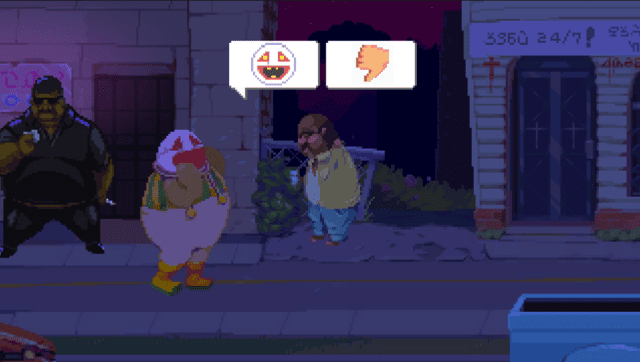
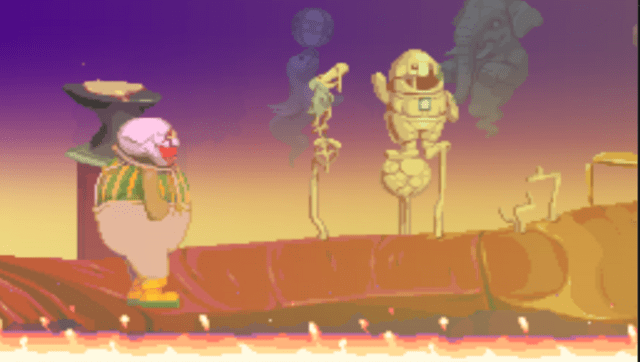
This is a port of Dropsy to the PS Vita.
Dropsy is a non-traditional take on the classic point and click adventure formula starring the game's perpetually carefree namesake clown as he explores a richly detailed world full of colorful characters and sinister secrets, doling out hugs along the way.
Installation
You need to supply your own patched GOG or Steam files to ux0:app/DROP5400/. They are not provided.
You might want to first install the .VPK using VitaShell. Don't try to launch the game, because it will crash without the necessary files.
Steam
- Download DropsyVITA.vpk from VitaDB or itch.io and install it.
- Put the game's folder(..Steam\steamapps\common\Dropsy\Dropsy_Data) inside the extracted folder.
- Launch "ApplyPatch.bat" and wait(Will need 1 to 5 minutes depending on the system).
- Let it finish and there should be a .ZIP file named DropsyVita.zip.
- Open VitaShell, connect your PS Vita to your PC and copy the contents of the .ZIP file (Zip file should be around 231KB before unpacking) over to ux0:app/DROP54000/.
- Finally, just click on "Replace the files in destination" when it asks you to.
GOG
- Download DropsyVITA.vpk from VitaDB or itch.io and install it.
- Put the game's folder(...GOG Galaxy\Games\Dropsy\Dropsy_Data) inside the extracted folder
- Launch "ApplyPatch.bat" and wait(Will need 1 to 5 minutes depending on the system).
- Let it finish and there should be a .ZIP file named DropsyVita.zip.
- Open VitaShell, connect your PS Vita to your PC and copy the contents of the .ZIP file (Zip file should be around 231KB before unpacking) over to ux0:app/DROP54000/.
- Finally, just click on "Replace the files in destination" when it asks you to.
Screenshots
Media
Dropsy: A Point & Click Hugventure (YUOTUBE)
Changelog
v1.02
- Added joystick controls and PSTV support.
v1.01
- Fixed save data bug that could cause issues.
v1.0
- First Release.