
DayPR PSP: Difference between revisions
From GameBrew
More actions
No edit summary |
|||
| Line 27: | Line 27: | ||
File structure: | File structure: | ||
seplugins | seplugins | ||
|-DayPR | |-DayPR\ | ||
| |-dumps | | |-dumps\ | ||
| |-search | | |-search\ | ||
| |-DayPRimportant.bin (will be made when you first load DayPR) | | |-DayPRimportant.bin (will be made when you first load DayPR) | ||
| |-UCUS-98645.txt (other game files will be here as well) | | |-UCUS-98645.txt (other game files will be here as well) | ||
Revision as of 01:07, 25 February 2025
| DayPR | |
|---|---|
 | |
| General | |
| Author | lilmnm |
| Type | Plugins |
| Version | 6 Bug Fix |
| License | Mixed |
| Last Updated | 2010/02/01 |
| Links | |
| Download | |
| Website | |
A cheat device homebrew. It is a modification of nitePR.
Installation
Go to the OTHER folder and copy the prx file to ms0:/seplugins/. (for 3.71 for lower use the one in the 371 folder)
Write the following line in your game.txt file:
ms0:/seplugins/DayPR.prx 1
This will create all the folders/files you need to run and search.
To use cheats, create a text file named after the game's ID and add the cheat codes to it. Then place it in ms0:/seplugins/DayPR/.
File structure:
seplugins
 |-DayPR\
 | |-dumps\
 | |-search\
 | |-DayPRimportant.bin (will be made when you first load DayPR)
 | |-UCUS-98645.txt (other game files will be here as well)
 |-DayPR.prx
 |-game.txt
User guide
Hack Menu:
- You can change the names of cheats with the Start button.
Search Menu:
- Search Range: Search for the range of an address.
PRX Menu:
- Add a new cheat.
- Delete old RAM dumps.
- Delete search.dat and search.ram.
- Enable or disable USB connection.
- Reload cheats.
- Save cheats file (.txt).
- Load cheats file (.txt).
Extra Options Menu:
- Choose from 11 themes.
- Configure the button to open the menu.
- Enable or disable screenshot capture.
- Configure the button to take a screenshot.
Controls
Home - Close the DayPR logo when a game starts
Vol Down+Vol Up - Bring up the cheats menu
Cross - Select/Deselect cheats
L/R - Navigate between tabs
Circle - Exit the menu
Note - Activate/Deactivate cheats
Down+Note - Take a screenshot
Screenshots
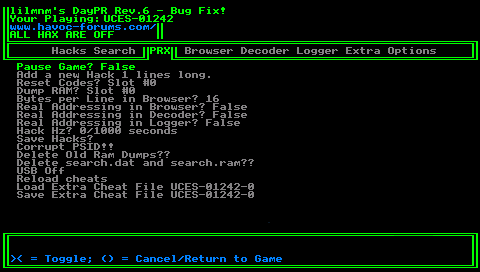
Changelog
Rev.6 Bug Fix
- Added a Extra Cheat file so you can load from (NOTE: after you load the new file the it clears out the old cheats).
- Fixed the bad scrolling when you had more then 20 cheats and you scrolled to the bottem it didnt show the last cheat.
Rev.6
- Added the usb mass storage to add more cheats and to also have the computer go though the ram dumps to speed up searches and als a reload cheats funtion to reload the cheats you may have just updated. I also added a Easteregg, just hit X when you get to it or just hit ) to exit and feel proud.
- New theme fixed up the GUI so the Boxs actually look right. Demon_Child gave me insight to a bad DMA code for DayPR and that has been fixed the only thing that hasnt been fixed so far is the slow ass search and the joker code that Demon_Child is generusly allowing me to use his.