
NTPSP: Difference between revisions
From GameBrew
More actions
No edit summary Tag: Reverted |
No edit summary Tag: Manual revert |
||
| Line 23: | Line 23: | ||
== Installation == | == Installation == | ||
Create a folder named NTPSP in /PSP/GAME/, place the EBOOT.PBP in the folder. | Create a folder named NTPSP in /PSP/GAME/, place the EBOOT.PBP in the folder. | ||
== Screenshots == | |||
https://dlhb.gamebrew.org/psphomebrew/images/ntpsp.png | |||
== Changelog == | == Changelog == | ||
Latest revision as of 05:29, 16 February 2025
| NTPSP | |
|---|---|
 | |
| General | |
| Author | Joel16 |
| Type | System Tools |
| Version | 1.1 |
| License | BSD-3-Clause |
| Last Updated | 2022/10/30 |
| Links | |
| Download | |
| Website | |
| Source | |
| Support Author | |
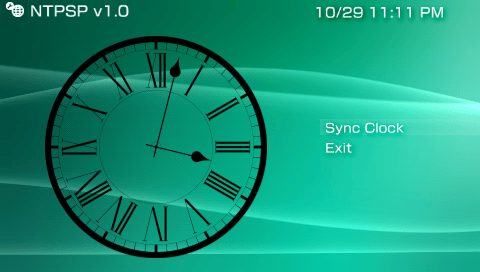
A simple NTP client for the Sony PlayStation Portable. This application changes the PSP's date and time using the ntp.org server.
The application also uses a kernel level plugin to change the system's date and time (cannot be done in user mode), use at your own risk.
Features
- Sync time with NTP server (0.pool.ntp.org) and displays a confirmation dialog to change system time.
Installation
Create a folder named NTPSP in /PSP/GAME/, place the EBOOT.PBP in the folder.
Screenshots
Changelog
v1.1
- Set a fixed background colour instead of letting VLFlib pic user's colour based on XMB. (Fixes background colour defaulting to black)
v1.0
- Initial release of NTPSP.
Credits
External links
- GitHub - https://github.com/joel16/NTPSP/