
ONScripter Multi Converter PSP: Difference between revisions
From GameBrew
More actions
No edit summary |
No edit summary |
||
| Line 15: | Line 15: | ||
}} | }} | ||
A Python tool for converting asset files for use with ONScripter, including: | A Python tool for converting asset files for use with ONScripter, including: | ||
*PSP | *PSP ([[ONScripter for PSP|onscripter-20110111_psp]]) | ||
*PSVITA | *PSVITA ([[ONScripterJH Vita|ONScripter-jh-PSVita (yuri) v0.5.1.3]]) | ||
*Brain: onscripter-20100510-424x318 / onscripter-20100510-qvga | *Brain: (onscripter-20100510-424x318 / onscripter-20100510-qvga) | ||
*Android | *Android (ONScripter v20240906) | ||
It is designed as a successor to the C&D Tools Win GUI. | It is designed as a successor to the C&D Tools Win GUI. | ||
| Line 49: | Line 49: | ||
== Screenshots == | == Screenshots == | ||
https://dlhb.gamebrew.org/psphomebrew/images/ | https://dlhb.gamebrew.org/psphomebrew/images/onscriptermulticonverter02.png | ||
== Known issues == | == Known issues == | ||
Revision as of 03:37, 9 February 2025
| ONScripter Multi Converter | |
|---|---|
 | |
| General | |
| Author | Prince-of-sea, PC-CNT |
| Type | File Operation |
| Version | 2.2.1 |
| License | MIT License |
| Last Updated | 2025/02/08 |
| Links | |
| Download | |
| Website | |
| Source | |
A Python tool for converting asset files for use with ONScripter, including:
- PSP (onscripter-20110111_psp)
- PSVITA (ONScripter-jh-PSVita (yuri) v0.5.1.3)
- Brain: (onscripter-20100510-424x318 / onscripter-20100510-qvga)
- Android (ONScripter v20240906)
It is designed as a successor to the C&D Tools Win GUI.
User guide
Follow the readme and download the required files.
Extract and move the downloaded files to the appropriate locations.
In a directory with path access:
- ffmpeg.exe
- ffprobe.exe
In a directory designated for the tool:
 |-ONScripter_Multi_Converter.exe
 |-tools\
 | |-nsaed.exe
 | |-smjpeg_encode.exe
 | |-Garbro_console\
 | | |-GARbro.Console.exe
 | | |-{Other numerous files}
 | | |-{Several additional directories}
How to use:
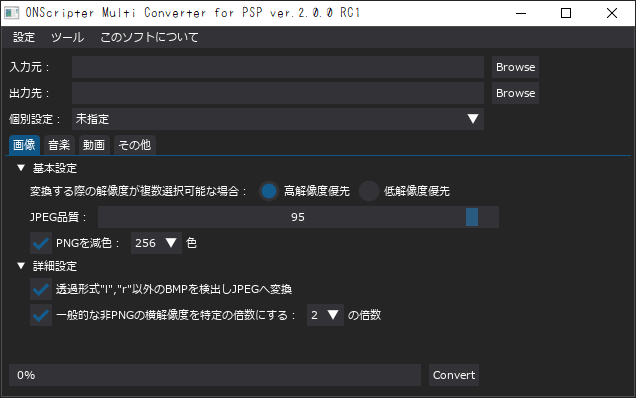
- In the input directory field (入力先), use the browse button to select the directory containing the game files.
- In the output directory field (出力先), use the browse button to choose a destination directory for the converted files.
- Modify the conversion settings, then click the convert button to start the conversion process.
- If using on the PSP, copy over the converted files, EBOOT.PBP and default.ttf for ONScripter for PSP to a PSP with CFW/LCFW.
Screenshots
Known issues
- If some functions like avi, mpegplay, rnd2 were originally overwritten with defsub, they may conflict with the features of this tool.
- The tool does not handle nbz files outside of nsa/sar/ns2 archives.