
ClassiCube 3DS: Difference between revisions
From GameBrew
More actions
No edit summary |
No edit summary |
||
| Line 19: | Line 19: | ||
|image_alt=ClassiCube | |image_alt=ClassiCube | ||
}} | }} | ||
ClassiCube | Custom Minecraft Classic / ClassiCube client written in C from scratch (formerly ClassicalSharp in C#). | ||
The game can be played on various platforms like Windows, Mac, and Linux. | |||
* | Notes: | ||
* | * The 3DS version is unfinished, but usable. | ||
* | * Text input - When required, the standard virtual keyboard will be displayed on the bottom screen. | ||
* File Storage - The 3DS port will always store and load data from the /3ds/ClassiCube folder on the SD card. | |||
== | == Controls == | ||
=== | === Default === | ||
D-Pad - player movement | |||
=== | Circle Pad - camera movement | ||
L - Place block | |||
R - Delete block | |||
Touch screen - camera movement | |||
Start - Menu click, pause screen toggle | |||
Select - Menu back | |||
A - Jump | |||
X - Open inventory | |||
Y - Open chat | |||
B+L - Speed | |||
B+R - Fly | |||
B+X - Noclip | |||
B+Up - Fly up | |||
B+Down - Fly down | |||
=== New 3DS only === | |||
C-Stick - Camera movement | |||
ZL - Move selected hotbar slot left | |||
ZR - Move selected hotbar slot right | |||
==Screenshots== | ==Screenshots== | ||
| Line 57: | Line 74: | ||
==Media== | ==Media== | ||
'''ClassiCube on a 3DS''' ([https://www.youtube.com/watch?v=zaV9coAN75s D/V]) <br> | '''ClassiCube on a 3DS''' ([https://www.youtube.com/watch?v=zaV9coAN75s D/V]) <br> | ||
<youtube width=" | <youtube width="400">zaV9coAN75s</youtube> | ||
==Known issues== | ==Known issues== | ||
Revision as of 05:48, 2 February 2025
| ClassiCube | |
|---|---|
 | |
| General | |
| Author | UnknownShadow200 |
| Type | Simulation |
| Version | 1.3.7 |
| License | Mixed |
| Last Updated | 2024/09/21 |
| Links | |
| Download | |
| Website | |
| Source | |
| Support Author | |
Custom Minecraft Classic / ClassiCube client written in C from scratch (formerly ClassicalSharp in C#).
The game can be played on various platforms like Windows, Mac, and Linux.
Notes:
- The 3DS version is unfinished, but usable.
- Text input - When required, the standard virtual keyboard will be displayed on the bottom screen.
- File Storage - The 3DS port will always store and load data from the /3ds/ClassiCube folder on the SD card.
Controls
Default
D-Pad - player movement
Circle Pad - camera movement
L - Place block
R - Delete block
Touch screen - camera movement
Start - Menu click, pause screen toggle
Select - Menu back
A - Jump
X - Open inventory
Y - Open chat
B+L - Speed
B+R - Fly
B+X - Noclip
B+Up - Fly up
B+Down - Fly down
New 3DS only
C-Stick - Camera movement
ZL - Move selected hotbar slot left
ZR - Move selected hotbar slot right
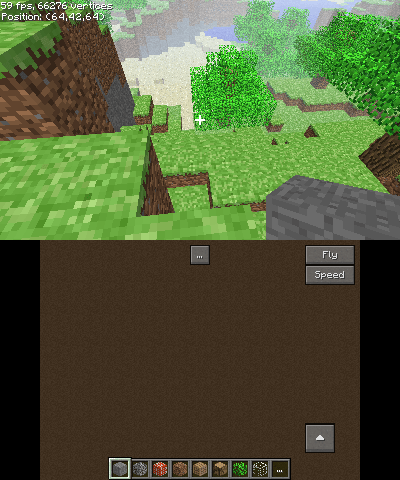
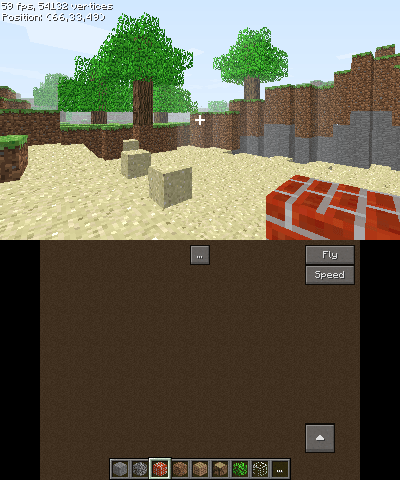
Screenshots
Media
ClassiCube on a 3DS (D/V)
Known issues
- Switching to another app and back may freeze the game.
- Stereoscopic 3D may not work correctly.
Changelog
External links
- Official Website - https://www.classicube.net/
- Github - https://github.com/ClassiCube/ClassiCube