
ClassiCube 3DS: Difference between revisions
From GameBrew
More actions
Created page with "{{Infobox 3DS Homebrews |title=ClassiCube |image=ClassiCube3DS.png |description=Custom Minecraft Classic / ClassiCube client written in C from scratch. |author=UnknownShadow200 |lastupdated=2024/09/21 |type=Simulation |version=1.3.7 |license=Mixed |download=https://dlhb.gamebrew.org/3dshomebrews/ClassiCube3DS.7z |website=https://www.classicube.net/ |source=https://github.com/ClassiCube/ClassiCube |donation= }} {{#seo: |title= (Simulation) - GameBrew |title_mode=append |i..." |
No edit summary |
||
| Line 11: | Line 11: | ||
|website=https://www.classicube.net/ | |website=https://www.classicube.net/ | ||
|source=https://github.com/ClassiCube/ClassiCube | |source=https://github.com/ClassiCube/ClassiCube | ||
|donation= | |donation=https://www.patreon.com/ClassiCube | ||
}} | }} | ||
{{#seo: | {{#seo: | ||
| Line 49: | Line 49: | ||
===File Storage=== | ===File Storage=== | ||
The 3DS port will always store and load data from the /3ds/ClassiCube folder on the SD card. | The 3DS port will always store and load data from the /3ds/ClassiCube folder on the SD card. | ||
==Screenshots== | |||
https://dlhb.gamebrew.org/3dshomebrews/images/ClassiCube3DS-01.png | |||
https://dlhb.gamebrew.org/3dshomebrews/images/ClassiCube3DS-02.png | |||
==Media== | ==Media== | ||
Revision as of 05:22, 2 February 2025
| ClassiCube | |
|---|---|
 | |
| General | |
| Author | UnknownShadow200 |
| Type | Simulation |
| Version | 1.3.7 |
| License | Mixed |
| Last Updated | 2024/09/21 |
| Links | |
| Download | |
| Website | |
| Source | |
| Support Author | |
ClassiCube is a sandbox-building game similar to Minecraft, but it's open-source and free to play. You can build and explore worlds made out of blocks, much like in Minecraft. The game has a simple, retro style and can be played on various platforms like Windows, Mac, and Linux. Players can create their own worlds, join multiplayer servers, and have fun building and exploring together.
Default Controls
- D-Pad - player movement
- C-Pad - camera movement
- L - Place block
- R - Delete block
- Touch screen - camera movement
- Start - Menu click, pause screen toggle
- Select - Menu back
- A - Jump
- X - Open inventory
- Y - Open chat
- B + L - speed
- B + R - fly
- B + X - noclip
- B + up - fly up
- B + down - fly down
- New 3DS only
- C-Stick - camera movement
- ZL - Move selected hotbar slot left
- ZR - Move selected hotbar slot right
Usage Guide
Text input
When required, the standard virtual keyboard will be displayed on the bottom screen.
File Storage
The 3DS port will always store and load data from the /3ds/ClassiCube folder on the SD card.
Screenshots
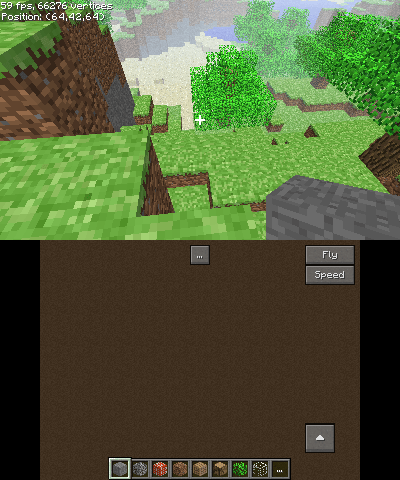
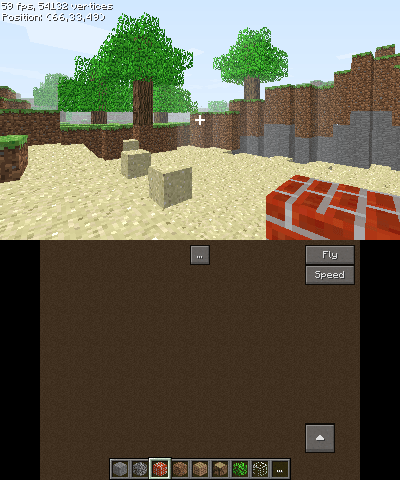
Media
ClassiCube on a 3DS (D/V)
Known issues
- Switching to another app and back may freeze the game.
- Stereoscopic 3D may not work correctly.
Changelog
External links
- Official Website - https://www.classicube.net/
- Github - https://github.com/ClassiCube/ClassiCube