
Effects.prx PSP: Difference between revisions
From GameBrew
More actions
Created page with "{{Infobox PSP Homebrews |title=effects.prx |image=effectprx.png |description=Add filters to the PSP screen. |author=teck4 |lastupdated=2012/06/23 |type=Plugins |format= |version=1.1beta |license=Mixed |download=https://dlhb.gamebrew.org/psphomebrew/effects.prx_Ver.1.1beta.rar |website=https://blog.teck4.com/2013/09/Previous.html#more |source=https://dlhb.gamebrew.org/psphomebrew/effects.prx_Ver.1.1beta.rar }}{{lowercase title}} effects.prx is a plugin that allows you to..." |
No edit summary |
||
| Line 25: | Line 25: | ||
Write the path in game.txt and vsh.txt | Write the path in game.txt and vsh.txt | ||
ms0:/seplugins/effects.prx 1 | ms0:/seplugins/effects.prx 1 | ||
Reset VSH from the Recovery Menu. | Reset VSH from the Recovery Menu. | ||
Latest revision as of 12:23, 31 January 2025
| effects.prx | |
|---|---|
 | |
| General | |
| Author | teck4 |
| Type | Plugins |
| Version | 1.1beta |
| License | Mixed |
| Last Updated | 2012/06/23 |
| Links | |
| Download | |
| Website | |
| Source | |
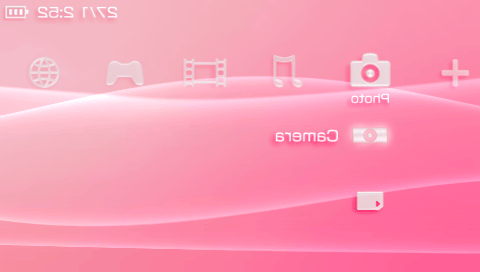
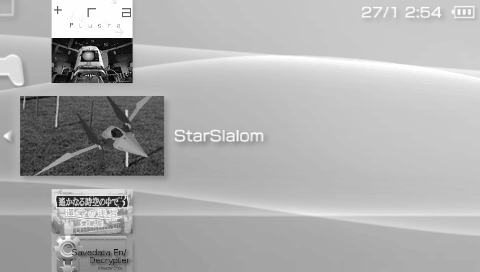
effects.prx is a plugin that allows you to apply visual effects to the PSP screen, such as:
- Color inversion (reversing colors on the screen).
- Grayscale (turning the screen to black and white).
- Horizontal flip (mirroring the screen from left to right).
The plugin is still in beta, so it might not be completely stable.
Installation
Copy effects.prx to ms0:/seplugins/.
Write the path in game.txt and vsh.txt
ms0:/seplugins/effects.prx 1
Reset VSH from the Recovery Menu.
Controls
Select+L/R - Previous/Next effect
Screenshots
Known issues
Due to the heavy processing involved in applying these effects, the plugin may cause the PSP to hang or freeze, especially on slower hardware or if the device is under heavy load.
External links
- Author's website - https://blog.teck4.com/