
Memory Restore PSP: Difference between revisions
From GameBrew
More actions
Created page with "{{Infobox PSP Homebrews |title=Memory Restore |image=memoryrestorerpsp.png |description=Create all the necessary folders on the Memory Stick. |author=fede94boss |lastupdated=2011/06/11 |type=Utilities |format= |version=2011 |license=Mixed |download=https://dlhb.gamebrew.org/psphomebrew/Memory_Restorer.rar |website=https://web.archive.org/web/20121231010622/http://taketheball.altervista.org/ |source=https://dlhb.gamebrew.org/psphomebrew/Memory_Restorer.rar }} This tool wi..." |
No edit summary |
||
| Line 28: | Line 28: | ||
* Author's website - [https://web.archive.org/web/20121231010622/http://taketheball.altervista.org/ http://taketheball.altervista.org/] (archived) | * Author's website - [https://web.archive.org/web/20121231010622/http://taketheball.altervista.org/ http://taketheball.altervista.org/] (archived) | ||
* Go!PSP Forum - https://www.gopsp.it/index.php?showtopic=10114&pid=61368&mode=threaded&show=&st=0 | * Go!PSP Forum - https://www.gopsp.it/index.php?showtopic=10114&pid=61368&mode=threaded&show=&st=0 | ||
[[Category:Lua applications on PSP]] | |||
Latest revision as of 01:16, 9 January 2025
| Memory Restore | |
|---|---|
 | |
| General | |
| Author | fede94boss |
| Type | Utilities |
| Version | 2011 |
| License | Mixed |
| Last Updated | 2011/06/11 |
| Links | |
| Download | |
| Website | |
| Source | |
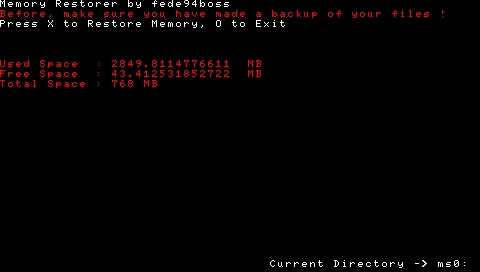
This tool will help you create all the necessary folders (such as ms0:/PSP/, ms0:/ISO/, ms0:/MUSIC/, etc.) on the Memory Stick if they don't already exist.
Note: Please use at your own risk.
Controls
Cross - Format memory
Circle - Exit
Screenshots
External links
- Author's website - http://taketheball.altervista.org/ (archived)
- Go!PSP Forum - https://www.gopsp.it/index.php?showtopic=10114&pid=61368&mode=threaded&show=&st=0