
Battery Warning PRX PSP: Difference between revisions
From GameBrew
More actions
Created page with "{{Infobox PSP Homebrews |title=Battery Warning PRX |image=battwarnzack.png |description=Show a message on screen when your battery reaches 15% or less charge. |author=Zack |lastupdated=2010/02/03 |type=Plugins |format= |version=0.3 |license=Mixed |download=https://dlhb.gamebrew.org/psphomebrew/battwarnzack.7z |website=http://www.retroemu.com/forum/index.php?/topic/192-release-battery-warning-plugin-v03/ |source= }} Battery Warning plugin is a PSP plugin that shows a mess..." |
No edit summary |
||
| Line 24: | Line 24: | ||
Open vsh.txt and/or game.txt and add the following line: | Open vsh.txt and/or game.txt and add the following line: | ||
ms0:/seplugins/battWarn.prx | ms0:/seplugins/battWarn.prx | ||
Enable the plugin in the Recovery Menu and restart the PSP. | Enable the plugin in the Recovery Menu and restart the PSP. | ||
Latest revision as of 10:36, 23 December 2024
| Battery Warning PRX | |
|---|---|
 | |
| General | |
| Author | Zack |
| Type | Plugins |
| Version | 0.3 |
| License | Mixed |
| Last Updated | 2010/02/03 |
| Links | |
| Download | |
| Website | |
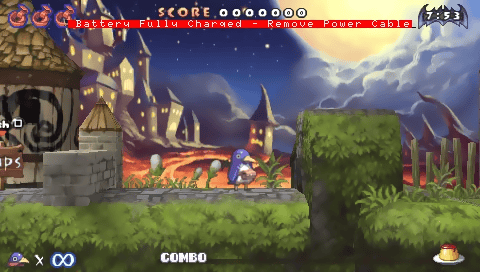
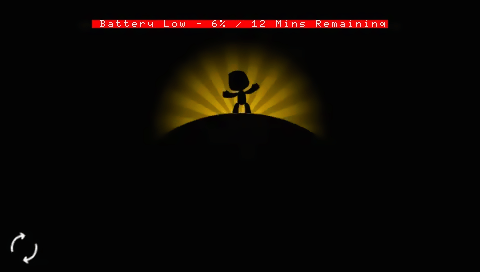
Battery Warning plugin is a PSP plugin that shows a message on screen when your battery reaches 15% or less charge.
Features
- Works in VSH & GAME.
- Displays on screen message when battery charge level is 15% or less.
- Message displays remaining percentage and how many minutes of charge are remaining.
Installation
Place battWarn.prx in ms0:/seplugins/.
Open vsh.txt and/or game.txt and add the following line:
ms0:/seplugins/battWarn.prx
Enable the plugin in the Recovery Menu and restart the PSP.
Controls
L+R+Select - Disable message
Screenshots
Changelog
V0.3
- Message upon battery reaching full charge (Whilst charging) - (See screenshot)
- Removing the power cable or pressing L+R+Select will disable the message.
V0.2
- Added ability to turn the message off. Press L+R+Select to disable the message once shown.
- Changed message to display remaining battery percentage and time remaining (in mins).
- Message now doesn't get hidden behind objects.
- Message now clearer to read (again).
- Reduced flickering substantially (still flickers in certain games).