
Brushes PSP: Difference between revisions
More actions
Created page with "{{Infobox PSP Homebrews |title=Brushes |image=brushespsp.png |description=A drawing application which allows you draw with your own made brushes. |author=Kenny Lindahl (HaxxBlaster) |lastupdated=2007/03/06 |type=Other |format= |version=2.0 |license=Mixed |download=https://dlhb.gamebrew.org/psphomebrew/brushespsp.7z |website=http://forums.qj.net/f-psp-development-forum-11/t-release-brushes-v20-99207.html |source=https://dlhb.gamebrew.org/psphomebrew/brushespsp.7z }} Brush..." |
No edit summary |
||
| Line 99: | Line 99: | ||
== External links == | == External links == | ||
* QuickJump - http://forums.qj.net/f-psp-development-forum-11/t-release-brushes-v20-99207.html | * QuickJump - http://forums.qj.net/f-psp-development-forum-11/t-release-brushes-v20-99207.html | ||
[[Category:Lua games on PSP]] | |||
Latest revision as of 08:42, 24 October 2024
| Brushes | |
|---|---|
 | |
| General | |
| Author | Kenny Lindahl (HaxxBlaster) |
| Type | Other |
| Version | 2.0 |
| License | Mixed |
| Last Updated | 2007/03/06 |
| Links | |
| Download | |
| Website | |
| Source | |
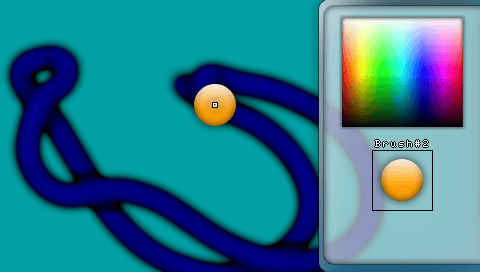
Brushes is a drawing application by HaxxBlaster which allows you draw with your own made brushes (PNG/JPG images).
User guide
Side menu options:
- Layer (1, 2)
- Drawmode (Normal, Side by side, Random, Line tool, Vertical)
- Brush#1
- Brush#2
- Effects: Over
Controls
Main controls
Cross - Draw
Circle - Undo
Triangle - Apply effect
Square - Reset the current draw mode or pause line tool
Analog - Navigate
Right/Left - Adjust navigation speed
Up/Down - Change draw mode
Select - Open/close side menu
Start - Open/close menu
L - Toggle brush states
R - Toggle brush visibility (On/Off)
Up/Down - Toggle options
Circle - Capture background color
Cross - Toggle Layers/Effects
Square - Clear the selected layer or toggle effect in front/behind the brush
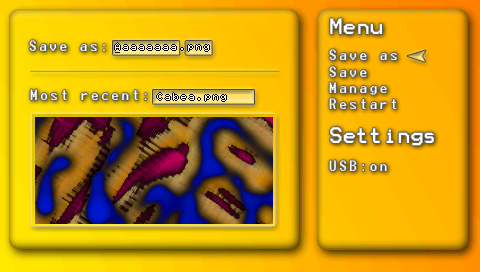
Menu
Cross - Enter
Circle - Go back
R - Show last saved work
Menu (save as)
Up - A, B, C
Down - Navigate left (A, B, C)
Cross - Jump to the next character
Square - Delete the last selected character
Triangle - Space (" ")
Start - Save
Select - Reset all characters
L - Change file type
Screenshots
CHangelog
v2.0
- Transparency for brushes.
- Draw mode: Vertical.
- Delete tool.
- Undo tool.
- Effect: Enhances the contrast between solid and transparent pixels.
- File check: Verifies if the file you are about to save already exists, with options to Rename, Overwrite, or Cancel.
- USB status recognition.
- Numerous refinements and bug fixes.