
ILife PSP: Difference between revisions
From GameBrew
More actions
No edit summary |
No edit summary |
||
| Line 11: | Line 11: | ||
|website=https://web.archive.org/web/20090105101404/http://www.todopsp.com/foros/forumdisplay.php?f=46 | |website=https://web.archive.org/web/20090105101404/http://www.todopsp.com/foros/forumdisplay.php?f=46 | ||
|source= | |source= | ||
}} | }}{{lowercase title}} | ||
iLife PSP is a shell replacement by Nikocronaldo made with Lua. It was entered into the TodoPSP Homebrew Contest. | iLife PSP is a shell replacement by Nikocronaldo made with Lua. It was entered into the TodoPSP Homebrew Contest. | ||
| Line 69: | Line 69: | ||
== Changelog == | == Changelog == | ||
'''v3''' | '''v3''' | ||
* New theme included. | * New theme included. | ||
* Restart iLife PSP avalaible in menu options. | * Restart iLife PSP avalaible in menu options. | ||
| Line 80: | Line 79: | ||
'''v2''' | '''v2''' | ||
* Create your password, login and select your language (the password by default is "ilifepsp" ). | * Create your password, login and select your language (the password by default is "ilifepsp" ). | ||
* The CPU speed depends on CPU.conf | * The CPU speed depends on CPU.conf | ||
| Line 96: | Line 94: | ||
** BMP format is included . Now you can rotate the images. | ** BMP format is included . Now you can rotate the images. | ||
** PLayings songs improved. CPU Speed is reduced, Ogg files fixed. R and L to play the next song or to play the pevious song. When song is finished, the next plays. Now you can see the percentage and the Songtime. | ** PLayings songs improved. CPU Speed is reduced, Ogg files fixed. R and L to play the next song or to play the pevious song. When song is finished, the next plays. Now you can see the percentage and the Songtime. | ||
** You can browse images while you are listening to music | ** You can browse images while you are listening to music. | ||
** Write the name for the captur | ** Write the name for the captur. | ||
'''v1''' | '''v1''' | ||
* Done in 3 languages: Spanish, English and French. | * Done in 3 languages: Spanish, English and French. | ||
* Browser-visually attractive. | * Browser-visually attractive. | ||
| Line 127: | Line 124: | ||
* Todo PSP - [https://web.archive.org/web/20090105101404/http://www.todopsp.com/foros/forumdisplay.php?f=46 http://www.todopsp.com/] (archived) | * Todo PSP - [https://web.archive.org/web/20090105101404/http://www.todopsp.com/foros/forumdisplay.php?f=46 http://www.todopsp.com/] (archived) | ||
[[Category:Lua applications on PSP]] | |||
[[Category:TodoPSP Homebrew Contest]] | [[Category:TodoPSP Homebrew Contest]] | ||
Revision as of 08:15, 24 October 2024
| iLife PSP | |
|---|---|
 | |
| General | |
| Author | Nikocronaldo |
| Type | Operating Systems |
| Version | 3 |
| License | Mixed |
| Last Updated | 2008/11/30 |
| Links | |
| Download | |
| Website | |
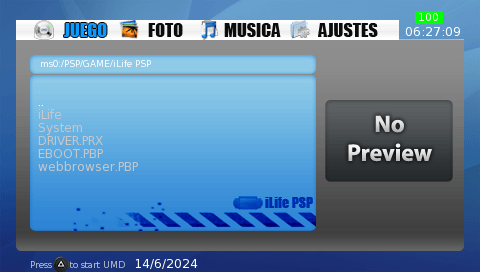
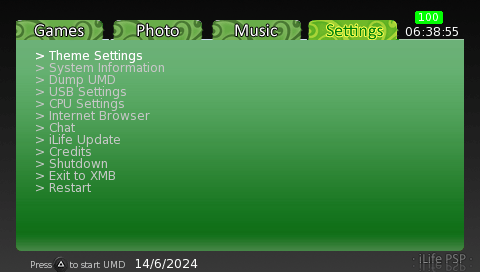
iLife PSP is a shell replacement by Nikocronaldo made with Lua. It was entered into the TodoPSP Homebrew Contest.
Features
- User account (the password by default is "ilifepsp").
- Spanish, French and English languages.
- Play MP3, AA3 and OGG songs.
- Show JPEG, BMP and PNG pictures.
- Load PBP, PRX, ELF, LUA, ISO, CSO, LUA, PSX, TXT, LOG, ZIP, PDF, HTM and PHP files.
- Browse the web.
- Take screenshots.
- Autoboot to iLife PSP.
- Load UMD.
- Delete, rename, copy and create files and folders.
- Change the theme.
- Watch system information.
- Dump your UMD.
- Connect to MS, Flash0, Flash1, Flash2, Flash3 and UMD.
- Change the CPU speed.
- Update the iLife PSP version.
- Shutdown, exit to xmb or restart iLife PSP.
Controls
Cross - Accept
Circle - Cancel
L/R - Move the tabs
Select - Take a screenshot
Triangle - Launch UMD
Start - Open file menu
Image viewer:
Circle - Cancel
Analog or D-Pad - Rotate the images
Music player:
Square - Stop
Cross - Pause
Circle - Browsing in the menu
L/R - Next/Previous song
Screenshots
Changelog
v3
- New theme included.
- Restart iLife PSP avalaible in menu options.
- Show the PSP model.
- iLife Update improved.
- Fixed bug about showing pictures.
- iLife PSP Music has english, spanish and french languages.
- The screen is off when is playin the music plays after 2 min.
- Fixed MP3, AA3 and OGG player.
v2
- Create your password, login and select your language (the password by default is "ilifepsp" ).
- The CPU speed depends on CPU.conf
- As file menu, delete files and folders, rename files and folders, create folders and cut and paste files only.
- iLife Update avalaible. (It doesn't work yet correctly)
- Autoboot to iLife PSP.
- Added Chat and CPU settings.
- Bugs fixed.
- The time is fixed too. Now you can see the seconds and the date.
- System information improved, now you can see some informations in MB.
- As regards playing songs and and loadings files:
- Load PSX games at format .PSX (only officials PSX GAMES)
- Read texts(still BETA)as txt,log, pdf,htm or php.
- Loading Lua and prx files fixed.
- BMP format is included . Now you can rotate the images.
- PLayings songs improved. CPU Speed is reduced, Ogg files fixed. R and L to play the next song or to play the pevious song. When song is finished, the next plays. Now you can see the percentage and the Songtime.
- You can browse images while you are listening to music.
- Write the name for the captur.
v1
- Done in 3 languages: Spanish, English and French.
- Browser-visually attractive.
- Plays MP3, OGG and ATRAC3, gives information on the song, like Artist, Title ...
- Supports images as PNG and JPG.
- Run-ISO, CSO, and probably DAX. (PSX games yet to go)
- Run-PBP, PRX and ELF.
- Extract-ZIP files.
- Menu with several options, including:
- Options-theme, where you can change the topic by default there are 4 different colors.
- Information System.
- Dumpea UMD-free USB connection directly to the MS.
- Options-USB, where you can connect to the MS, Flash0, FLASH1, Flash2, Flash3 and UMD.
- Internet Browser.
- iLife Update (still does not work, is a feature in future versions).
- Credits.
- Off-PSP.
- Exit the XMB.
Credits
Developer - Nikocronaldo.
Graphic design - Kogoyin.
External links
- Todo PSP - http://www.todopsp.com/ (archived)